Import SPEDS Funding
Special Education > Utilities > Import SPEDS Funding
This utility allows users to import SPEDS funding data from a file to create funding records for students based on the calculated values from the TEA Special Education Funding Tool.
The utility will import the following data elements from a CSV file:
- Tier of Intensity
- SPEDS Service Group
- Number of Minutes in SPED
NOTE: Tier of Intensity and Number of Minutes in SPED are required. SPEDS Service Group is no longer needed.
Only students with existing Special Education records (Registration > Maintenance > Student Enrollment > Special Ed) are eligible for import processing.
| Field | Description |
|---|---|
| File | Choose an applicable file to Import. |
| Begin Date | Type the begin date using the MMDDYYYY format. Or, click  to select the date from a calendar. NOTE: The Begin Date will be applied to all imported funding records and will not perform date comparisons during the import process. |
❏ Click Import.
A message indicates that the import is completed.
- ❏ Click Print Report to view the results. Review, save, and/or print the report.
Review the report using the following buttons:
Click to go to the first page of the report.
Click to go back one page.
Click to go forward one page.
Click to go to the last page of the report.
The report can be viewed and saved in various file formats.
Click to save and print the report in PDF format.
Click to save and print the report in CSV format. (This option is not available for all reports.) When a report is exported to the CSV format, the report headers may not be included.
Click to close the report window. Some reports may have a Close Report, Exit, or Cancel button instead.


- Import SPEDS Funding Utility Scenarios:
Import SPEDS Funding Utility Scenarios
Scenario Example or Criteria Expectation Student does not have a record already in place within the SPEC ED tab in the Registration Application. N/A Student will not be imported and an exception reason will appear on the Import SPEDS Funding Exception page that states “Student does not have an existing Special Education record.” Student has an incorrect Student Local ID. Student's actual Local ID: 298586
Entered examples within the CSV file: 299999 or 28ACDBStudent will not be imported and an exception reason will appear on the Import SPEDS Funding Exception page that states “Invalid Student ID.” Student has an incorrect UID within the CSV file. Student's actual UID: 2262569384
Entered examples within the CSV file: 7852444444 or 7598FBLELAStudent will not be imported and an exception reason will appear on the Import SPEDS Funding Exception page that states “Invalid Student Unique ID.” Student has no reporting SPED minutes within the CSV file. Blank cell below the Minutes column within the CSV file from the SPEDS Funding Tool. Student will not be imported and an exception reason will appear on the Import SPEDS Funding Exception page that states “Number of Minutes in SPED is required.” Student has an incorrect number of SPED minutes within the CSV file. Number of minutes acceptable include anything within 0-600. Student will not be imported and an exception reason will appear on the Import SPEDS Funding Exception page that states “Invalid Number of minutes in SPED.” Student has an incorrect SPEDS Service Group number within the CSV file. First column for SPED Service groups is either values 1,2, or 3.
Second column for SPED Service groups is either values 4 or 5.Student will not be imported and an exception reason will appear on the Import SPEDS Funding Exception page that states “Invalid SPEDS Service Group.” Student has no reporting Tier of Intensity within the CSV file. Blank cell below the Tier column within the CSV file from the SPEDS Funding Tool. Student will not be imported and an exception reason will appear on the Import SPEDS Funding Exception page that states “Tier of Intensity is required.” Student has an incorrect Tier of Intensity number within the CSV file. Tier of Intensity should be between Tier 1 - Tier 8 Student will not be imported and an exception reason will appear on the Import SPEDS Funding Exception page that states “Invalid Tier of Intensity.” Student is duplicated with the same exact data within the CSV file. 
Student will not be imported and an exception reason will appear on the Import SPEDS Funding Exception page that states “Duplicate student record found in the import file.” Student has mulitiple records either within SPED Tier of Intensity or SPED Minutes with the same begin date.
(SPED Service Group is allowed to have multiple rows without an end date.)Student already has records either within SPED Tier of Intensity or SPED Minutes that has the same begin date that is trying to be imported within the Import SPEDS Funding utility. Student will not be imported and an exception reason will appear on the Import SPEDS Funding Exception page that states “Student has multiple active SPEDS Funding records.” Student record that is being imported is using a begin date that falls between a begin and end date that already exist within the SPED Funding tables. Student has a previous record within the SPED Minutes table that has a begin date of 8/17/2026 and an end date of 8/24/2026, and also has a current record with SPED Minutes that has a begin date of 8/24/2026. Now the user is using the Import SPEDS Funding utility to import the same student with a different amount of minutes but enters a begin date of 8/20/2026. This will not allow the record to be imported. Student will not be imported and an exception reason will appear on the Import SPEDS Funding Exception page that states “Begin Date conflicts with an existing SPEDS Funding record.” Student's enrollment date within the campus and begin date for the SPEDS Funding utility are the same. Enrollment Date: 8/11/2026
Begin Date: 8/11/2026Record will be imported successfully with the begin date of 8/11/2026. Student's begin date for the SPEDS Funding utility is before the student's enrollment date within the campus. Enrollment Date: 8/11/2026
SPEDS Funding Begin Date: 8/06/2026Record will be imported successfully with the student's enrollment date as the begin date (8/11/2026). Student's begin date for the SPEDS Funding utility is after the student's enrollment date within the campus. Enrollment Date: 8/11/2026
SPEDS Funding Begin Date: 8/14/2026Record will be imported successfully with the begin date of 8/14/2026. A student's record is already within the SPEDS Funding tables that has the same enrollment and begin date. User attempts to import another record for the same student with the same existing data and the same import begin date. Student has an Enrollment Date of 8/11/2026 and a SPEDS Funding Begin Date of 8/11/2026 within the SPEDS Funding tables. User then attempts to import another record for the same student with the same data that is already recorded and uses the same begin date of 8/11/2026. Student will not be imported and an exception reason will appear on the Import SPEDS Funding Exception page that states “Student already has matching SPEDS Funding record(s) for the Begin Date; nothing to import.” A student's record is already within the SPEDS Funding tables that has the same enrollment and begin date. User attempts to import another record for the same student with different data and the same import begin date. Student has an Enrollment Date of 8/11/2026 and a SPEDS Funding Begin Date of 8/11/2026 within the SPEDS Funding tables. User then attempts to import another record for the same student with different data that needs to be recorded and uses the same begin date of 8/11/2026.
SPED Minutes first record: 255
SPED Minutes second record: 352Exisiting record will be updated with the new minutes successfully with the begin date still of 8/11/2026. A new row is not created within the table. Existing student record is within the SPEDS Funding tables already and the user attempts to import another CSV file with a begin date before the student's enrollment date that contains the same existing SPEDS Funding data. Enrollment Date: 8/13/2026
SPED Funding record begin date that is already within the tables: 8/17/2026
New CSV file with same student and same data but a begin date before both enrollment date and existing SPED Funding begin date: 8/07/2026Student will not be imported and an exception reason will appear on the Import SPEDS Funding Exception page that states “Student already has matching SPEDS Funding record(s) for the Begin Date; nothing to import.” Existing student record is within the SPEDS Funding tables already and the user attempts to import another CSV file with a begin date before the student's enrollment date that contains different SPEDS Funding data. Enrollment Date: 8/13/2026
SPED Funding record begin date that is already within the tables: 8/17/2026
New CSV file with same student and different data but a begin date before both enrollment date and existing SPED Funding begin date: 8/07/2026A new record will be imported within the SPEDS Funding tables successfully using the begin date of 8/13/2026. Existing student record is within the SPEDS Funding tables already and the user attempts to import another CSV file with a begin date after the student's enrollment date and original begin date that contains the same existing SPEDS Funding data. Enrollment Date: 8/13/2026
SPED Funding record begin date that is already within the tables: 8/13/2026
New CSV file with same student and same data but a begin date after both enrollment date and existing SPED Funding begin date: 8/18/2026Student will not be imported and an exception reason will appear on the Import SPEDS Funding Exception page that states “Student already has matching SPEDS Funding record(s) for the Begin Date; nothing to import.” Existing student record is within the SPEDS Funding tables already and the user attempts to import another CSV file with a begin date after the student's enrollment date and original begin date that contains the different SPEDS Funding data. Enrollment Date: 8/13/2026
SPED Funding record begin date that is already within the tables: 8/13/2026
New CSV file with same student and same data but a begin date after both enrollment date and existing SPED Funding begin date: 8/18/2026
SPED Minutes first record: 255
SPED Minutes second record: 352The record will be imported successfully.
A new row is created within the SPEDS Funding minutes table with the new begin date(8/18/2026) and updated minutes(352).
The previous record will now have an end date of the begin date(8/18/2026) that was used to import the latest CSV file.Existing student record within the SPEDS Funding tables has a begin and end date. A new CSV file is being imported with a begin date after the previous begin and end date. Initial SPEDS Funding record begin date: 8/05/2026
Initial SPEDS Funding record end date: 8/11/2026
New SPEDS Funding record date: 8/19/2026A new record will be imported within the SPEDS Funding tables successfully using the begin date of 8/19/2026. Previous record will still be present within the SPEDS funding tables and it will include still the original begin date (8/05/2026) and end date (8/11/2026). Student is duplicated with the same exact data but a different Date/Time Saved within the CSV file. 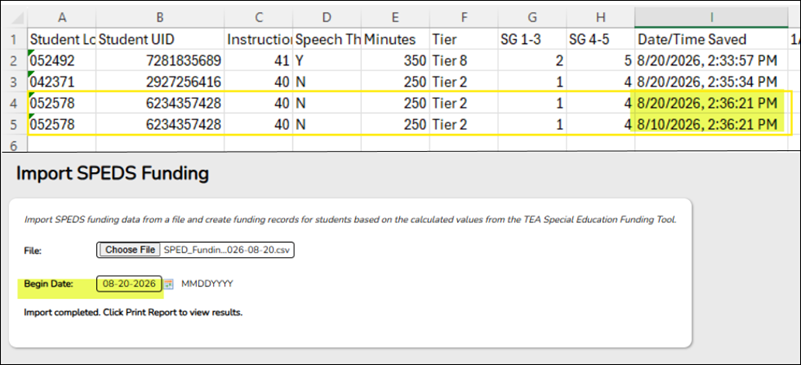
Student will still be imported and also an exception reason will appear on the Import SPEDS Funding Exception page that states “Duplicate student record found in the import file.” The record that will be imported would be the one with the most recent begin date. In this case it would be the row with the same date that was entered within the Begin Date field on the Import SPEDS Funding Utility screen. Student is duplicated with the same exact data but a different Date/Time Saved within the CSV file. 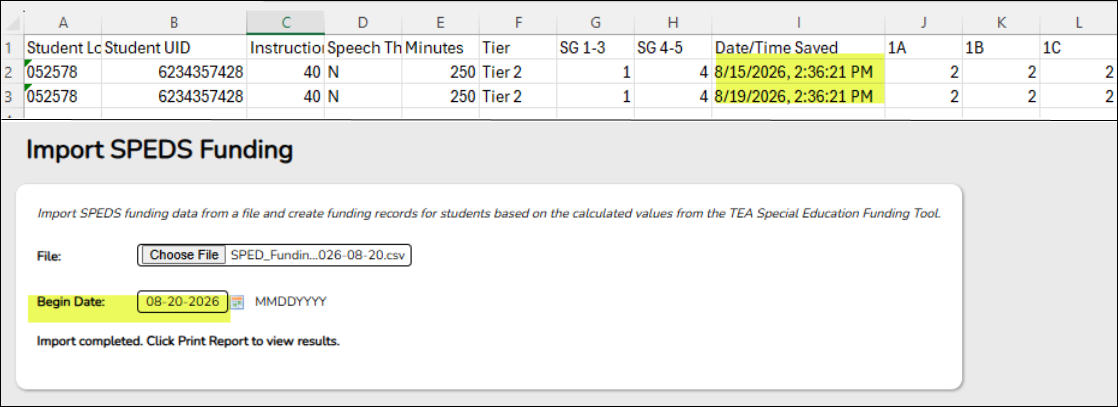
Student will still be imported and also an exception reason will appear on the Import SPEDS Funding Exception page that states “Duplicate student record found in the import file.” The record that will be imported will be either one since they both have the same info. Regarding the SPED Funding tables, they will all use 8/20/2026 as the begin date for the student's record. Student is duplicated with the different data and a different Date/Time Saved within the CSV file. 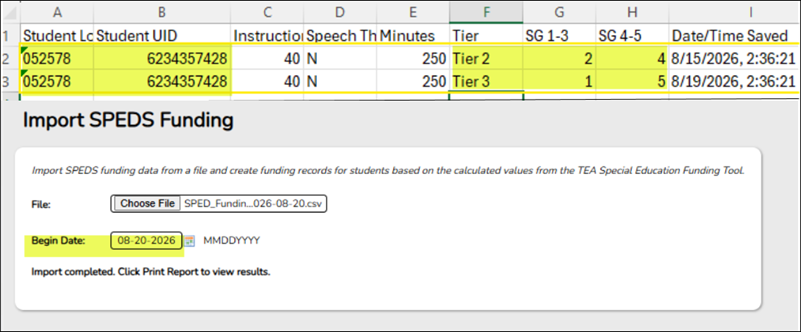
Student will still be imported and also an exception reason will appear on the Import SPEDS Funding Exception page that states “Duplicate student record found in the import file.” The record that will be imported will be the first initial row with the duplicate student ID/UID . Regarding the SPED Funding tables, they will all use 8/20/2026 as the begin date for the student's record since that was entered within the Begin Date field.


