SPPI-12 (Early Childhood Transition) refers to compliance for children referred from Part C of IDEA before age three, found eligible for Part B, and have an individualized education program (IEP) developed and implemented by their third birthday to receive early childhood special education (ECSE) services.
LEAs will submit student-level data for children who had an eligibility determination (ED) date during the annual data collection period which occurs from July 1 to June 30.
SPPI-12 is a compliance indicator used for meeting federal public reporting requirements for the State Performance Plan/Annual Performance Report (SPP/APR). It is also part of the federally required elements (FREs) used along with the results-driven accountability (↠) indicators for making annual LEA special education determinations (34 CFR §300.600(a)(2)).
- Child Find: SPPI-12 - Scenario 3: Enrolled Students, ages 0 and up to, but not including, 3.
Registration > Maintenance > Student Enrollment > Demo1
Child Find: SPPI-12 reports Enrolled students who are less than 3 years old as of September 1st.
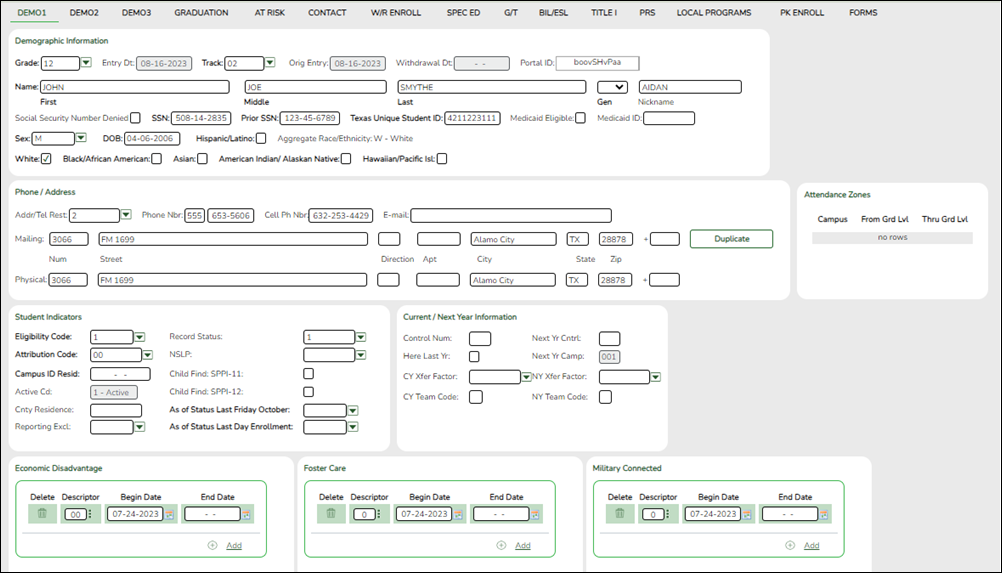
Update data:
❏ Retrieve a student who is already enrolled at the campus using their Local Student ID, Student Name, or Texas Unique Student ID.
❏ Select the Child Find: SPPI-12 checkbox in the Student Indicators section.
❏ Click Save.
Registration > Maintenance > Core Collections > Child Find: SPPI-12 > Demographics/Enrollment
Information retrieved on this tab for an enrolled student is read-only and cannot be modified. Information can only be edited on Registration > Maintenance > Demo1.
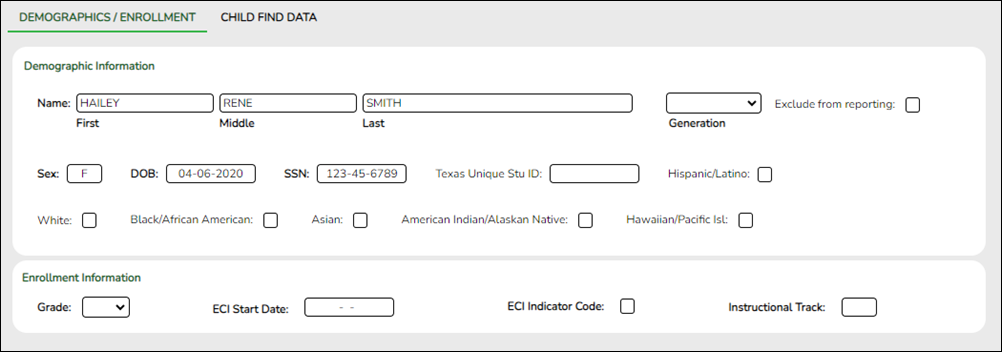
Retrieve a Student:
Click Directory to select a student from the directory.
❏ Under Demographic Enrollment and Enrollment Information:
Information retrieved on this tab is for an enrolled student and is read-only and cannot be modified. Information can only be edited on Registration > Maintenance > Demo1.
NOTE: The Grade and Instructional Track fields will auto-populate with information from Registration > Maintenance > Student Enrollment > Demo1.
The ECI Start Date and ECI Indicator Code fields will auto-populate with information from Registration > Maintenance > Student Enrollment > SpecEd if a student has an active ECI record.
Registration > Maintenance > Core Collections > Child Find: SPPI-12 > Child Find Data
The information on this screen is specific to this tab and is not found anywhere else in ASCENDER.
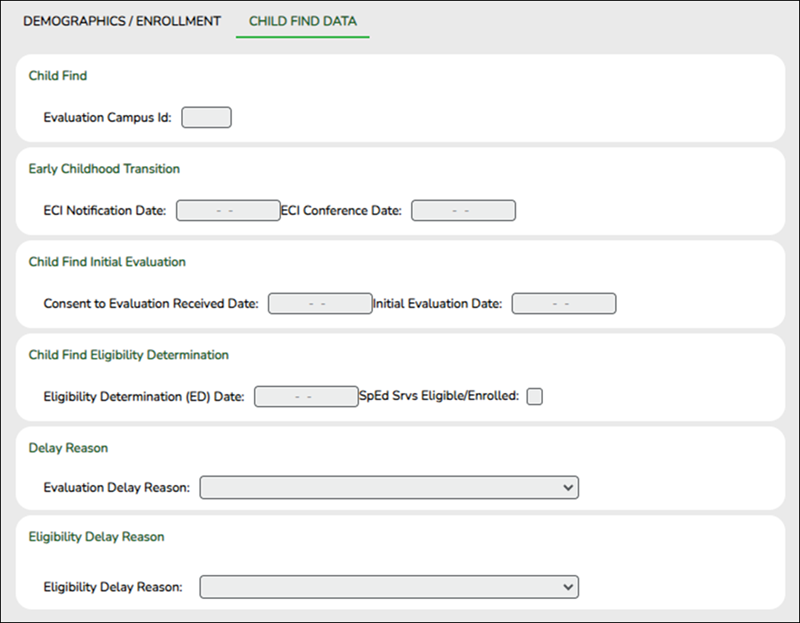
Update data:
❏ Under Child Find:
Evaluation Campus ID Enter the campus ID on which the student was evaluated.
The Evaluation Campus ID number may or may not be the same as the Campus Enrollment ID.
For example, the student may have been evaluated on Campus 105, but is enrolled at Campus 101.
❏ Under Early Childhood Transition:
ECI Notification Date Enter the notification date.
Data Element: TransitionNotificationDate (E1712)ECI Conference Date Enter the conference date.
Data Element: TransitionConferenceDate (E1713)
❏ Under Child Find Initial Evaluation:
Consent to Evaluation Received Date Enter the first instructional day after LEA receives consent from the parent.
Data Element: ConsentToEvaluationReceivedDate (E1738)Initial Evaluation Date Enter the date the child was initially evaluated for the program.
This date must not be before the Consent to Evaluation Received Date.
❏ Click Save.
❏ Under Child Find Eligibility Determination:
Eligibility Determination (ED) Date If applicable, enter the date the child was determined eligible for the program.
IMPORTANT: If this date is left blank, the student will not be extracted to the interchanges.SpEd Srvc Eligible/Enrolled Select if a student is eligible for, and enrolled in Special Education services after the Eligibility Determination Date.
❏ Under Delay Reason:
Evaluation Delay Reason If applicable, choose a reason for the evaluation delay. Leave blank if there is no delay in evaluation.

❏ Under Eligibility Delay Reason:
Eligibility Delay Reason If applicable, choose a reason for the eligibility delay. Leave blank if there is no delay in eligibility.

❏ Click Save.
If a student will not be reported, return to the Demo1 tab, uncheck the Child Find: SPPI-12 indicator and click Save. The student's information will be retained in ASCENDER but will not be reported.


- Child Find: SPPI-12 - Scenario 4: Non-Enrolled Students, ages 0 and up to, but not including, 3.
Registration > Maintenance > Core Collections > Child Find: SPPI-12 > Demographics/Enrollment
Information on this tab must be manually added by the district.
Instructional Track is not enabled or applicable for non-enrolled students.
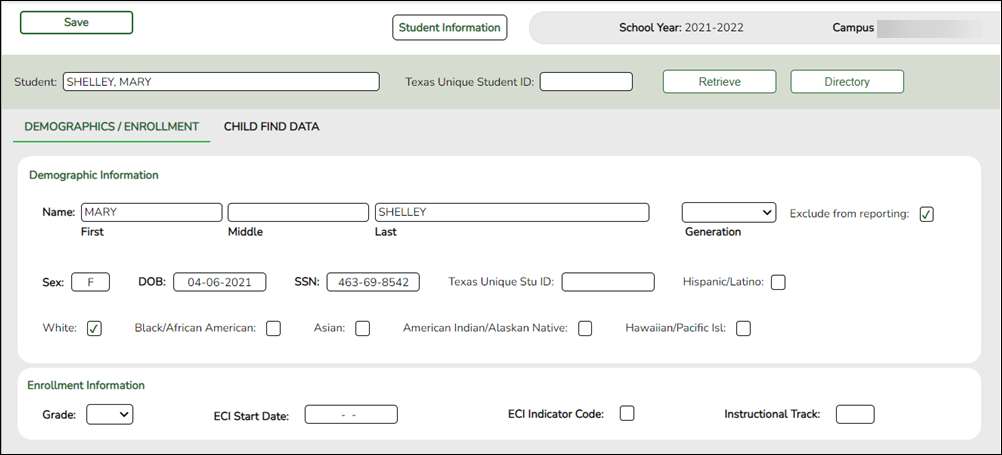
Update data:
❏ Under Demographic Information:
Name Type the student's first, middle, and last name. Select a generation code if applicable. Exclude from reporting Select to exclude a non-enrolled student from reporting. Sex Select the student's gender. DOB Type the student's date of birth (MM-DD-YYYY). SSN Type the student’s nine-digit social security number. Texas Unique Stu ID If available, type the student's ten-digit unique student ID. This ID is assigned to students by TEA and issued to schools by the TSDS TX Unique ID Application. This ID cannot be generated by an LEA and cannot begin with zero.
This number can be added after it is received by TEA.Hispanic/Latino Select if the student is of Cuban, Mexican, Puerto Rican, South or Central American, or other Spanish culture or origin, regardless of race. Race One or more of the following options is selected, regardless of whether the student is Hispanic/Latino.
Data Element: Race (E3050) (Code table: C304)
White The field is selected if the student has origins in any of the original peoples of Europe, the Middle East, or North Africa.
Black/African American The field is selected if the student has origins in any of the black racial groups of Africa.
Asian The field is selected if the student has origins in any of the original peoples of the Far East, Southeast Asia, or the Indian subcontinent (including Cambodia, China, India, Japan, Korea, Malaysia, Pakistan, the Philippine Islands, Thailand, and Vietnam).
American Indian/Alaskan Native The field is selected if the student has origins in any of the original peoples of North and South America (including Central America).
Hawaiian/Pacific Isl The field is selected if the student has origins in any of the original peoples of Hawaii, Guam, Samoa, or other Pacific Islands.
❏ Click Save.
❏ Under Enrollment Information:
Grade For student's who do not have a Texas Unique Stu ID, select the grade as if the student were enrolled. Leave blank for the 2022 school year. ECI Start Date Enter the date the intervention takes effect.
The date must be before the student's third birthday.ECI Indicator Code Select if the student participates in the Early Childhood Intervention (ECI) program.
Ensure Notification Date and ECI Conference Date are first saved on Child Find Data.Instructional Track Disabled for non-enrolled students.
❏ Click Save.
Using the Directory to retrieve a non-enrolled student
In this scenario Campus has two purposes:
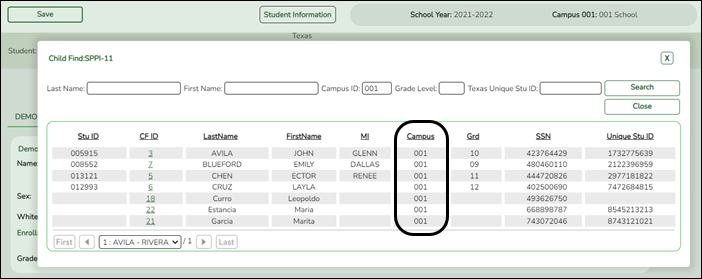
• For an enrolled student, the Campus ID is the enrollment campus. There is a Stu ID associated with the student.
• For a non-enrolled student, the Campus ID is the evaluation campus. There is not a Stu ID associated with the student. These students have a CF ID which will act as a Stu ID for reporting purposes.
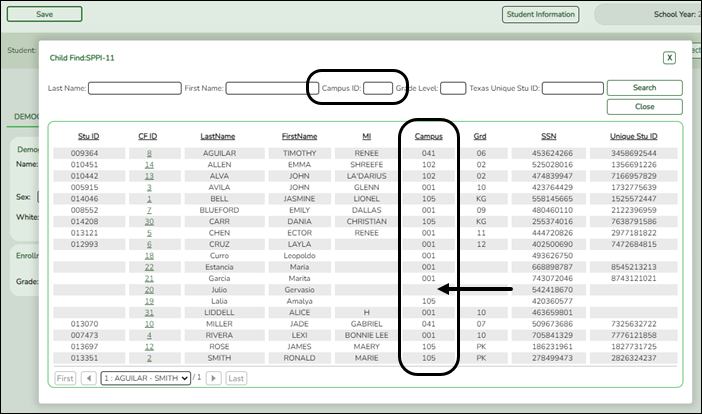
To retrieve students in the Directory who do not have an Evaluation Campus ID assigned on Registration > Maintenance > Core Collections > Child Find: SPPI-12 > Child Find Data:
❏ Clear the Campus ID field, then click Search. All students display.
❏ Click on the student’s CF ID to retrieve the student.
Registration > Maintenance > Core Collections > Child Find: SPPI-12 > Child Find Data
The information on this screen is specific to this tab and is not found anywhere else in ASCENDER.
Update data:
❏ Under Child Find:
Evaluation Campus ID Enter the campus ID on which the student was evaluated.
The Evaluation Campus ID number may or may not be the same as the Campus Enrollment ID.
For example, the student may have been evaluated on Campus 105, but is enrolled at Campus 101.
❏ Under Early Childhood Transition:
ECI Notification Date Enter the notification date.
Data Element: TransitionNotificationDate (E1712)ECI Conference Date Enter the conference date.
Data Element: TransitionConferenceDate (E1713)
❏ Under Child Find Initial Evaluation:
Consent to Evaluation Received Date Enter the first instructional day after LEA receives consent from the parent.
Data Element: ConsentToEvaluationReceivedDate (E1738)Initial Evaluation Date Enter the date the child was initially evaluated for the program.
This date must not be before the Consent to Evaluation Received Date.
❏ Click Save.
❏ Under Child Find Eligibility Determination:
Eligibility Determination (ED) Date If applicable, enter the date the child was determined eligible for the program.
IMPORTANT: If this date is left blank, the student will not be extracted to the interchanges.SpEd Srvc Eligible/Enrolled Select if a student is eligible for, and enrolled in Special Education services after the Eligibility Determination Date.
❏ Under Delay Reason:
Evaluation Delay Reason If applicable, choose a reason for the evaluation delay. Leave blank if there is no delay in evaluation.
❏ Under Eligibility Delay Reason:
Eligibility Delay Reason If applicable, choose a reason for the eligibility delay. Leave blank if there is no delay in eligibility.
❏ Click Save.
If a student will not be reported, return to the Demo1 tab, uncheck the Child Find: SPPI-12 indicator and click Save. The student's information will be retained in ASCENDER but will not be reported.


