
Sidebar
academy:fall_submission_verify_reg_prior_year_leaver
This is an old revision of the document!
Registration > Utilities > Create Leaver Tracking Records
This utility creates leaver tracking records for the current school year for graduates, withdrawn students, and No Show students as part of the Move to Grade Reporting process. Any existing leaver tracking records for the current school year are deleted.

For the for the 2018-2019 school year, type 09282018 for School Start Window (SSW) Date.
Click Create Tracking Records to run the utility.
- If errors are encountered, the number of errors is displayed. Otherwise, “No Leaver Tracking errors out of xxxx students” is displayed.
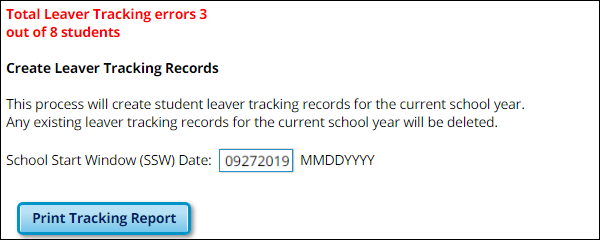
- The Print Tracking Report button is displayed. Click Print Tracking Report to view the errors and total leaver records created.
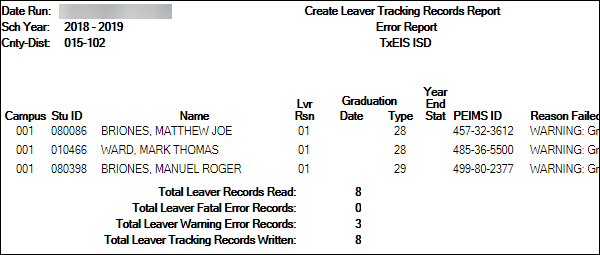


Registration > Reports > Registration Reports > Withdrawal > SRG1700 - Leaver Tracking Report
SRG1700 reflects the changes made when the Create Leaver Tracking Records utility is run. It provides a list of all students to students who will potentially be reported as leavers.

- Any students on this list will extracted when the fall extract is run.
- Review the graduation type and graduation date for all students. Note that graduation type code is specific by year.
- Refer to TEDS for additional information.
Registration > Maintenance > Prior Year Leaver Tracking
This page allows you to add or update leaver data for prior year leavers. This data is initially created when you run the Create Leaver Tracking Records utility. Leaver records cannot be deleted.
Leaver data is extracted for all students who withdraw during the school year. The data is extracted from the student demographic and enrollment tables during Move to Grade Reporting and saved to a leaver tracking table. In the fall of each school year, prior year leaver data is submitted to PEIMS along with No Show leaver data for the current school year. The prior year leaver data is extracted from the leaver tracking table, and current No Shows are written to the leaver tracking table when the fall PEIMS extract is run.
If a student was excluded from leaver tracking by mistake, the Prior Year Leaver Tracking page can be used add the student. Use this page carefully.
NOTE: No Show leaver data, which is current year data, must be updated on Maintenance > Student Enrollment > W/R Enroll.

Add a student to leaver tracking:
- Type the student ID and click Retrieve. A message is displayed indicating that the student is not a leaver.
- Click Yes to continue.
- The Leaver Year field is set to the ending year of the prior school year.
- Update data as needed.
- Click Save.
Note that you cannot delete a student from leaver tracking, but you can exclude the student from being extracted.
Category: Student
Interchange: StudentEnrollmentExtension
Complex Type: SchoolLeaverExtension (40203)
Description: Student leavers in grade levels 7-12 during the prior school year.
The following elements from the SchoolLeaverExtension complex type are included in the Fall submission:
❏ MILITARY-ENLISTMENT-INDICATOR-CODE Military Enlistment (E1589) indicates if the student has graduated from high school and has enlisted in the United States Armed Forces after graduation.
❏ LEAVER-REASON-CODE Withdrawal Code (E1001) indicates the reason a prior year student in grade level 7-12 is not enrolled in the district during the current school year. A LEAVER-REASON-CODE is not required for students in grade levels 7-12 who were enrolled during the prior year and enrolled in the school-start window of the current year. Students in grade levels EE-6 in the prior school year are never reported with a LEAVER-REASON-CODE.
❏ GRADUATION-TYPE-CODE Graduation Type (E0806) is the type of plan under which the student graduated.
❏ DATE-OF-GRADUATION Graduation Date (E0791) is the month and year the student graduated from high school.
❏ INDIVIDUAL-GRADUATION-COMMITTEE-GRADUATE-CODE IGC (E1562) indicates whether a student for whom an IGC was established has graduated based on an IGC decision.
academy/fall_submission_verify_reg_prior_year_leaver.1537557764.txt.gz · Last modified: 2018/09/21 14:22 (external edit)