
Sidebar
academy:business_overview_guide_purchasing_enter_requisitions
This is an old revision of the document!
QuickGuide: Perform Requisition Maintenance

After the QuickGuide: Set up Purchasing Administration Options and the QuickGuide: Set up Purchasing Approval Workflows are addressed, use the following steps to create and submit requisitions, and perform requisition inquiries in the Purchasing application.
This guide assumes you are familiar with the basic features of the TxEIS Business system and have reviewed the TxEIS Business Overview guide.
Create, Modify, or Delete a Requistion
- Create a requisition.
Create a requisition
Purchasing > Maintenance > Create/Modify Requisition
Use this page to create new requisitions.
- The logged-on user can only view their own requisitions.
- If an originator does not have an approval path and creates a requisition, the requisition is automatically approved when saved, and a purchase order is created if they are submitted.
- Requisitions cannot be created if the current date is greater than the cutoff date on the District Administration > Options > Purchasing/Warehouse > Current Year page.
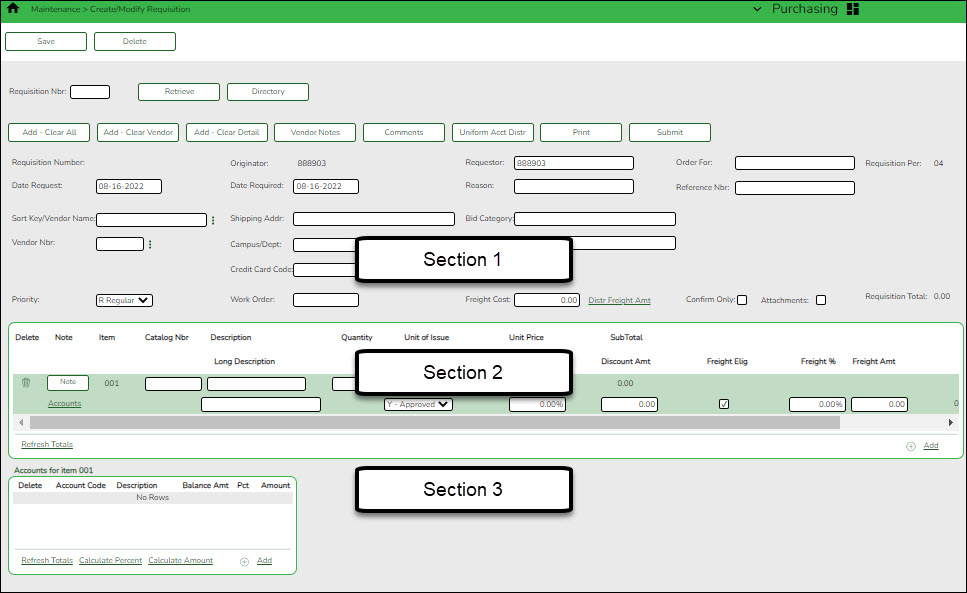
Use the following three-section process to guide you through creating and saving or submitting a requisition.
❏ Click Add - Clear All to display a blank requisition page.
Section 1
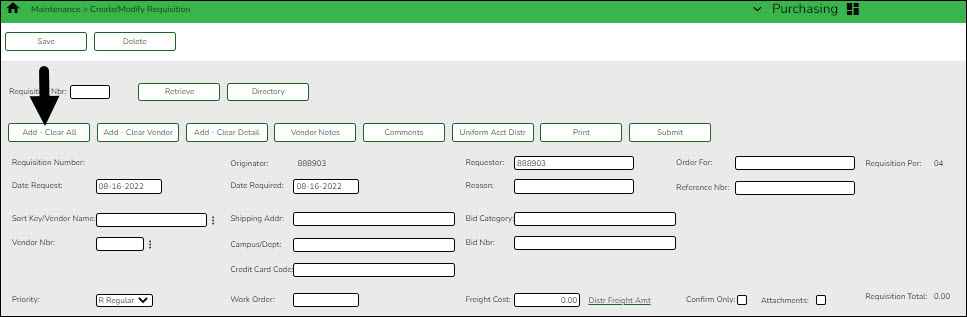
Complete the requisition data fields.
Field Description Originator The name of the logged-on user is displayed.
Requestor Type the name of the person or organization who is requesting the item(s). As you type the data, a drop-down list of corresponding data is displayed. Select the requestor.
Notes:
The requisition follows the requestor's approval path that is set up on the District Administration > Workflow > Approval Path page.
If no requestors exist for the selected user on the District Administration > User Profiles > Purchasing Requestors tab, the originator is displayed in the requestor list.
If requestors are added to the District Administration > User Profiles > Purchasing Requestors tab, the originator is limited to only those accounts that are associated with the requestor.
The originator is also limited to the amounts entered in the Req Max and YTD Max fields on the District Administration > User Profiles > Purchasing Permissions tab for the specified requestor. The originator's account and amounts are not affected.
If changing the requestor, a warning is displayed indicating that this action causes all accounts assigned to the items to be deleted. The accounts that the new requestor is authorized to use are charged with the item cost.Requisition Nbr The requisition number is populated when the requisition is saved if the Use Automatic CYR Requisition Number Assignment field is selected on the Finance > Tables > District Finance Options tab. Otherwise, you must enter a six-digit requisition number.
Date Request Type the date of the requisition request. By default, the field is set to the current date; however, it can be changed.
Date Required Type the date that the requisition is required. By default, the field is set to the current date; however, it can be changed.
Order For Type the shipping contact name to be displayed on the purchase order. The field can be a maximum of 30 characters.
If blank, the data from the Requestor field is displayed on the purchase order.Note: Data from the Order For or Requestor field is only displayed on the purchase order if a Y is entered in the Include Requestor's Name in Shipping Address parameter on the Print Purchase Orders or Reprint Purchase Orders report parameter page.
Requisition Per The requisition period for this transaction is displayed. This field is the same as the accounting period and is set to the current or next period on the Finance > Tables > District Finance Options tab.
Shipping Addr Type the address where the requisition is to be shipped. The shipping addresses are assigned on the District Administration > User Profiles > Purchasing Addresses tab.
Sort Key/Vendor Name Type a valid vendor name, if known. The Vendor Nbr field is populated with the corresponding vendor number.
If the vendor number is not known, click
 to select a vendor from the Vendors Directory.
The Vendor Directory is populated from the vendor records established on the Finance > Maintenance > Vendor Information > Vendor Name/Address tab.
Vendor Nbr Populated with the vendor number based on the value entered in the Sort Key/Vendor Name field. Or, type a valid vendor number if known. The Sort Key/Vendor Name field is populated with the corresponding vendor name.
If the vendor number is not known, click
to select a vendor from the Vendors Directory.
Reason Type the reason for submitting the requisition or edit the current reason. The field can be a maximum of 30 characters.
This information is displayed on various reports and on the general ledger.Priority Click  to select or change the requisition priority. By default, priority is set to Regular, but it can be changed to Urgent.
Reference Nbr Type the identification number for this requisition. The field can be a maximum of 15 characters.
Work Order Type a work order number. This field is only for informational purposes. Bid Category Type the category code to be used for the requisition. As you type the data, a drop-down list of corresponding data is displayed. Select a bid category code.
Only category codes identified as a bid category on the Finance > Tables > Vendor Categories page and assigned to the selected vendor on the Finance > Maintenance > Vendor Information > Vendor Miscellaneous tab are displayed in the drop-down list.Bid Nbr If the bid process was used for this vendor and you are ordering based on a bid, type the bid number; otherwise, leave the field blank. This information is printed on the purchase order. Confirm Only Select if an order was sent via fax, email, or the Internet, and this purchase order only confirms that the order was already received by the vendor. Attachments Select if an attachment is included with the purchase order. Freight Cost Type a cost value, edit the current cost value, or leave the field blank if there are no charges. The freight cost is distributed to all line items when the Freight Elig field is selected. In addition, the Freight % field is populated based on the amount in the Freight Amt field divided by the subtotal of the line item. Distr Freight Amt Click to distribute the freight cost evenly among all line items in the requisition. Credit Card Code Type the credit card code to be used for the requisition. As you type the data, a drop-down list of corresponding data is displayed. Select a credit card code.
Only active credit card codes that are assigned to the requestor on the District Administration > Maintenance > User Profiles > Purchasing Credit Cards tab are displayed in the drop-down list.
After a requisition is submitted, only the originator can update the credit card code. The requisition must be returned to the originator to make any changes.Campus/Dept Type the name of the campus submitting the requisition. This field is also used to direct the requisition to the first approver. As you type the data, a drop-down list of corresponding data is displayed. Select a campus/department.
Notes:
This field is only displayed if the Allow for Approval Process is selected on the District Administration > Options > Purchasing/Warehouse tab.
The Campus/Dept field is optional when the requisition is created and is required when the requisition is submitted.
The Campus/Dept drop-down list includes the campus/department number, campus/department name, and the first approver.Section 2

❏ Click the Accounts link to select a line item. The line item is highlighted for editing and you can view or add accounts for the selected line item in the Accounts section at the bottom of the page.
Note Click to add or read a note for the item. If a paper clip is displayed next to the Note button, an item note exists.
In the note window, review the existing notes or type new or additional notes (justification or instructions) about the item. This information is for internal use only.
Click OK to save the note and close the window. Otherwise, click Cancel to close the window.Item The sequential number of the row is automatically populated. Catalog Nbr Type an item catalog number. This field can be a maximum of 15 characters.
Description Type a short description (e.g., computer, pens, books, etc.) of the item being ordered. This field is required and can be a maximum of 30 characters.
Unit of Issue Click
to select a basic unit (e.g., EA (each), CA (case)) on which the price is based.
Quantity Type the quantity in units of issue for the requested item.
Unit Price Type the price per unit of issue for the requested item.
SubTotal The subtotal is populated based on the Quantity and Unit Price fields. Commodity Code Begin typing a commodity code or description. As you type the data, a drop-down list of corresponding data is displayed. Select the applicable commodity code. The commodity codes are maintained on the District Administration > Tables > Commodity Codes page. The commodity code can be selected and changed on a saved requisition and also by an approver once submitted.
Note: If Restrict Commodity Codes to Buyer is selected on the District Administration > Options > Purchasing/Warehouse page, only buyers (i.e., Buyer is selected on the District Administration > Maintenance > User Profiles > Purchasing Permissions tab) can view the Commodity Code field. If Restrict Commodity Codes to Buyer is not selected, then all users can view the Commodity Code field.Discount % If there is a discount on the line item, type the value (percent) to be reduced from the item price. The Discount Amt field is populated when another field is selected. Discount Amt Type a value of the discount amount. The Discount % field is recalculated when another field is selected. Freight Elig Select if the requisition item is eligible for transportation charges and you want to include the freight cost in the requisition total. If not selected, the Freight % and Freight Amt fields are disabled. Freight % Type the percentage value of the item's purchase price for the item's transportation charges. The Freight Amt field is calculated and the Freight Cost field is adjusted when another field is selected. Freight Amt Type the freight charge amount. The Freight % and Freight Cost fields are adjusted when another field is selected. Totals The total line item value is displayed. The discount and freight amounts are included in the calculation. Status By default, this field set to Y - Approved. Click
to select a different requisition item status.
Notes:
If Y - Approved is selected, a unit price other than $0 is required.
If F - Free is selected for goods or services being requisitioned without charge, the account code must be blank.Long Description Type a detailed item description (e.g., training dates, etc.)
Requisition Total The calculated total cost for each item in the requisition based on the quantity ordered and unit price per item is displayed.
❏ Click Refresh Totals to update the totals if any amounts are changed in the grid.
The last line of the requisition displays the requisition subtotal (quantity x unit price), discount amount, freight amount, and requisition total (the total calculated requisition amount including discounts and freight amounts).
❏ Click +Add to add additional line items.
Section 3

Add account code data for each line item:
If you add multiple account codes per line item, be sure that you accurately indicate the percent and amount for each account code. Review the example in the Pct field description.
Account Code Type the account code to be charged. The account code must exist in the general ledger and in the user profile (the account code must be assigned to the Requestor's user profile in District Administration.).
The account code is comprised of the fund, function, object, subobject, organization, and program codes, and are the individual components that uniquely identify a specific budget category. You can add multiple accounts for each item.
Press the SPACEBAR to view a list of account codes associated with the requestor's user profile. If the account code is not known, click . The Accounts Codes lookup is displayed.
• Type data in the individual account code component fields and click Search.
• A list of account codes matching your search components is displayed.
• Select the applicable account code from the list. Otherwise, click Cancel to close the Account Codes lookup.
• The Description field is populated with the description of the account.Note: If an account code is added or changed, click Approve to save the account code and continue with the approval process.
Description This field is populated with the account description from the Finance chart of accounts. Balance Displays the fund balance available in the account. A negative balance indicates that the fund has available funds. Pct Type the percent of that item to charge the selected fund. Each requisition line item must equal 100%.
For example, the percent would be 100% if you paid from one account; however, if you paid from two accounts, you could split the amount 50/50, 75/25, or 60/40 for a total of 100%.Amount Type the amount to charge the selected fund. The amount that will be charged to that account according to the percent entered in the Pct field. ❏ Click Refresh Totals to update the totals if any amounts are changed in the grid.
❏ Click Calculate Percent to populate the Percent column based on the amount entered in the Amount column.
❏ Click Calculate Amount to populate the Amount column based on the amount entered in the Percent column.
OR
❏ Click Uniform Acct Distr to assign one or more account codes to the entire requisition. You can split all of the costs for a requisition item between two or more funds. The percentage split does not have to be the same for each fund, but the sum of all percentages must equal 100%.
The Uniform Account Distribution pop-up window is displayed.❏ Complete the following fields:
Account Code Type the account code to be charged. The account code must exist in the general ledger and in the user profile (the account code must be assigned to the Requestor's user profile in District Administration.).
The account code is comprised of the fund, function, object, subobject, organization, and program codes, and are the individual components that uniquely identify a specific budget category. You can add multiple accounts for each item.
Press the SPACEBAR to view a list of account codes associated with the requestor's user profile. If the account code is not known, click. The Accounts Codes lookup is displayed.
• Type data in the individual account code component fields and click Search.
• A list of account codes matching your search components is displayed.
• Select the applicable account code from the list. Otherwise, click Cancel to close the Account Codes lookup.
• The Description field is populated with the description of the account.Note: If an account code is added or changed, click Approve to save the account code and continue with the approval process.
Description This field is populated with the account description from the Finance chart of accounts. Balance Displays the fund balance available in the account. A negative balance indicates that the fund has available funds. Pct Type the percent of that item to charge the selected fund. Each requisition must equal 100%.
For example, the percent would be 100% if you paid from one account; however, if you paid from two accounts, you could split the amount 50/50, 75/25, or 60/40 for a total of 100%.Amount Type the amount to charge the selected fund. The amount that will be charged to that account according to the percent entered in the Percent Field. ❏ Click Refresh Totals to update the totals if any amounts are changed in the grid.
❏ Click Calculate Percent to populate the Percent column based on the amount entered in the Amount column.
❏ Click Calculate Amount to populate the Amount column based on the amount entered in the Percent column.
- Click OK to apply the amounts.
- Click Cancel to close the window without applying the amounts.
Additional options
The following buttons are displayed at the top of the page.
Details Click
 to select or view the account code(s) for the selected item. The account code data is displayed in the lower grid.
Vendor Notes Click to add or view vendor notes. A Vendor Notes window is displayed. If there is a paper clip next to the Vendor Notes button, a requisition vendor note exists. In the Vendor Notes window, type the note to be printed on the purchase order for the vendor to view.
Notes:
If you are using a preprinted purchase order form, the text displayed on the purchase order is limited to one line that is approximately three inches in length.
If you are not using a preprinted purchase order form, the text displayed on the purchase order is limited to three lines that are approximately three inches in length. Use the scale above the text to measure the length of the note.Click OK to save the vendor note and close the window.
Click Cancel to close the window without saving the note.Comments
❏ Click Print to print the requisition for your records.If the requisition is incomplete, you can save the requisition and retrieve it at a later time to continue modifying it.
❏ Click Save. If Use Automatic CYR Requisition Number is selected on the Finance > Tables > District Finance Options tab, the requisition number is assigned upon clicking Save.
If the requisition is complete, submit the requisition for approval.❏ Click Submit to submit the requisition. A message with the requisition number is displayed indicating that the requisition process is completed. You are prompted to print the Purchasing Requisition Report.
- Click Yes to continue and print the report.
- Click No to continue without printing the report.
The requisition is forwarded to the next approver in the approval path.
Note: Unless permission is granted, Purchasing will not allow users to go over budget. If a user attempts to submit a requisition for more than the available amount, a message is displayed informing them of the issue and the requisition is not submitted. You can save the requisition until a budget amendment is done to increase the account or a different account is used.
If your LEA uses the Document Attachments feature, the Documents button is displayed at the top of the page after the requisition is saved.
❏ Click Documents to upload supporting documents for the requisition. The Document Options pop-up window is displayed.
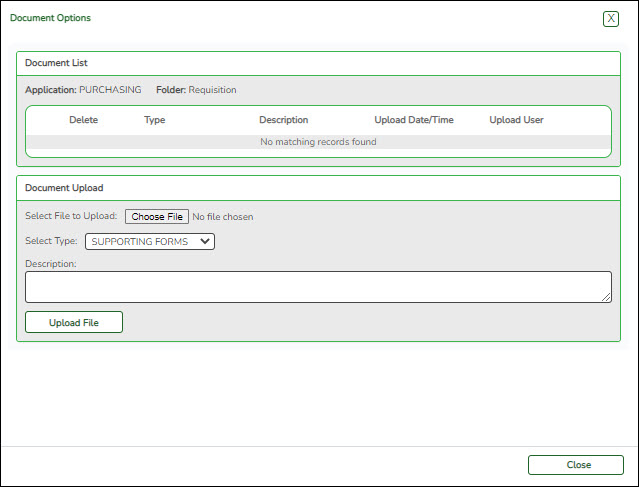
- Click Choose File to locate a file to be uploaded.
- In the Select Type field, click to select the type of document (Supporting Forms or Vendor Documents) to be uploaded.
- In the Description text box, type a description for the document attachment.
- Click Upload File. The file is uploaded and listed in the Document List section.
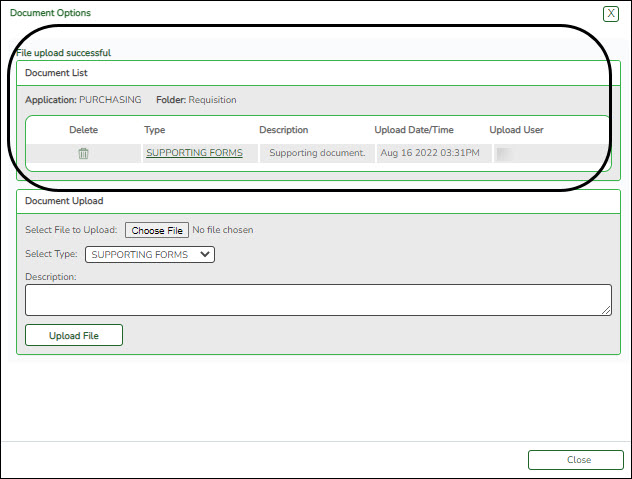
❏ Click Close to close the pop-up window. The Documents button displays a note icon.

- Modify a requisition.
Modify a requisition
Purchasing > Maintenance > Create/Modify Requisition
Use this page to modify saved requisitions (i.e., requisitions that have not been submitted).
❏ Retrieve the requisition to be modified.
- Add items, delete items, change account codes, change vendor, or change requestors.
- Click Save to save the requisition and modify it at a later time.
Or
❏ Click Submit to submit the requisition for approval. If you change the Requestor, a warning is displayed indicating that all accounts assigned to the items will be deleted. The accounts that the new requestor is authorized to use are charged with the item cost.
- Click Yes to continue.
- Otherwise, click No.
- Delete a requisition.
Delete a requisition
Purchasing > Maintenance > Create/Modify Requisition
Use this page to delete a requisition. Only requisitions that are in a Not Submitted or Returned status can be deleted.
❏ Retrieve the requisition to be deleted.
❏ Click Delete to delete the requisition. A message is displayed asking you to confirm the deletion.
- Click Yes to delete the requisition.
- Otherwise, click No to not delete the requisition.
Notes:
- A requisition cannot be deleted while it is being edited.
- If you delete a requisition, click Save before editing or creating a new requisition.
- Only the originator can delete the requisition.


Perform a Requistion Inquiry
- Perform a requisition inquiry.
Perform a requisition inquiry
Purchasing > Inquiry > Requisition Status Inquiry
Use this page to view the status of each item included on a specific requisition or purchase order without a contract. The Requisition Status Inquiry page can be accessed from two menus:
- For the current year, click Requisition Status Inquiry from the Inquiry menu.
- For next year, click Requisition Status Inquiry from the Next Year menu.
The page consists of the following three grids:
- The top grid displays requisitions or purchase orders.
- The middle grid displays items included in the requisition.
- The bottom grid displays a list of the approvers in the sequence of their approval.
Note: If Global Access is selected, the user can perform inquiries on the status of all requisition accounts.
Retrieve a record. The From and To Date fields default to your current fiscal year.
TIP: Use the following fields to narrow your inquiry search. For example, you can perform a search on a specific requisition Status to only display a list of requisitions with the selected status. By narrowing your search parameters, you can avoid retrieving large amounts of data in a single instance.
Req Nbr Type the requisition number to be retrieved. PO Nbr Type the purchase order number to be retrieved. Leading zeros are not required. However, if the purchase order number is alphanumeric, the field is not zero-filled. Contr Type Click to select a contract type.From Date Type the beginning search date in the MMDDYYYY format. To Date Type the ending search date in the MMDDYYYY format.
Note: The Date Requested is the date considered when using the From Date and To Date parameters.
Status Click to select a status to be included in the search.Vendor Number Type the vendor number. Vendor Name Type the vendor name. Requestor Name Type the requestor name. Bid Category Type the bid category code. Click Retrieve. Requisitions and purchase orders that you have submitted but that have not been received are displayed in the three grids.
In the top grid, click
to inquire about the selected requisition. The requisition information from the Create/Modify Requisition page is displayed.
Field Description Status The current status of the requisition is displayed.
If the status is Pending to be approved, the requisition is not yet a purchase order.
If the status is Approved, the PO Nbr field is populated with the assigned purchase order number. - View requisition reports.
Generate and review requisition report
The following reports are available to assist you in tracking requisition and purchase order information.
Purchasing > Reports > Purchasing Reports > REQ1050 - Requisitions Pending Approval
This report provides a list of requisitions that have been submitted but are not yet approved. The report allows you to view pending requisitions by vendor number assignment or by account number assignment. The requisitions are totaled by the requisition number, originator, and organization. The requisitions can be sorted by the requestor, receiving location, vendor, or requisition number if the parameter is left blank.
Purchasing > Reports > Purchase Order Reports > REQ1350 - Outstanding Purchase Orders Report
This report provides a list of purchase orders with account codes created in Purchasing that have balance amounts greater than zero. (The requisition status must be A - Approved.) The report is summed by purchase order number.
Purchasing > Reports > Purchase Order Reports > REQ1400 - Open PO Report
This report provides a list of purchase orders with line items that have been placed but not liquidated when the Create Receiving Payable district option is selected. If Create Receiving Payable is not selected, all placed purchase orders with goods that have not been fully received and with requisition items that have not been disapproved or voided are listed. Information includes purchase order number, requisition number, vendor name, purchase order date, date required, the original amount (by PO for original encumbrance amount), and balance.
academy/business_overview_guide_purchasing_enter_requisitions.1538409692.txt.gz · Last modified: 2018/10/01 11:01 (external edit)
Except where otherwise noted, content on this wiki is licensed under the following license: CC Attribution-Share Alike 4.0 International
Americans with Disabilities Act (ADA) and Web Accessibility
The Texas Computer Cooperative (TCC) is committed to making its websites accessible to all users. It is TCC policy to ensure that new and updated content complies with Web Content Accessibility Guidelines (WCAG) 2.0 Level AA. We welcome comments and suggestions to improve the accessibility of our websites. If the format of any material on our website interferes with your ability to access the information, use this form to leave a comment about the accessibility of our website.
Click to add or view requisitions comments. These comments are displayed on the District copy of the purchase order. A Requisition Comments window is displayed. If there is a paper clip icon next to the Comments button, a requisition comment exists. In the Requisition Comments window, type comments about the requisition.
Click OK to save the requisition comment and close the window.
Click Cancel to close the window without saving the comment.