
User Tools
Sidebar
academy:employeeguide_travelrequests
Book Creator
Add this page to your book
Add this page to your book
Book Creator
Remove this page from your book
Remove this page from your book
This is an old revision of the document!
Employee Guide: Manage Travel

Welcome to ASCENDER EmployeePortal. This application provides you with access to various employee data inquiries and maintenance features.
EmployeePortal allows you to request reimbursement of mileage, lodging, meals, and incidentals stemming from official business travel. Additionally, you can view a summary and detailed view of travel reimbursement requests.
Your local education agency (LEA) determines the pages and data fields that can be viewed and/or edited in EmployeePortal. If you have questions, please contact your EmployeePortal administrator.
Before You Begin
Review the ASCENDER EmployeePortal Navigation page to familiarize yourself with the portal.
TIP: If you have any notifications from EmployeePortal, you will see the number of pending notifications in the top-right corner of the page on the bell icon. Click the bell icon to view the notifications page. From the notifications page, click the eye icon to clear your notifications.
I. Manage Travel Reimbursement Requests
EmployeePortal > Travel Reimbursement Requests > Travel Requests
This page is used to create, edit, delete, and submit travel reimbursement requests. There are two types of travel requests, mileage and extended. If this page is not enabled, check with your EmployeePortal administrator as your LEA may have opted to not allow access.
If a message is available from your LEA, it is displayed in red at the top of the page.
- You can save the request and return to it at a later date, or enter a request and submit it. When the request is submitted, an email message is sent to the first approver notifying them that a request is awaiting approval.
- When the request is fully approved, you will receive an email message indicating that the request has been approved and issued for payment. If any approver disapproves the request, you will receive an email message notifying you of the disapproved request. You can change and resubmit the request according to the approver's instructions, or you can delete the request.
- If your request is disapproved, you can view the comments from the approver who disapproved the request. These comments are also included in the disapproval email message.
- View travel summary.
The following information is displayed in the top section of the page: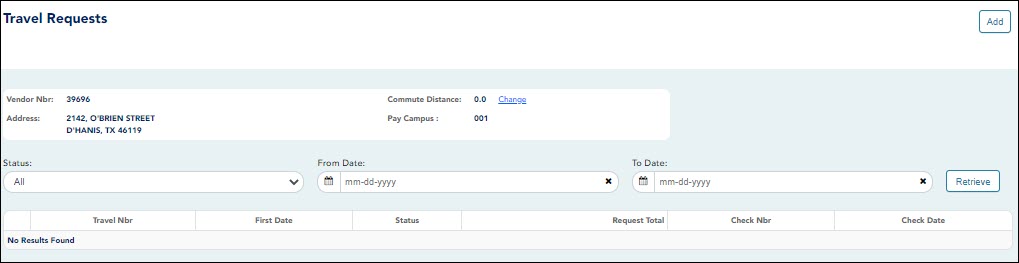
Field Description Vendor Nbr Your vendor number is displayed as set up in ASCENDER Finance. Address Your vendor address is displayed as set up in ASCENDER Finance.
Admin Note: This address is populated from the Remittance Address on the Finance > Maintenance > Vendor Information > Vendor Name/Address tab even when the Order Address is populated. If only the Order Address is populated in ASCENDER Finance, then the Order Address is used.Note: Employees MUST have an established vendor number to enter travel reimbursement requests.
Commute Distance The commute distance is displayed. This is the number of miles between your home and assigned work location.
If you need to update your commute distance, click Change. The Please enter your one-way commute distance pop-up window opens. Type your commute distance and then click Save to close the pop-up window. Valid values are 0-999.9.
Admin Note: The commute distance can also be updated on the employee's demographic record in ASCENDER Personnel.Pay Campus The pay campus is displayed. This is your assigned pay campus ID.
Admin Note: The pay campus is retrieved from the highest pay frequency where the employee is active.A list of your travel reimbursement requests is displayed if any. The following details are displayed for each travel reimbursement request:
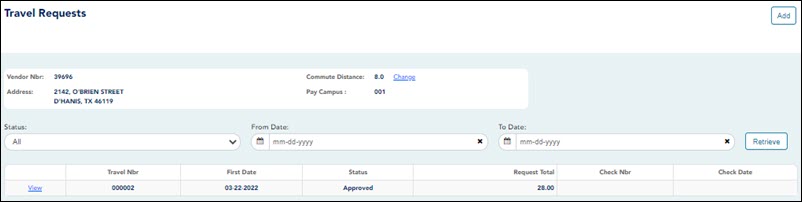
Travel Nbr The travel number for the existing travel reimbursement request is displayed. The travel number is assigned to a new request when it is saved or submitted. Once a request is submitted, you can track the progress of the request by the travel number. First Date For a single day mileage request, the date of travel is displayed. Or, for extended mileage requests, the first date of travel is displayed. Status The current status of the travel reimbursement request is displayed. Request Total The total amount of the travel reimbursement request is displayed. Check Nbr Once approved and processed, the travel reimbursement request becomes a Finance check transaction and is paid on the next Finance check run. The check number is displayed. Check Date The Finance check run date is displayed. ❏ Use the following fields to filter the travel reimbursement request data by date range and/or status.
Status Click  to select the status for which you want to view travel reimbursement request data.
• All
• Approved
• Pending
• SavedFrom and To Date Type the range of dates for which you want to view travel reimbursement request data or click  to select the dates.
❏ Click Retrieve. A list of travel reimbursement requests for the specified date range and/or status is displayed.
- Create and submit travel requests.
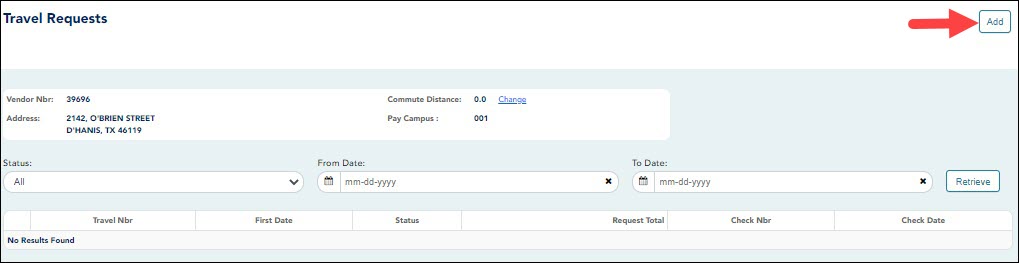
You have two options to create a travel request.Option 1: Click Add in the upper-right corner of the Travel Requests page.
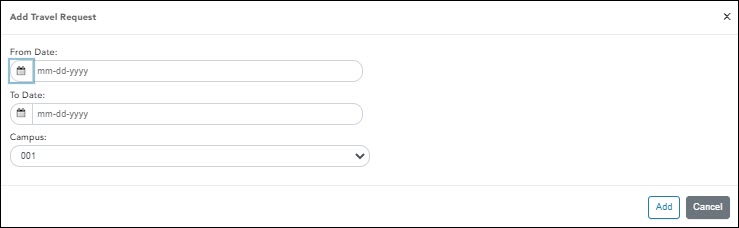
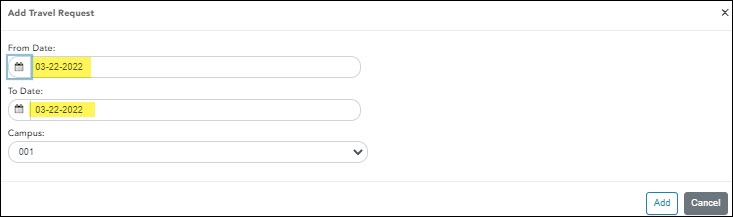
The Add Travel Request pop-up window opens allowing you to begin entering the details of your travel request.
- If entering a regular mileage request, reference the Mileage travel request section.
- If entering an extended (multiple consecutive travel dates) mileage request, reference the Extended travel request section.
Option 2: From the EmployeePortal homepage calendar, you will notice that the current day is highlighted in yellow. Click the day for which you want to enter a travel request. The Add Request Type pop-up window opens allowing you select the type of request you want to enter.
TIP: If you have any existing approved, pending, or saved travel requests, the entry is displayed for that day on the calendar. You can click the entry to open the details of the request.
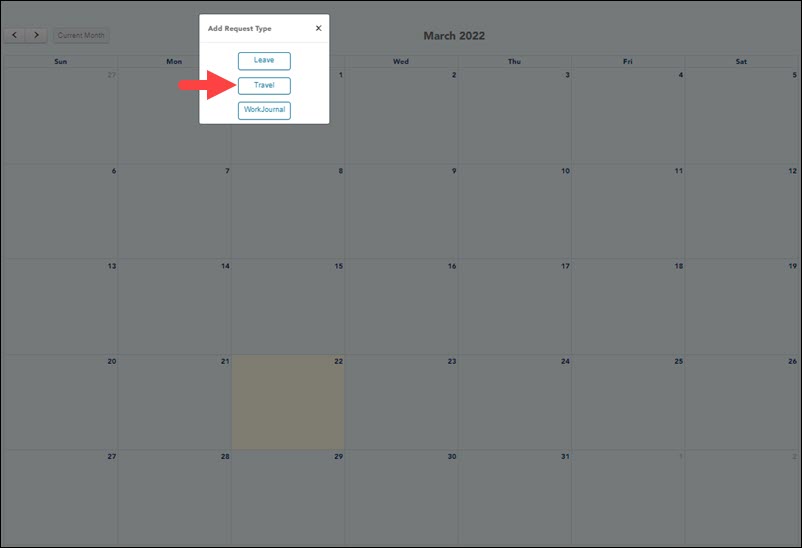
❏ Click Travel. The Add Travel Request pop-up window opens. The From Date and To Date fields are automatically populated with the date you selected from the calendar. For extended travel requests, select the applicable To Date.
- If entering a regular mileage request, reference the Mileage travel request section.
- If entering an extended (multiple consecutive travel dates) mileage request, reference the Extended travel request section.
Mileage travel request:
❏ If entering a single travel date or multiple consecutive travel dates for non-extended travel (mileage & incidentals), ensure the following fields are completed:
From Date Type the date on which the travel occurred in the MM-DD-YYYY format. Or, click to select a date. If entering a single date of travel, a To Date is not necessary. To Date Type the date on which the travel ended in the MM-DD-YYYY format. Or, click to select a date. Campus The campus is automatically populated with your assigned pay campus.
Admin Note: The pay campus is retrieved from the highest pay frequency where the employee is active.❏ If the From Date and To Date selections exceed a single day, the Overnight Trip? check box is displayed.
Do not select the Overnight Trip? check box for non-extended travel.
Note: Selecting the Overnight Trip? check box allows the display of the additional fields needed when creating an extended travel request entry.
❏ Click Add. The Travel Request page is displayed with an entry for each day of your travel with dates populated according to your selected to/from dates.
Otherwise, click Cancel to close the Add Travel Request pop-window and return to the EmployeePortal calendar or the Travel Request page.
The Travel Summary is displayed at the top of the page with the following details:
Note: If you are entering a new request, this information is blank.
- Travel Nbr - Displays the assigned travel number.
- Status - Displays the status of the travel request.
- Date Entered - Displays the date the travel request was entered.
- Total Miles - Displays the total miles traveled minus commute miles.
- Total Misc - Displays the total amount of all miscellaneous items.
- Total Request - Displays the total amount of the travel request (mileage + miscellaneous items).
- Account - Displays the assigned account codes to be expensed.
- Amount - Displays the amount to be expensed for each assigned account code.
- Approver - Displays the approver's name.
- Alternate Approver - Displays the approver's alternate approver if any.
- Approval Status - Displays the approver's approval status (Approved, Pending, or Returned).
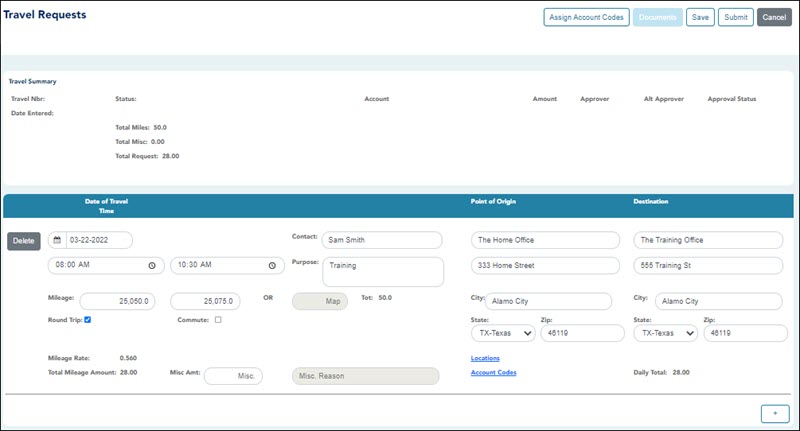
❏ Complete the following information for the request:Date The travel date is automatically populated with the date you selected in the Add Travel Request window but can be changed. Type the date on which the travel occurred in the MM-DD-YYYY format. Or, click to select a date from the calendar.From Time Type the time at which you departed the origin location (start time) in the HH MM AM/PM format. Or, click  to select the start time.
To Time If the entry is round trip, type the time at which you returned to the origin location (end time) in the HH MM AM/PM format. If the entry is a one-way trip, type the time you arrived at your destination. Or, click to select the end time.Contact Type the name of your contact person at the destination. This field can be a maximum of 40 characters and is required. Purpose Type the purpose of the trip. This field can be a maximum of 180 characters and is required. Mileage Start Type the beginning odometer reading. If this field is used, leave the Map field blank. Mileage Stop Type the ending odometer reading. If this field is used, leave the Map field blank. Mileage Map This field can be used to enter the total reimbursable miles. If this field is used, leave the Mileage Start/Stop fields blank.
Type the number of miles from the point of origin to the destination point if one-way, calculated using mapping software. For round-trip, double the mileage of the one-way total.Tot The total mileage (Start Mileage - Stop Mileage) for the entry is calculated and displayed. Round Trip Select to indicate that the entry is round trip with the same mileage each way (two one-way trips, one from Point A to Point B and the other from Point B to Point A). Selecting Round Trip doubles the total mileage for the entry. Commute Select to include your commute distance in the mileage calculation. This is the mileage that you would normally travel from home to work and vice versa.
If Round Trip is selected, the commute mileage is deducted twice from the total mileage. If Round Trip is not selected, the commute mileage is only deducted once from the total mileage.
For example, if you enter a one-way trip leaving from home to a destination for a total of 50 miles and your commute distance is set to 20 miles, then your total mileage for the request is 30 miles (50 - 20).Mileage Rate The mileage reimbursement rate is displayed. This rate is set up in the ASCENDER Finance application according to the travel dates. Total Mileage Amount The total amount to be reimbursed for the entry (Total Mileage - Commute Distance x Mileage Reimbursement Rate) is displayed. Misc Amt Type the amount of any additional expenses for items such as tolls, parking fees, etc. In the Misc Reason field, indicate the reason for the miscellaneous amount. TIP: If the Mileage (Start, Stop, and Map) fields, Point of Origin, and Destination fields are disabled, the Location Locking feature has been enabled by your EmployeePortal administrator and you must click the Locations link to select from a predefined list of travel locations and distances.
❏ Under Point of Origin:
Origin Description Type a description for the starting location. Origin Address Type the address at which you started. City Type the city name for the origin address. This field can be a maximum of 25 characters. State Click to select a state for the origin address. Zip Type the five-digit zip code for the origin address. ❏ Under Destination:
Destination Description Type a description for the ending location. Destination Address Type the address to which you traveled. City Type the city name for the destination address. This field can be a maximum of 25 characters. State Click to select a state for the destination address. Zip Type the five-digit zip code for the destination address. ❏ If Location Locking is enabled, click the Locations link to open and select from a predefined list of travel locations.
Assign account codes:
❏ Click the Account Codes link to assign an account code to a specific travel day within the travel request. Or, click the Assign Account Codes button at the top of the page to assign account codes to the entire travel request.
The Assign Account Codes pop-up window opens allowing you to enter account code information for the travel request. Only account codes to which you have access are displayed.
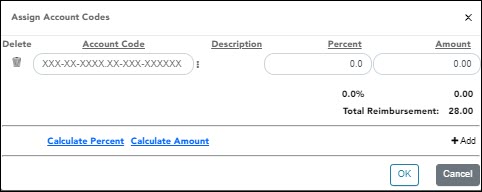
The Assign Account Codes button overrides any accounts code assignments for a specific travel day within a travel request.
- Click +Add to add a blank account code line. You can add additional account codes rows as needed.
- In the Account Code column, type the account code. Or, click
 to open the Account Codes pop-up window and search for an account code.
 - Type the applicable account code components, click to open the Fund Search pop-up window, or leave blank for all account codes, and then click Search. A list of available account codes is displayed.
- Select an account code from the list. The Account Code and Description fields are populated with the selected account code.
- Click Clear to clear your selections.
- Click X to close the Account Codes pop-up window.
- In the Percent column, type the percent of the travel request amount to be expensed to the account code. Or, in the Amount column, type the dollar amount of the travel request amount to be expensed to the account code.
❏ Click Calculate Percent to populate the Percent column based on the amount entered in the Amount column.
❏ Click Calculate Amount to populate the Amount column based on the percentage entered in the Percent column.
The total percentage and amount distribution for all accounts listed is displayed.
❏ Click OK to save your changes and close the pop-up window. Click X or Cancel to close the pop-up window without saving your changes.❏ Click + to add an additional travel request entry.
Extended travel request:
❏ If entering multiple consecutive travel dates for extended travel (mileage, lodging, meals, and incidentals), complete the following fields:
From Date Type the date on which the travel occurred in the MM-DD-YYYY format. Or, click to select a date. If entering an extended travel request, indicate the first date of travel.To Date Type the date on which the travel ended in the MM-DD-YYYY format. Or, click to select a date. If entering an extended travel request, indicate the last date of travel.Campus The campus is automatically populated with your assigned pay campus.
Admin Note: The pay campus is retrieved from the highest pay frequency where the employee is active.❏ If the From Date and To Date selections exceed a single day, the Overnight Trip? check box is displayed.
Select the Overnight Trip? check box. The time fields are displayed.
Note: Selecting the Overnight Trip? check box allows the display of the additional fields needed when creating an extended travel request entry.
From Time Type the time at which you departed the origin location (start time) in the HH MM AM/PM format. Or, click to select the start time.To Time Type the time at which you returned to the origin location (end time) in the HH MM AM/PM format. Or, click to select the end time.❏ Click Add. The Travel Request page is displayed with an entry for each day of your travel with dates populated according to your selected to/from dates.
Otherwise, click Cancel to close the Add Travel Request pop-window and return to the EmployeePortal calendar or the Travel Request page.
The Travel Summary is displayed at the top of the page with the following details:
Note: If you are entering a new request, this information is blank.
- Travel Nbr - Displays the assigned travel number.
- Status - Displays the status of the travel request.
- Date Entered - Displays the date the travel request was entered.
- Total Miles - Displays the total miles traveled minus commute miles.
- Total Misc - Displays the total amount of all miscellaneous items.
- Total Request - Displays the total amount of the travel request (mileage + miscellaneous items).
- Account - Displays the assigned account codes to be expensed.
- Approver - Displays the approver's name.
- Alternate Approver - Displays the approver's alternate approver if any.
- Approval Status - Displays the approver's approval status (Approved, Pending, or Returned).
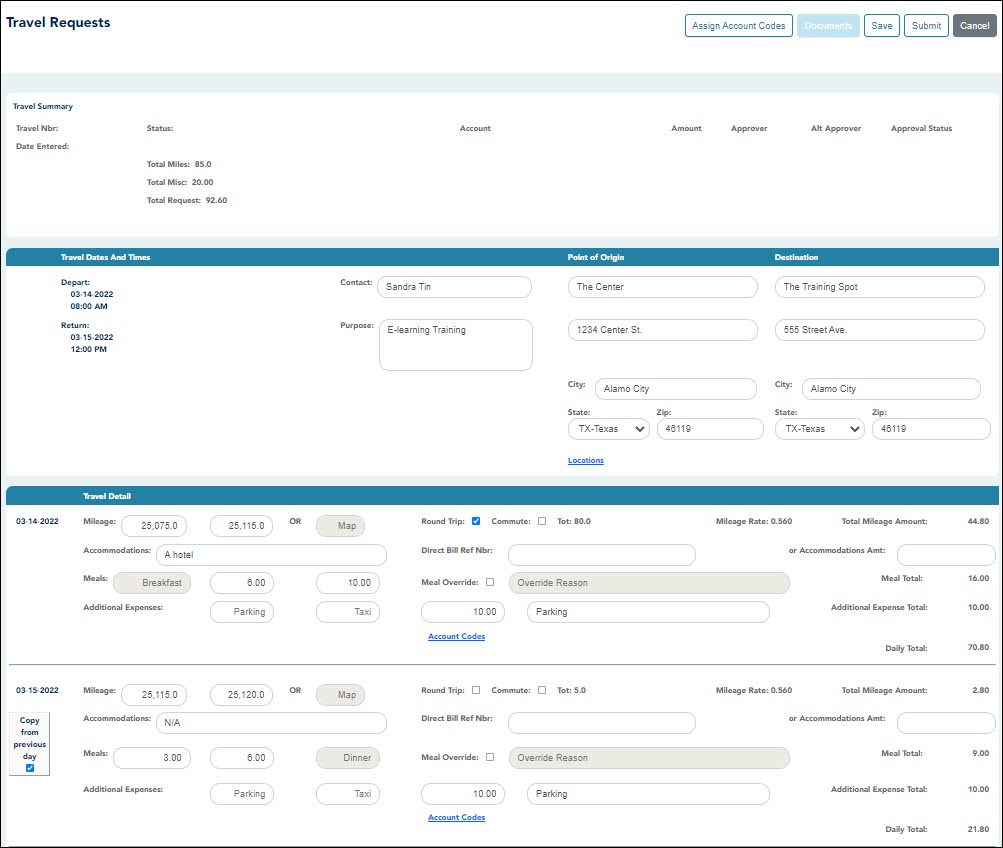
❏ Complete the following information for the request:
The Depart and Return fields are automatically populated with the dates and times selected in the Add Travel Request pop-up window.
❏ After all travel details have been entered for the first day's entry, the Copy from Previous Day check box is displayed on subsequent entries. Select this check box to copy all travel details from the previous day's entry and make changes as needed. This feature overrides any existing data and replaces it with the previous day details. If selecting this check box on the last travel day and the day from which you are copying has a dinner amount, the Dinner field will not be populated if the return time is not later than the Dinner Eligible Return Time as defined in ASCENDER Finance.Contact Type the name of your contact person at the destination. This field can be a maximum of 40 characters and is required. Purpose Type the purpose of the trip. This field can be a maximum of 180 characters and is required. ❏ Under Point of Origin:
Origin Description Type a description for the starting location. Origin Address Type the address at which you started. City Type the city name for origin address. This field can be a maximum of 25 characters. State Click to select a state for the origin address. Zip Type the five-digit zip code for the origin address. ❏ Under Destination:
Destination Description Type a description for the ending location. Destination Address Type the address to which you traveled. City Type the city name for the destination address. This field can be a maximum of 25 characters. State Click to select a state for the destination address. Zip Type the five-digit zip code for the destination address. ❏ Under Travel Detail, there is an entry section for each travel day. Complete the applicable fields:
Mileage Start Type the beginning odometer reading. If this field is used, leave the Map field blank. Mileage Stop Type the ending odometer reading. If this field is used, leave the Map field blank. Mileage Map This field can be used to enter the total reimbursable miles. If this field is used, leave the Mileage Start/Stop fields blank.
Type the number of miles from the point of origin to the destination point if one-way, calculated using mapping software. For round-trip, double the mileage of the one-way total.Round Trip Select to indicate that the entry is round trip with the same mileage each way (two one-way trips, one from Point A to Point B and the other from Point B to Point A). Selecting Round Trip doubles the total mileage for the entry. Commute Select to include your commute distance in the mileage calculation. This is the mileage that you would normally travel from home to work and vice versa.
If Round Trip is selected, the commute mileage is deducted twice from the total mileage. If Round Trip is not selected, the commute mileage is only deducted once from the total mileage.
For example, if you enter a one-way trip leaving from home to a destination for a total of 50 miles and your commute distance is set to 20 miles, then your total mileage for the request is 30 miles (50 - 20).Tot The total mileage (Start Mileage - Stop Mileage) for the entry is calculated and displayed. Mileage Rate The mileage reimbursement rate is displayed. This rate is set up in ASCENDER Finance according to the travel dates. Total Mileage Amount The total amount to be reimbursed for the entry (Total Mileage - Commute Distance x Mileage Reimbursement Rate) is displayed. Accommodations If a hotel stay was necessary, type the name of the hotel. This field can be a maximum of 35 characters. The hotel expense can be paid one of two ways:
You can pay the bill and request reimbursement. In this case, type the amount in the Reimbursement Amt field.
The hotel can direct bill the LEA or service center. In this case, type the reference number in the Direct Bill Ref Nbr field (up to 20 characters).Meals In the Breakfast, Lunch, and Dinner fields, type the amount for incurred meal expenses. These amounts cannot exceed the limits set by your EmployeePortal administrator in ASCENDER Finance.
Notes:
• To be reimbursed for breakfast on the first travel day, the from (departure) time must be earlier than the Breakfast Eligible Depart Time as defined in ASCENDER Finance.
• To be reimbursed for dinner on the last travel day, the to (return) time must be later than the Dinner Eligible Return Time as defined in ASCENDER Finance.If you need further information about these amounts and times, contact your supervisor or EmployeePortal administrator.
Meal Override Select if any meal expenses for the date exceeded the limits. If selected, an explanation is required in the Override Reason field. Meal Total The sum of expenses for breakfast, lunch, and dinner is displayed. Additional Expenses In the Parking, Taxi, or Misc fields, type the amount of any parking, taxi, or miscellaneous expenses for the day.
The Misc field is used for expenses that do not fall under any of the other categories. If an amount is entered in the Misc field, an explanation is required in the Misc Reason field.Additional Expense Total The sum of all additional expenses for the day is displayed. Daily Total The sum of all expenses for the day is displayed. Assign account codes:
❏ Click the Account Codes link to assign an account code to a specific travel day within the travel request. Or, click the Assign Account Codes button at the top of the page to assign account codes to the entire travel request.
The Assign Account Codes pop-up window opens allowing you to enter account code information for the travel request. Only account codes to which you have access are displayed.
The Assign Account Codes button overrides any accounts code assignments for a specific travel day within a travel request.
- Click +Add to add a blank account code line. You can add additional account codes rows as needed.
- In the Account Code column, type the account code. Or, click to open the Account Codes pop-up window and search for an account code.
- Type the applicable account code components, click to open the Fund Search pop-up window, or leave blank for all account codes, and then click Search. A list of available account codes is displayed.
- Select an account code from the list. The Account Code and Description fields are populated with the selected account code.
- Click Clear to clear your selections.
- Click X to close the Account Codes pop-up window.
- In the Percent column, type the percent of the travel request amount to be expensed to the account code. Or, in the Amount column, type the dollar amount of the travel request amount to be expensed to the account code.
❏ Click Calculate Percent to populate the Percent column based on the amount entered in the Amount column.
❏ Click Calculate Amount to populate the Amount column based on the percentage entered in the Percent column.
The total percentage and amount distribution for all accounts listed is displayed.
❏ Click OK to save your changes and close the pop-up window. Click X or Cancel to close the pop-up window without saving your changes.
Once you have completed your travel request:
❏ Click Save to save the request without submitting it for approval. The Documents button at the top of the page is enabled allowing you to upload documents such as receipts, maps, etc. Once the request is saved, you can return to it at a later time to make changes and/or submit it for approval.
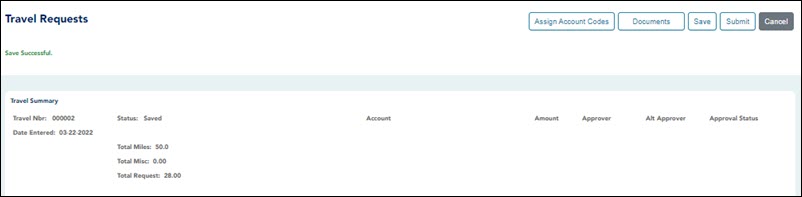
❏ Click Submit to submit the request for approval. The request is sent through the appropriate approval path.
You will receive an email message when the request is approved/returned.
❏ Click Cancel to return to the Travel Requests page. - Edit and delete travel requests.
If the travel request Status is Approved or Pending, click View to view the details.
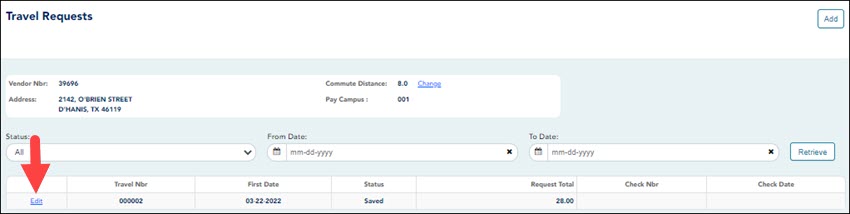
If the travel request Status is Returned or Saved, click Edit to edit the details of the request and submit the request for approval. Or, once you open the travel request, you can click Delete to delete the request.


If you are an approver for travel requests, you will see an additional menu item (Approve Travel Requests) under the Travel Reimbursement Requests menu.
II. Approve Travel Requests
- Approve travel requests.
ASCENDER EmployeePortal > Travel Reimbursement Requests > Approve Travel Requests
This page is used to approve or return employee travel requests.
If this page is not enabled, check with your EmployeePortal administrator as the LEA may have opted to not allow access.
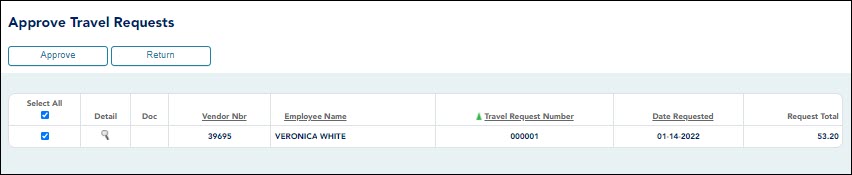
When you access the Approve Travel Requests page, a list of travel requests pending your action is displayed if any. The list is automatically sorted by the Travel Request Number. However, you can re-sort the list by clicking another underlined column.
❏ Select the requests that you want to approve or return. You can select individual requests (check boxes) or select the top Select All check box to select all requests (check boxes).
The following information is displayed for each travel request.
Field Description Detail Click  to view the travel request details. The travel details are display only and cannot be edited.
 Doc If documents exist for the travel request,  is displayed. Click to open the Document Attachments pop-up and view the existing uploaded documents.
 Vendor Nbr The employee's vendor number is displayed, as set up in ASCENDER Finance. Employee Name The employee's name is displayed. Travel Request Number The assigned travel number for the travel request is displayed. Date Requested The date the travel request was submitted is displayed. Request Total The total amount of the travel request is displayed. ❏ Click Approve to approve the request. If you are the final approver, an email message is sent to the employee notifying them of the action (approved/returned) taken on the request.
- If the request is approved or returned, the request is no longer displayed in the list of pending travel requests.
- If the request is not selected and no action is taken, the request remains in the list of pending travel requests.
❏ Click Return to return the request to the employee. The request is no longer displayed in the list of pending travel requests.


academy/employeeguide_travelrequests.1627358633.txt.gz · Last modified: 2021/07/26 23:03 (external edit)
Except where otherwise noted, content on this wiki is licensed under the following license: CC Attribution-Share Alike 4.0 International
Americans with Disabilities Act (ADA) and Web Accessibility
The Texas Computer Cooperative (TCC) is committed to making its websites accessible to all users. It is TCC policy to ensure that new and updated content complies with Web Content Accessibility Guidelines (WCAG) 2.0 Level AA. We welcome comments and suggestions to improve the accessibility of our websites. If the format of any material on our website interferes with your ability to access the information, use this form to leave a comment about the accessibility of our website.