
Sidebar
general:attendance_copy_calendar_to
This is an old revision of the document!
Select the campus-tracks to copy the calendar to.
IMPORTANT: If the calendar and/or options differ at the From and To campus-tracks, the calendar and/or options at the To campus-track will be overwritten according to your selections.
When changing the Grading Cycle Type for the To Campus Track, the Track End Dates must be updated on Grade Reporting > Maintenance > Tables > Campus Control Options > Parameters.
Check boxes are color coded as follows:
 - Attendance options exist for the track, but not a calendar. The Minimum Daily Mins, Daily Mins, Shortened Min Daily Mins, and Shortened Daily Min values are all the same at both campus-tracks.
 Attendance options exist for the track, but not a calendar. At least one of the Minimum Daily Mins, Daily Mins, Shortened Min Daily Mins, and Shortened Daily Min values are different at the From and To campus-tracks. Note that only the basic calendar will be copied to the To track calendar (Membership day, Begin School, Begin Cycle, End of School, Weekend, Holiday, and Inservice day). The special days (Weather Day, Waiver Day, Make-up Day and Adjust Membership) are not copied.
 - Neither calendar nor attendance options exist for the track.
 Calendar and attendance options exist for the track. The Minimum Daily Mins, Daily Mins, Shortened Min Daily Mins, and Shortened Daily Min values are all the same at both campus-tracks.
 Calendar and attendance options exist for the track. At least one of the Minimum Daily Mins, Daily Mins, Shortened Min Daily Mins, and Shortened Daily Min values are different at the From and To campus-tracks. Note that only the basic calendar will be copied to the To track calendar (Membership day, Begin School, Begin Cycle, End of School, Weekend, Holiday, and Inservice day). The special days (Weather Day, Waiver Day, Make-up Day and Adjust Membership) are not copied.
 The box is displayed for the From Campus Track. A campus-track cannot be copied to itself.
 The check box is disabled because attendance has been posted on at least one date this school year for this campus-track.
A check box is not displayed if that track does not exist at the campus.
Create a new track:
- Click
 to add a new campus-track. A text input field appears in place of the button, allowing you to type a new two-digit track.
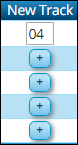
NOTE: To cancel, double-click the input field, and the button is again displayed.
- IMPORTANT: After typing the track, press ENTER. The track is added to the grid and is selected by default.


The new track is not saved until you click Copy with that track selected. Once saved, the new track will appear in Track drop-down fields across TxEIS.
general/attendance_copy_calendar_to.1530017547.txt.gz · Last modified: 2018/06/26 07:52 (external edit)