
User Tools
Sidebar
academy:child_find_speds
Book Creator
Add this page to your book
Add this page to your book
Book Creator
Remove this page from your book
Remove this page from your book
This is an old revision of the document!
Core Collection: Special Education Data System (SPEDS) (To Be Updated)

The Special Education Data System (SPEDS) Collection is a data collection used by the Texas Education Agency (TEA) to gather data for some State Performance Plan (SPP) indicators.
The SPEDS - Summer Submission joins together the Early Childhood Outcomes (SPPI-7), Timely Initial Evaluation and Eligibility Determination (SPPI-11), Early Childhood Transition (SPPI-12), and Secondary Transition (SPPI-13) indicators into one submission.
The SPEDS submission is due July 30, 2026.
IMPORTANT: Some of the images and/or examples provided in this document are for informational purposes only and may not completely represent your LEA’s process.
Registration
Registration > Maintenance > Core Collections
Data will be entered for Timely Initial Evaluation: SPPI-11 and SPPI-12 under Registration > Maintenance > Core Collections on the Child Find: SPPI-11 and Child Find: SPPI-12 screens.
There are four scenarios for reporting students:
• Timely Initial Evaluation: SPPI-11 Scenario 1 for Enrolled Students, ages 3-21
• Timely Initial Evaluation: SPPI-11 Scenario 2 for Non-Enrolled Students, ages 3-21
• Timely Initial Evaluation: SPPI-12 Scenario 1 for Enrolled Students, ages 0 and up to, but not including, 3.
• Timely Initial Evaluation: SPPI-12 Scenario 2 for Non-Enrolled Students, ages 0 and up to, but not including, 3.
NOTE: For the 2025–2026 school year, data for these indicators will be entered in the system within the Registration application using the current Child Find fields and screens. In the future, the Child Find screens will be renamed and relocated to the Special Education application.

- Child Find: SPPI-11 - Scenario 1: Enrolled Students, ages 3-21
Registration > Maintenance > Student Enrollment > Demo1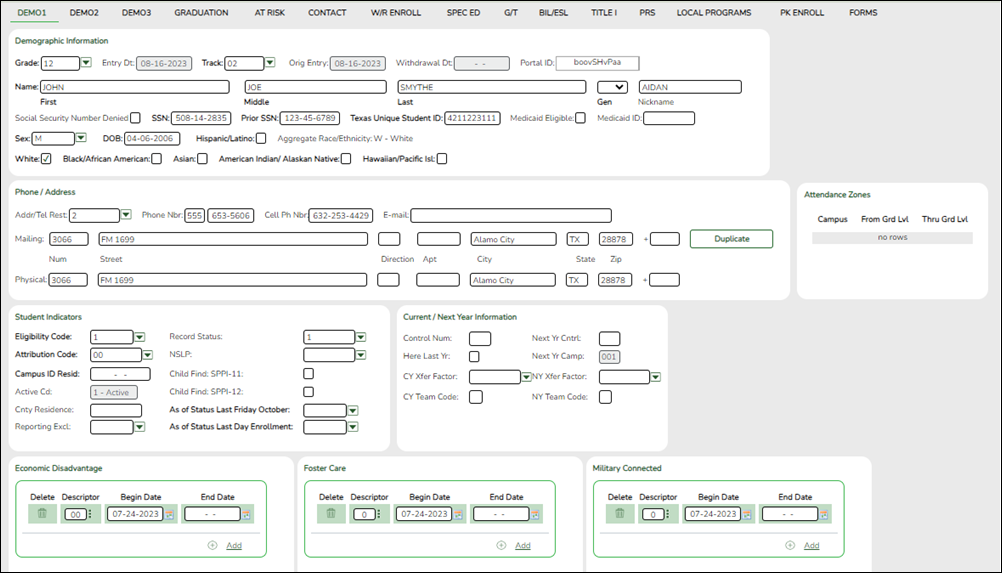
Update data:
❏ Retrieve a student who is already enrolled at the campus using their Local Student ID, Student Name, or Texas Unique Student ID.
❏ Select the Child Find: SPPI-11 checkbox in the Student Indicators section.
❏ Click Save.
Registration > Maintenance > Core Collections > Child Find: SPPI-11 > Demographics/Enrollment
Information retrieved on this tab for an enrolled student is read-only and cannot be modified. Information can only be edited on Registration > Maintenance > Demo1.
Exclude from reporting is not used with enrolled students and is disabled on this screen.
Evaluation Delay Days is a calculation derived from the number of absences between the Consent to Evaluation Received Date and the Initial Evaluation Date found on Child Find Data and counts only those absences in an Average Daily Attendance (ADA) period. If those dates have not been entered, the field will show 0. This number is used by TEA to determine if the district is in compliance.
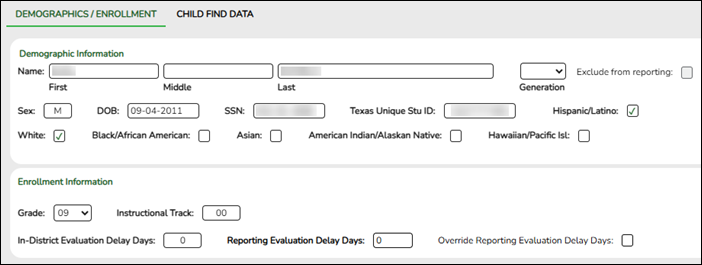
Retrieve a Student:
NOTE: The Student field does not auto-complete at this time.
❏ Type the exact Student ID or the exact Texas Unique Student ID.
❏ Click Retrieve.
OR
❏ Click Directory to select a student from the directory.
The Directory screen will display students that have been marked with the Child Find: SPPI-11 indicator on Maintenance > Student Enrollment > Demo1.
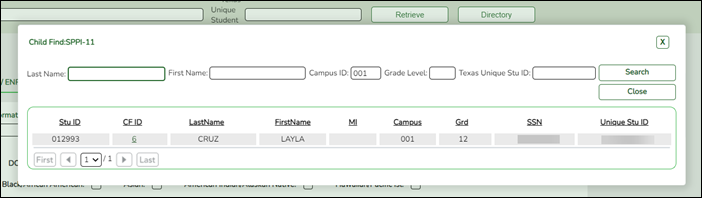
NOTE:
• The CF ID is the ID auto-generated.
• The Campus ID field auto-populates with the campus number on which the user is logged in.
• The Campus number identifies the student’s campus of enrollment.
❏ Click the student’s CF ID to Retrieve.
Update data:
❏ Under Enrollment Information:
Grade For student's who do not have a Texas Unique Stu ID, select the grade as if the student were enrolled. Leave blank for the 2022 school year. Instructional Track Disabled for non-enrolled students. In-District Evaluation Delay Days Disabled for non-enrolled students.
TWEDS Data Element: EvaluationDelayDays (E1711) indicates the number of student absences, if any, beginning the first instructional day following the date on which the Local Education Agency (LEA) received written parental consent for the full individual and initial evaluation (FIIE) report.
For TSDS extract purposes:
• If the Consent to Evaluation Received Date and Initial Evaluation Date fields are blank, then the Evaluation Delay Days calculation does not occur.
• If the Consent to Evaluation Received Date or Initial Evaluation Date fields are blank, then the Evaluation Delay Days calculation does not occur.
• If the existing Consent to Evaluation Received Date or Initial Evaluation Date fields are updated, then the Evaluation Delay Days calculation does occur.Reporting Evaluation Delay Days Disabled for non-enrolled students. Override Reporting Evaluation Delay Days Disabled for non-enrolled students.
❏ Click Save.
Registration > Maintenance > Core Collections > Child Find: SPPI-11 > Child Find Data
The information on this screen is specific to this tab and is not found anywhere else in ASCENDER.
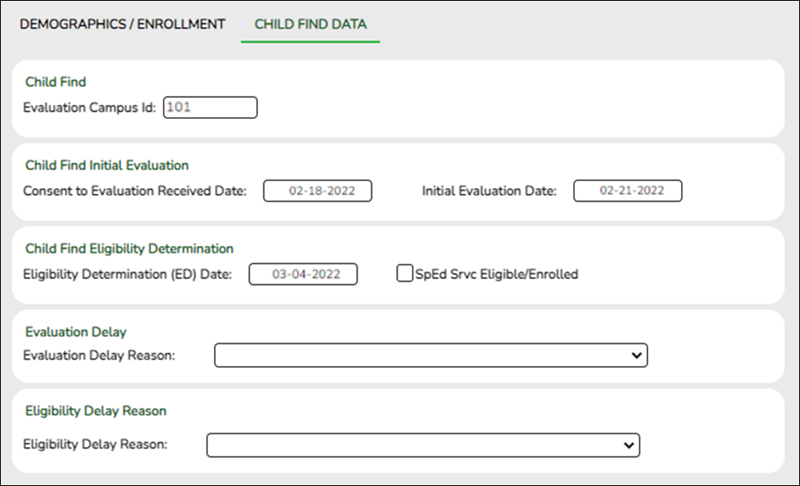
Update Data
❏ Under Child Find:
Evaluation Campus ID Enter the campus ID on which the student was evaluated.
The Evaluation Campus ID number may or may not be the same as the Campus Enrollment ID.
For example, the student may have been evaluated on Campus 105, but is enrolled at Campus 101.
❏ Under Child Find Initial Evaluation:
Consent to Evaluation Received Date Enter the month, day, and year of the first instructional day following the date on which the Local Education Agency (LEA) received written consent for the full individual and initial evaluation (FIIE) from the student's parent.
Initial Evaluation Date Enter the date the child was initially evaluated for the program.
This date must not be before the Consent to Evaluation Received Date.
❏ Click Save.
❏ Under Child Find Eligibility Determination:
Eligibility Determination (ED) Date If applicable, enter the date the child was determined eligible for the program.
IMPORTANT: If this date is left blank, the student will not be extracted to the interchanges.SpEd Srvc Eligible/Enrolled Select if a student is eligible for, and enrolled in Special Education services after the Eligibility Determination Date.
❏ Under Evaluation Delay:
Evaluation Delay Reason If applicable, choose a reason for the evaluation delay. Leave blank if there is no delay in evaluation.

❏ Under Eligibility Delay Reason:
Eligibility Delay Reason If applicable, choose a reason for the eligibility delay. Leave blank if there is no delay in eligibility.

❏ Click Save.
If a student will not be reported, return to the Demo1 tab, uncheck the Child Find: SPPI-11 indicator and click Save. The student's information will be retained in ASCENDER but will not be reported.


- Child Find: SPPI-11 - Scenario 2: Non-Enrolled Students, ages 3-21
Registration > Maintenance > Core Collections > Child Find: SPPI-11 > Demographics/Enrollment
Information on this tab must be manually added by the district.
Instructional Track and Evaluation Delay Days are not enabled or applicable for non-enrolled students.
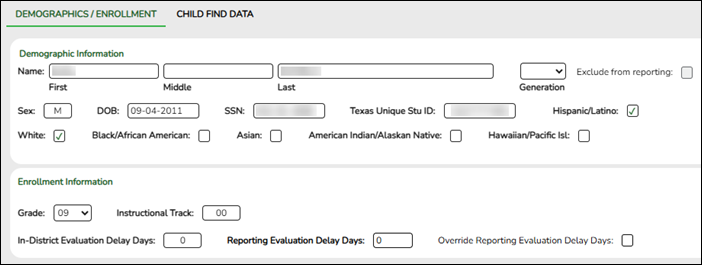
Update data:
❏ Under Demographic Information:
Name Type the student's first, middle, and last name. Select a generation code if applicable. Exclude from reporting Select to exclude a non-enrolled student from reporting. Sex Select the student's gender. DOB Type the student's date of birth (MM-DD-YYYY). SSN Type the student’s nine-digit social security number. Texas Unique Stu ID If available, type the student's ten-digit unique student ID. This ID is assigned to students by TEA and issued to schools by the TSDS TX Unique ID Application. This ID cannot be generated by an LEA and cannot begin with zero.
This number can be added after it is received by TEA.Hispanic/Latino Select if the student is of Cuban, Mexican, Puerto Rican, South or Central American, or other Spanish culture or origin, regardless of race. Race One or more of the following options is selected, regardless of whether the student is Hispanic/Latino.
White The field is selected if the student has origins in any of the original peoples of Europe, the Middle East, or North Africa.
Black/African American The field is selected if the student has origins in any of the black racial groups of Africa.
Asian The field is selected if the student has origins in any of the original peoples of the Far East, Southeast Asia, or the Indian subcontinent (including Cambodia, China, India, Japan, Korea, Malaysia, Pakistan, the Philippine Islands, Thailand, and Vietnam).
American Indian/Alaskan Native The field is selected if the student has origins in any of the original peoples of North and South America (including Central America).
Hawaiian/Pacific Isl The field is selected if the student has origins in any of the original peoples of Hawaii, Guam, Samoa, or other Pacific Islands.
❏ Click Save.
❏ Under Enrollment Information:
Grade For student's who do not have a Texas Unique Stu ID, select the grade as if the student were enrolled. Leave blank for the 2022 school year. Instructional Track Disabled for non-enrolled students. In-District Evaluation Delay Days Disabled for non-enrolled students.
TWEDS Data Element: EvaluationDelayDays (E1711) indicates the number of student absences, if any, beginning the first instructional day following the date on which the Local Education Agency (LEA) received written parental consent for the full individual and initial evaluation (FIIE) report.
For TSDS extract purposes:
• If the Consent to Evaluation Received Date and Initial Evaluation Date fields are blank, then the Evaluation Delay Days calculation does not occur.
• If the Consent to Evaluation Received Date or Initial Evaluation Date fields are blank, then the Evaluation Delay Days calculation does not occur.
• If the existing Consent to Evaluation Received Date or Initial Evaluation Date fields are updated, then the Evaluation Delay Days calculation does occur.Reporting Evaluation Delay Days Disabled for non-enrolled students. Override Reporting Evaluation Delay Days Disabled for non-enrolled students.
❏ Click Save.
Using the Directory to retrieve a non-enrolled student
In this scenario Campus has two purposes:
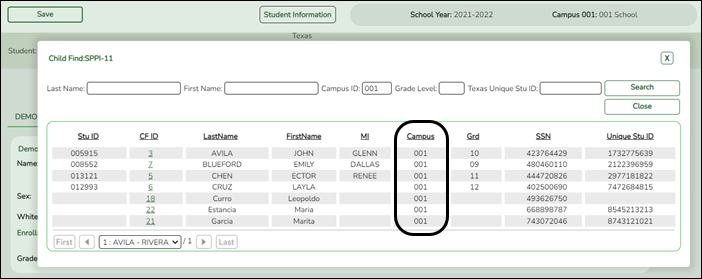
• For an enrolled student, the Campus ID is the enrollment campus. There is a Stu ID associated with the student.
• For a non-enrolled student, the Campus ID is the evaluation campus. There is not a Stu ID associated with the student. These students have a CF ID which will act as a Stu ID for reporting purposes.
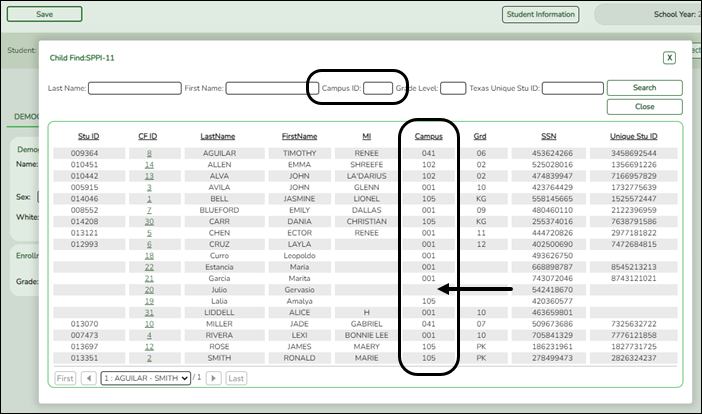
To retrieve students in the Directory who do not have an Evaluation Campus ID assigned on Registration > Maintenance > Core Collections > Child Find: SPPI-11 > Child Find Data:
❏ Clear the Campus ID field, then click Search. All students display.
❏ Click on the student’s CF ID to retrieve the student.
Registration > Maintenance > Core Collections > Child Find: SPPI-11 > Child Find Data
The information on this screen is specific to this tab and is not found anywhere else in ASCENDER.
Update Data
❏ Under Child Find:
Evaluation Campus ID Enter the campus ID on which the student was evaluated.
The Evaluation Campus ID number may or may not be the same as the Campus Enrollment ID.
For example, the student may have been evaluated on Campus 105, but is enrolled at Campus 101.
❏ Under Child Find Initial Evaluation:
Consent to Evaluation Received Date Enter the month, day, and year of the first instructional day following the date on which the Local Education Agency (LEA) received written consent for the full individual and initial evaluation (FIIE) from the student's parent.
Initial Evaluation Date Enter the date the child was initially evaluated for the program.
This date must not be before the Consent to Evaluation Received Date.
❏ Click Save.
❏ Under Child Find Eligibility Determination:
Eligibility Determination (ED) Date If applicable, enter the date the child was determined eligible for the program.
IMPORTANT: If this date is left blank, the student will not be extracted to the interchanges.SpEd Srvc Eligible/Enrolled Select if a student is eligible for, and enrolled in Special Education services after the Eligibility Determination Date.
❏ Under Evaluation Delay:
Evaluation Delay Reason If applicable, choose a reason for the evaluation delay. Leave blank if there is no delay in evaluation.
❏ Under Eligibility Delay Reason:
Eligibility Delay Reason If applicable, choose a reason for the eligibility delay. Leave blank if there is no delay in eligibility.
❏ Click Save.


- Child Find: SPPI-12 - Scenario 3: Enrolled Students, ages 0 and up to, but not including, 3.
Registration > Maintenance > Student Enrollment > Demo1
Child Find: SPPI-12 reports Enrolled students who are less than 3 years old as of September 1st.
Update data:
❏ Retrieve a student who is already enrolled at the campus using their Local Student ID, Student Name, or Texas Unique Student ID.
❏ Select the Child Find: SPPI-12 checkbox in the Student Indicators section.
❏ Click Save.
Registration > Maintenance > Core Collections > Child Find: SPPI-12 > Demographics/Enrollment
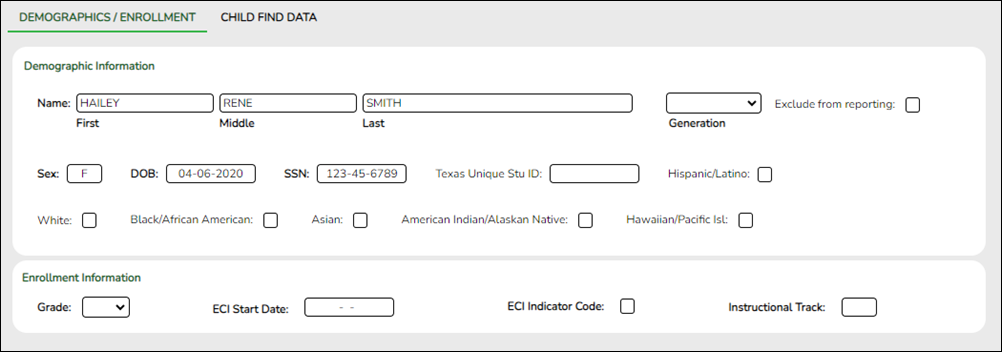
Most information retrieved on this tab for an enrolled student is read-only and cannot be modified. Information can only be edited on Registration > Maintenance > Demo1.
However, enrolled students are able to edit the ECI Start Date and ECI Indicator Code.
Retrieve a Student:
Click Directory to select a student from the directory.
❏ Under Demographic Enrollment and Enrollment Information:
Most information retrieved on this tab is for an enrolled student and is read-only and cannot be modified. Information can only be edited on Registration > Maintenance > Demo1.
NOTE: The Grade and Instructional Track fields will auto-populate with information from Registration > Maintenance > Student Enrollment > Demo1.
The ECI Start Date and ECI Indicator Code fields will auto-populate with information from Registration > Maintenance > Student Enrollment > SpecEd if a student has an active ECI record.
Enrolled students are able to edit the ECI Start Date and ECI Indicator Code.
Registration > Maintenance > Core Collections > Child Find: SPPI-12 > Child Find Data
The information on this screen is specific to this tab and is not found anywhere else in ASCENDER.
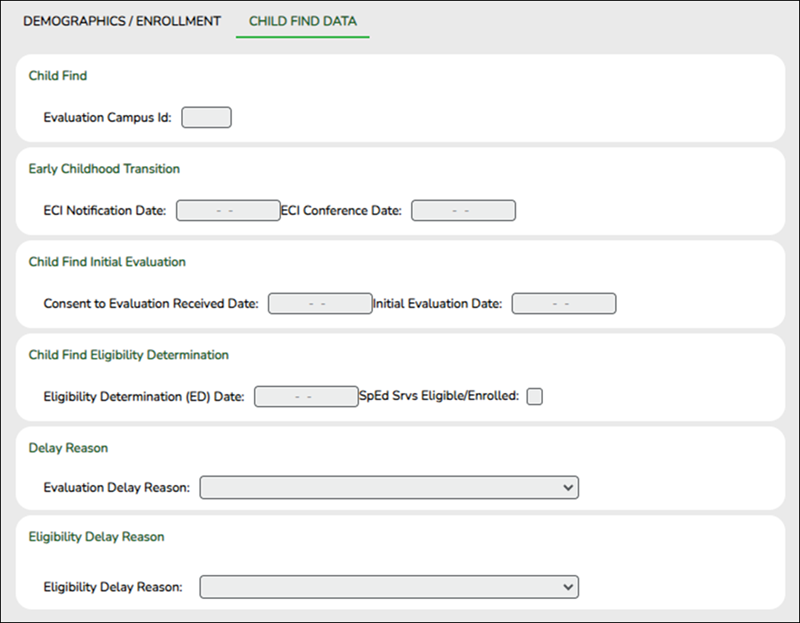
Update data:
❏ Under Child Find:
Evaluation Campus ID Enter the campus ID on which the student was evaluated.
The Evaluation Campus ID number may or may not be the same as the Campus Enrollment ID.
For example, the student may have been evaluated on Campus 105, but is enrolled at Campus 101.
❏ Under Early Childhood Transition:
ECI Notification Date Enter the notification date
TWEDS Data Element: TransitionNotificationDate (E1712) indicates the month, day, and year the LEA Notification of Potentially Eligible for Special Education Services was sent by the early childhood intervention (ECI) contractor to the local education agency (LEA) to notify them that a child enrolled in ECI will shortly reach the age of eligibility for Part B services and the child is potentially eligible for services under Part B, early childhood special education (ECSE). The LEA Notification constitutes a referral to the LEA for an initial evaluation and eligibility determination of the child which the parent may opt out from the referral.ECI Conference Date Enter the conference date.
TWEDS Data Element: TransitionConferenceDate (E1713) ndicates the month, day, and year when the transition conference was held (for a child receiving early childhood intervention (ECI) services) among the lead agency, the family, and the LEA where the child resides to discuss the child’s potential eligibility for early childhood special education (ECSE) services.
❏ Under Child Find Initial Evaluation:
Consent to Evaluation Received Date Enter the month, day, and year of the first instructional day following the date on which the Local Education Agency (LEA) received written consent for the full individual and initial evaluation (FIIE) from the student's parent.
Initial Evaluation Date Enter the date the child was initially evaluated for the program.
This date must not be before the Consent to Evaluation Received Date.
❏ Click Save.
❏ Under Child Find Eligibility Determination:
Eligibility Determination (ED) Date If applicable, enter the date the child was determined eligible for the program.
IMPORTANT: If this date is left blank, the student will not be extracted to the interchanges.SpEd Srvc Eligible/Enrolled Select if a student is eligible for, and enrolled in Special Education services after the Eligibility Determination Date.
❏ Under Delay Reason:
Evaluation Delay Reason If applicable, choose a reason for the evaluation delay. Leave blank if there is no delay in evaluation.
❏ Under Eligibility Delay Reason:
Eligibility Delay Reason If applicable, choose a reason for the eligibility delay. Leave blank if there is no delay in eligibility.
❏ Click Save.
If a student will not be reported, return to the Demo1 tab, uncheck the Child Find: SPPI-12 indicator and click Save. The student's information will be retained in ASCENDER but will not be reported.


- Child Find: SPPI-12 - Scenario 4: Non-Enrolled Students, ages 0 and up to, but not including, 3.
Registration > Maintenance > Core Collections > Child Find: SPPI-12 > Demographics/Enrollment
Information on this tab must be manually added by the district.
Instructional Track is not enabled or applicable for non-enrolled students.
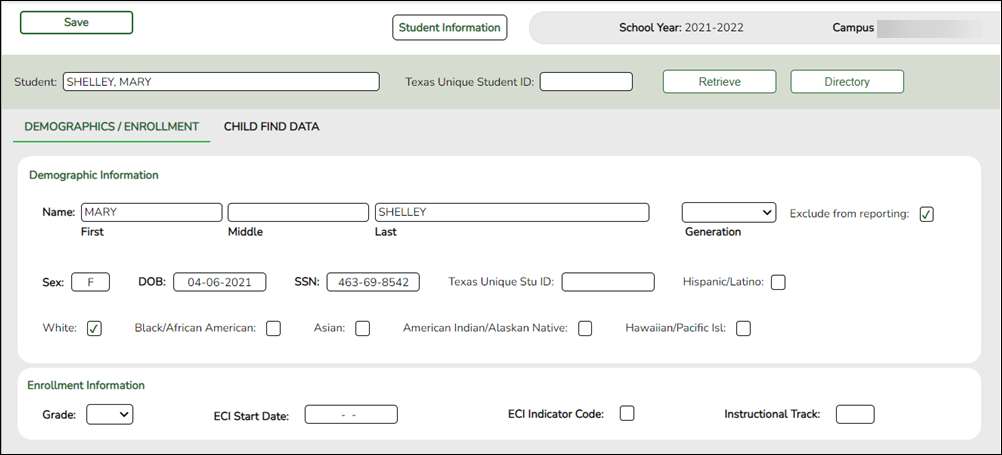
Update data:
❏ Under Demographic Information:
Name Type the student's first, middle, and last name. Select a generation code if applicable. Exclude from reporting Select to exclude a non-enrolled student from reporting. Sex Select the student's gender. DOB Type the student's date of birth (MM-DD-YYYY). SSN Type the student’s nine-digit social security number. Texas Unique Stu ID If available, type the student's ten-digit unique student ID. This ID is assigned to students by TEA and issued to schools by the TSDS TX Unique ID Application. This ID cannot be generated by an LEA and cannot begin with zero.
This number can be added after it is received by TEA.Hispanic/Latino Select if the student is of Cuban, Mexican, Puerto Rican, South or Central American, or other Spanish culture or origin, regardless of race. Race One or more of the following options is selected, regardless of whether the student is Hispanic/Latino.
White The field is selected if the student has origins in any of the original peoples of Europe, the Middle East, or North Africa.
Black/African American The field is selected if the student has origins in any of the black racial groups of Africa.
Asian The field is selected if the student has origins in any of the original peoples of the Far East, Southeast Asia, or the Indian subcontinent (including Cambodia, China, India, Japan, Korea, Malaysia, Pakistan, the Philippine Islands, Thailand, and Vietnam).
American Indian/Alaskan Native The field is selected if the student has origins in any of the original peoples of North and South America (including Central America).
Hawaiian/Pacific Isl The field is selected if the student has origins in any of the original peoples of Hawaii, Guam, Samoa, or other Pacific Islands.
❏ Click Save.
❏ Under Enrollment Information:
Grade For student's who do not have a Texas Unique Stu ID, select the grade as if the student were enrolled. Leave blank for the 2022 school year. ECI Start Date Enter the date the intervention takes effect.
The date must be before the student's third birthday.ECI Indicator Code Select if the student participates in the Early Childhood Intervention (ECI) program.
TWEDS Descriptor Table: SPEDProgramSvc (C341)
Ensure Notification Date and ECI Conference Date are first saved on Child Find Data.Instructional Track Disabled for non-enrolled students.
❏ Click Save.
Using the Directory to retrieve a non-enrolled student
In this scenario Campus has two purposes:
• For an enrolled student, the Campus ID is the enrollment campus. There is a Stu ID associated with the student.
• For a non-enrolled student, the Campus ID is the evaluation campus. There is not a Stu ID associated with the student. These students have a CF ID which will act as a Stu ID for reporting purposes.
To retrieve students in the Directory who do not have an Evaluation Campus ID assigned on Registration > Maintenance > Core Collections > Child Find: SPPI-12 > Child Find Data:
❏ Clear the Campus ID field, then click Search. All students display.
❏ Click on the student’s CF ID to retrieve the student.
Registration > Maintenance > Core Collections > Child Find: SPPI-12 > Child Find Data
The information on this screen is specific to this tab and is not found anywhere else in ASCENDER.
Update data:
❏ Under Child Find:
Evaluation Campus ID Enter the campus ID on which the student was evaluated.
The Evaluation Campus ID number may or may not be the same as the Campus Enrollment ID.
For example, the student may have been evaluated on Campus 105, but is enrolled at Campus 101.
❏ Under Early Childhood Transition:
ECI Notification Date Enter the notification date
TWEDS Data Element: TransitionNotificationDate (E1712) indicates the month, day, and year the LEA Notification of Potentially Eligible for Special Education Services was sent by the early childhood intervention (ECI) contractor to the local education agency (LEA) to notify them that a child enrolled in ECI will shortly reach the age of eligibility for Part B services and the child is potentially eligible for services under Part B, early childhood special education (ECSE). The LEA Notification constitutes a referral to the LEA for an initial evaluation and eligibility determination of the child which the parent may opt out from the referral.ECI Conference Date Enter the conference date.
TWEDS Data Element: TransitionConferenceDate (E1713) ndicates the month, day, and year when the transition conference was held (for a child receiving early childhood intervention (ECI) services) among the lead agency, the family, and the LEA where the child resides to discuss the child’s potential eligibility for early childhood special education (ECSE) services.
❏ Under Child Find Initial Evaluation:
Consent to Evaluation Received Date Enter the month, day, and year of the first instructional day following the date on which the Local Education Agency (LEA) received written consent for the full individual and initial evaluation (FIIE) from the student's parent.
Initial Evaluation Date Enter the date the child was initially evaluated for the program.
This date must not be before the Consent to Evaluation Received Date.
❏ Click Save.
❏ Under Child Find Eligibility Determination:
Eligibility Determination (ED) Date If applicable, enter the date the child was determined eligible for the program.
IMPORTANT: If this date is left blank, the student will not be extracted to the interchanges.SpEd Srvc Eligible/Enrolled Select if a student is eligible for, and enrolled in Special Education services after the Eligibility Determination Date.
❏ Under Delay Reason:
Evaluation Delay Reason If applicable, choose a reason for the evaluation delay. Leave blank if there is no delay in evaluation.
❏ Under Eligibility Delay Reason:
Eligibility Delay Reason If applicable, choose a reason for the eligibility delay. Leave blank if there is no delay in eligibility.
❏ Click Save.
If a student will not be reported, return to the Demo1 tab, uncheck the Child Find: SPPI-12 indicator and click Save. The student's information will be retained in ASCENDER but will not be reported.

Reports
Registration > Reports > Registration Reports > Student > SRG5010 – Child Find SPPI-11 Student Roster Report
Use the SRG5010 - Child Find SPPI-11 Student Roster Report to verify SPPI-11 student data.

Students without an Evaluation Campus ID will display on the first page of the report followed by listings for each evaluating campus.

Registration > Reports > Registration Reports > Student > SRG5020 – Child Find SPPI-12 Student Roster Report
Use the SRG5020 - Child Find SPPI-12 Student Roster Report to verify SPPI-12 student data.
This report displays one listing per student for every ECI record on Spec Ed. For example, if a student has three ECI records, they will appear in the report three times, one time for each ECI record.

Students without an Evaluation Campus ID will display on the first page of the report followed by listings for each evaluating campus.

Special Education
- Early Childhood Outcomes (SPPI-7)
Special Education > Maintenance > Student Sp Ed Data > SPEDS > ECSE
Early Childhood Outcomes (SPPI-7) measures the demonstrated improvement for preschool children aged three through five with Individualized Education Programs (IEPs) in the following areas:
- Positive social-emotional skills (including social relationships).
- Acquisition and use of knowledge and skills (including early language/communication and early literacy); and
- Use of appropriate behaviors to meet their needs.
Local education agencies (LEAs) utilize the Childhood Outcomes Summary (COS) Process to document children's progress in the three outcomes. LEAs report these outcomes using a specific rating category on a seven-point scale at entry and exit of all students aged three through five (not in kindergarten) who receive early childhood special education (ECSE) services for six months or more during the school year.
NOTE: There are no system restrictions on this screen. Users are able to add information, however once data is sent, users may receive a fatal error since the student does not meet the criteria for that indicator.
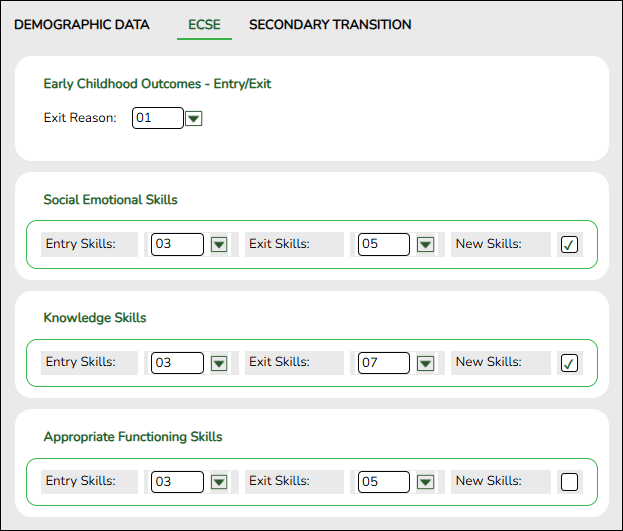
View data:
❏ To retrieve a student's records, select the student in one of the following ways:
Student Begin typing the student ID (with leading zeros) or last name. As you begin typing, a drop-down list displays students whose ID or last name begins with the numbers or characters you have typed. The drop-down list displays the students' full name and grade level. From the drop-down list you can select the student.
The student can also be located by typing the name in one of the following formats:
• Last name, comma, first name (smith, john)
• Last name initial, comma, first name initial (s,j)
• Comma, first name (,j)Texas Unique Stu ID Type all or part of the student's Texas Unique Student ID to retrieve students whose ID begins with the characters you typed.
If the student does not have a Unique ID, click TSDS Unique ID button to connect to the TSDS Unique ID Web Service and obtain an ID. Your LEA must have the appropriate credentials through Texas Education Agency Login (TEAL) before this functionality can be used.Review the Assign a TSDS Unique ID guide for additional information.
Directory Click to select a student from the Directory.
(photo) If a photo exists for the student, the student photo is displayed.
From Registration > Maintenance > Student Enrollment, you can change the student photo:
1. Hover over the image, and click Change. The Change Student Photo window opens.
2. Click Choose File. Locate and open the file for the new image.
3. Click Save. The window closes, and the new image is displayed.
Photos are not displayed in all applications. They are displayed in Attendance (Inquiry), Discipline, Grade Reporting, Graduation Plan, Health, Registration, and Scheduling. They are not displayed in Special Ed or Test Scores.
Early Childhood Outcomes - Entry/Exit:
Exit Reason Select the reason the student is no longer in the program. Social Emotional Skills:
Entry Skills Select the student's skill level at Entry.
Exit Skills Select the student's skill level at Exit.
New Skills Select if the student has acquired new skills.
Knowledge Skills:
Entry Skills Select the student's skill level at Entry.
Exit Skills Select the student's skill level at Exit.
New Skills Select if the student has acquired new skills.
Appropriate Functioning Skills:
Entry Skills Select the student's skill level at Entry.
Exit Skills Select the student's skill level at Exit.
New Skills Select if the student has acquired new skills.
❏ Click Save.
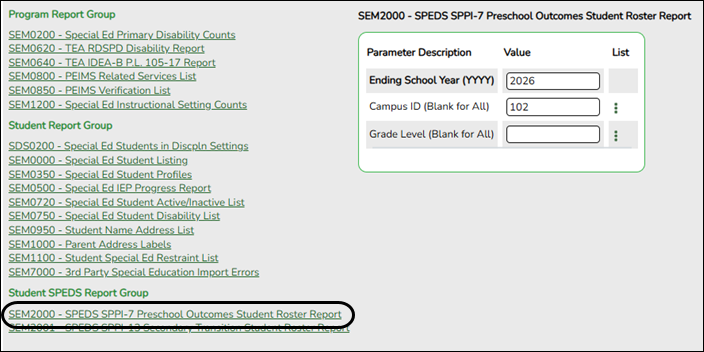
Report
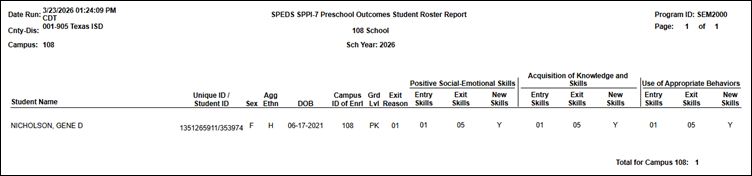
Use the SEM2000 - SPEDS SPPI-7 Preschool Outcomes Student Roster Report to verify SPPI-7 student data.


- Timely Initial Evaluation (SPPI-11)
Timely Initial Evaluation (SPPI-11) refers to compliance with the state-established timeframes (19 TAC §89.1011) for evaluating children, ages 3-21, for special education under Part B of the Individuals with Disabilities Education Act (IDEA).
LEAs will submit student-level data for children who had an eligibility determination (ED) date during the annual data collection period which occurs from July 1 to June 30.
SPPI-11 (Timely Initial Evaluation) is a compliance indicator used for meeting federal public reporting requirements for the State Performance Plan/Annual Performance Report (SPP/APR). It is also part of the federally required elements (FREs) used along with the results-driven accountability indicators for making annual LEA special education determinations (34 CFR §300.600(a)(2)).- Timely Initial Evaluation (SPPI-11) - Scenario 1: Enrolled Students, ages 3-21
Registration > Maintenance > Student Enrollment > Demo1
Update data:
❏ Retrieve a student who is already enrolled at the campus using their Local Student ID, Student Name, or Texas Unique Student ID.
❏ Select the Child Find: SPPI-11 checkbox in the Student Indicators section.
❏ Click Save.
Registration > Maintenance > Core Collections > Child Find: SPPI-11 > Demographics/Enrollment
Information retrieved on this tab for an enrolled student is read-only and cannot be modified. Information can only be edited on Registration > Maintenance > Demo1.
Exclude from reporting is not used with enrolled students and is disabled on this screen.
Evaluation Delay Days is a calculation derived from the number of absences between the Consent to Evaluation Received Date and the Initial Evaluation Date found on Child Find Data and counts only those absences in an Average Daily Attendance (ADA) period. If those dates have not been entered, the field will show 0. This number is used by TEA to determine if the district is in compliance.
Retrieve a Student:
NOTE: The Student field does not auto-complete at this time.
❏ Type the exact Student ID or the exact Texas Unique Student ID.
❏ Click Retrieve.
OR
❏ Click Directory to select a student from the directory.
The Directory screen will display students that have been marked with the Child Find: SPPI-11 indicator on Maintenance > Student Enrollment > Demo1.
NOTE:
• The CF ID is the ID auto-generated.
• The Campus ID field auto-populates with the campus number on which the user is logged in.
• The Campus number identifies the student’s campus of enrollment.
❏ Click the student’s CF ID to Retrieve.
Update data:
❏ Under Enrollment Information:
Grade For student's who do not have a Texas Unique Stu ID, select the grade as if the student were enrolled. Leave blank for the 2022 school year. Instructional Track Disabled for non-enrolled students. In-District Evaluation Delay Days Disabled for non-enrolled students.
TWEDS Data Element: EvaluationDelayDays (E1711) indicates the number of student absences, if any, beginning the first instructional day following the date on which the Local Education Agency (LEA) received written parental consent for the full individual and initial evaluation (FIIE) report.
For TSDS extract purposes:
• If the Consent to Evaluation Received Date and Initial Evaluation Date fields are blank, then the Evaluation Delay Days calculation does not occur.
• If the Consent to Evaluation Received Date or Initial Evaluation Date fields are blank, then the Evaluation Delay Days calculation does not occur.
• If the existing Consent to Evaluation Received Date or Initial Evaluation Date fields are updated, then the Evaluation Delay Days calculation does occur.Reporting Evaluation Delay Days Disabled for non-enrolled students. Override Reporting Evaluation Delay Days Disabled for non-enrolled students.
❏ Click Save.
Registration > Maintenance > Core Collections > Child Find: SPPI-11 > Child Find Data
The information on this screen is specific to this tab and is not found anywhere else in ASCENDER.
Update Data
❏ Under Child Find:
Evaluation Campus ID Enter the campus ID on which the student was evaluated.
The Evaluation Campus ID number may or may not be the same as the Campus Enrollment ID.
For example, the student may have been evaluated on Campus 105, but is enrolled at Campus 101.
❏ Under Child Find Initial Evaluation:
Consent to Evaluation Received Date Enter the month, day, and year of the first instructional day following the date on which the Local Education Agency (LEA) received written consent for the full individual and initial evaluation (FIIE) from the student's parent.
Initial Evaluation Date Enter the date the child was initially evaluated for the program.
This date must not be before the Consent to Evaluation Received Date.
❏ Click Save.
❏ Under Child Find Eligibility Determination:
Eligibility Determination (ED) Date If applicable, enter the date the child was determined eligible for the program.
IMPORTANT: If this date is left blank, the student will not be extracted to the interchanges.SpEd Srvc Eligible/Enrolled Select if a student is eligible for, and enrolled in Special Education services after the Eligibility Determination Date.
❏ Under Evaluation Delay:
Evaluation Delay Reason If applicable, choose a reason for the evaluation delay. Leave blank if there is no delay in evaluation.
❏ Under Eligibility Delay Reason:
Eligibility Delay Reason If applicable, choose a reason for the eligibility delay. Leave blank if there is no delay in eligibility.
❏ Click Save.
If a student will not be reported, return to the Demo1 tab, uncheck the Child Find: SPPI-11 indicator and click Save. The student's information will be retained in ASCENDER but will not be reported.
- Timely Initial Evaluation (SPPI-11) - Scenario 2: Non-Enrolled Students, ages 3-21
Registration > Maintenance > Core Collections > Child Find: SPPI-11 > Demographics/Enrollment
Information on this tab must be manually added by the district.
Instructional Track and Evaluation Delay Days are not enabled or applicable for non-enrolled students.
Update data:
❏ Under Demographic Information:
Name Type the student's first, middle, and last name. Select a generation code if applicable. Exclude from reporting Select to exclude a non-enrolled student from reporting. Sex Select the student's gender. DOB Type the student's date of birth (MM-DD-YYYY). SSN Type the student’s nine-digit social security number. Texas Unique Stu ID If available, type the student's ten-digit unique student ID. This ID is assigned to students by TEA and issued to schools by the TSDS TX Unique ID Application. This ID cannot be generated by an LEA and cannot begin with zero.
This number can be added after it is received by TEA.Hispanic/Latino Select if the student is of Cuban, Mexican, Puerto Rican, South or Central American, or other Spanish culture or origin, regardless of race. Race One or more of the following options is selected, regardless of whether the student is Hispanic/Latino.
White The field is selected if the student has origins in any of the original peoples of Europe, the Middle East, or North Africa.
Black/African American The field is selected if the student has origins in any of the black racial groups of Africa.
Asian The field is selected if the student has origins in any of the original peoples of the Far East, Southeast Asia, or the Indian subcontinent (including Cambodia, China, India, Japan, Korea, Malaysia, Pakistan, the Philippine Islands, Thailand, and Vietnam).
American Indian/Alaskan Native The field is selected if the student has origins in any of the original peoples of North and South America (including Central America).
Hawaiian/Pacific Isl The field is selected if the student has origins in any of the original peoples of Hawaii, Guam, Samoa, or other Pacific Islands.
❏ Click Save.
❏ Under Enrollment Information:
Grade For student's who do not have a Texas Unique Stu ID, select the grade as if the student were enrolled. Leave blank for the 2022 school year. Instructional Track Disabled for non-enrolled students. In-District Evaluation Delay Days Disabled for non-enrolled students.
TWEDS Data Element: EvaluationDelayDays (E1711) indicates the number of student absences, if any, beginning the first instructional day following the date on which the Local Education Agency (LEA) received written parental consent for the full individual and initial evaluation (FIIE) report.
For TSDS extract purposes:
• If the Consent to Evaluation Received Date and Initial Evaluation Date fields are blank, then the Evaluation Delay Days calculation does not occur.
• If the Consent to Evaluation Received Date or Initial Evaluation Date fields are blank, then the Evaluation Delay Days calculation does not occur.
• If the existing Consent to Evaluation Received Date or Initial Evaluation Date fields are updated, then the Evaluation Delay Days calculation does occur.Reporting Evaluation Delay Days Disabled for non-enrolled students. Override Reporting Evaluation Delay Days Disabled for non-enrolled students.
❏ Click Save.
Using the Directory to retrieve a non-enrolled student
In this scenario Campus has two purposes:
• For an enrolled student, the Campus ID is the enrollment campus. There is a Stu ID associated with the student.
• For a non-enrolled student, the Campus ID is the evaluation campus. There is not a Stu ID associated with the student. These students have a CF ID which will act as a Stu ID for reporting purposes.
To retrieve students in the Directory who do not have an Evaluation Campus ID assigned on Registration > Maintenance > Core Collections > Child Find: SPPI-11 > Child Find Data:
❏ Clear the Campus ID field, then click Search. All students display.
❏ Click on the student’s CF ID to retrieve the student.
Registration > Maintenance > Core Collections > Child Find: SPPI-11 > Child Find Data
The information on this screen is specific to this tab and is not found anywhere else in ASCENDER.
Update Data
❏ Under Child Find:
Evaluation Campus ID Enter the campus ID on which the student was evaluated.
The Evaluation Campus ID number may or may not be the same as the Campus Enrollment ID.
For example, the student may have been evaluated on Campus 105, but is enrolled at Campus 101.
❏ Under Child Find Initial Evaluation:
Consent to Evaluation Received Date Enter the month, day, and year of the first instructional day following the date on which the Local Education Agency (LEA) received written consent for the full individual and initial evaluation (FIIE) from the student's parent.
Initial Evaluation Date Enter the date the child was initially evaluated for the program.
This date must not be before the Consent to Evaluation Received Date.
❏ Click Save.
❏ Under Child Find Eligibility Determination:
Eligibility Determination (ED) Date If applicable, enter the date the child was determined eligible for the program.
IMPORTANT: If this date is left blank, the student will not be extracted to the interchanges.SpEd Srvc Eligible/Enrolled Select if a student is eligible for, and enrolled in Special Education services after the Eligibility Determination Date.
❏ Under Evaluation Delay:
Evaluation Delay Reason If applicable, choose a reason for the evaluation delay. Leave blank if there is no delay in evaluation.
❏ Under Eligibility Delay Reason:
Eligibility Delay Reason If applicable, choose a reason for the eligibility delay. Leave blank if there is no delay in eligibility.
❏ Click Save.
Report
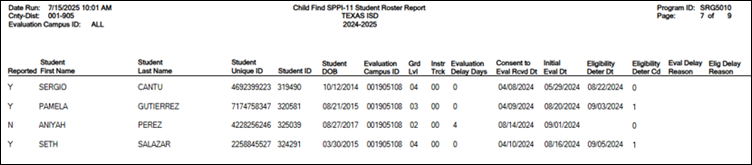
Use the SRG5010 - Child Find SPPI-11 Student Roster Report to verify SPPI-11 student data.
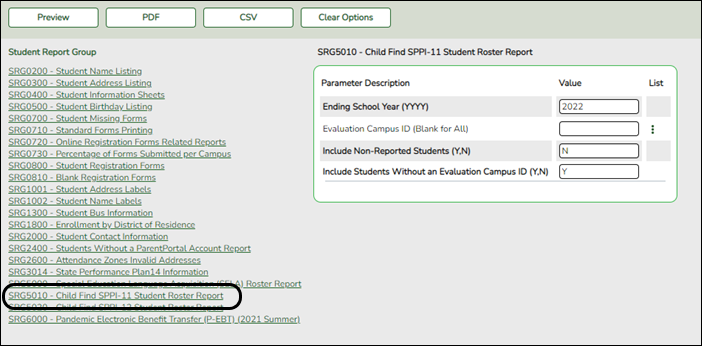
Students without an Evaluation Campus ID will display on the first page of the report followed by listings for each evaluating campus.
- Timely Initial Evaluation (SPPI-12)
Early Childhood Transition (SPPI-12) refers to compliance for children referred from Part C of IDEA before age three, found eligible for Part B, and have an individualized education program (IEP) developed and implemented by their third birthday to receive early childhood special education (ECSE) services.
LEAs will submit student-level data for children who had an eligibility determination (ED) date during the annual data collection period which occurs from July 1 to June 30.
SPPI-12 is a compliance indicator used for meeting federal public reporting requirements for the State Performance Plan/Annual Performance Report (SPP/APR). It is also part of the federally required elements (FREs) used along with the results-driven accountability indicators for making annual LEA special education determinations (34 CFR §300.600(a)(2)).- Child Find: SPPI-12 - Scenario 1: Enrolled Students, ages 0 and up to, but not including, 3.
Registration > Maintenance > Student Enrollment > Demo1
Child Find: SPPI-12 reports Enrolled students who are less than 3 years old as of September 1st.
Update data:
❏ Retrieve a student who is already enrolled at the campus using their Local Student ID, Student Name, or Texas Unique Student ID.
❏ Select the Child Find: SPPI-12 checkbox in the Student Indicators section.
❏ Click Save.
Registration > Maintenance > Core Collections > Child Find: SPPI-12 > Demographics/Enrollment
Most information retrieved on this tab for an enrolled student is read-only and cannot be modified. Information can only be edited on Registration > Maintenance > Demo1.
However, enrolled students are able to edit the ECI Start Date and ECI Indicator Code.
Retrieve a Student:
Click Directory to select a student from the directory.
❏ Under Demographic Enrollment and Enrollment Information:
Most information retrieved on this tab is for an enrolled student and is read-only and cannot be modified. Information can only be edited on Registration > Maintenance > Demo1.
NOTE: The Grade and Instructional Track fields will auto-populate with information from Registration > Maintenance > Student Enrollment > Demo1.
The ECI Start Date and ECI Indicator Code fields will auto-populate with information from Registration > Maintenance > Student Enrollment > SpecEd if a student has an active ECI record.
Enrolled students are able to edit the ECI Start Date and ECI Indicator Code.
Registration > Maintenance > Core Collections > Child Find: SPPI-12 > Child Find Data
The information on this screen is specific to this tab and is not found anywhere else in ASCENDER.
Update data:
❏ Under Child Find:
Evaluation Campus ID Enter the campus ID on which the student was evaluated.
The Evaluation Campus ID number may or may not be the same as the Campus Enrollment ID.
For example, the student may have been evaluated on Campus 105, but is enrolled at Campus 101.
❏ Under Early Childhood Transition:
ECI Notification Date Enter the notification date
TWEDS Data Element: TransitionNotificationDate (E1712) indicates the month, day, and year the LEA Notification of Potentially Eligible for Special Education Services was sent by the early childhood intervention (ECI) contractor to the local education agency (LEA) to notify them that a child enrolled in ECI will shortly reach the age of eligibility for Part B services and the child is potentially eligible for services under Part B, early childhood special education (ECSE). The LEA Notification constitutes a referral to the LEA for an initial evaluation and eligibility determination of the child which the parent may opt out from the referral.ECI Conference Date Enter the conference date.
TWEDS Data Element: TransitionConferenceDate (E1713) ndicates the month, day, and year when the transition conference was held (for a child receiving early childhood intervention (ECI) services) among the lead agency, the family, and the LEA where the child resides to discuss the child’s potential eligibility for early childhood special education (ECSE) services.
❏ Under Child Find Initial Evaluation:
Consent to Evaluation Received Date Enter the month, day, and year of the first instructional day following the date on which the Local Education Agency (LEA) received written consent for the full individual and initial evaluation (FIIE) from the student's parent.
Initial Evaluation Date Enter the date the child was initially evaluated for the program.
This date must not be before the Consent to Evaluation Received Date.
❏ Click Save.
❏ Under Child Find Eligibility Determination:
Eligibility Determination (ED) Date If applicable, enter the date the child was determined eligible for the program.
IMPORTANT: If this date is left blank, the student will not be extracted to the interchanges.SpEd Srvc Eligible/Enrolled Select if a student is eligible for, and enrolled in Special Education services after the Eligibility Determination Date.
❏ Under Delay Reason:
Evaluation Delay Reason If applicable, choose a reason for the evaluation delay. Leave blank if there is no delay in evaluation.
❏ Under Eligibility Delay Reason:
Eligibility Delay Reason If applicable, choose a reason for the eligibility delay. Leave blank if there is no delay in eligibility.
❏ Click Save.
If a student will not be reported, return to the Demo1 tab, uncheck the Child Find: SPPI-12 indicator and click Save. The student's information will be retained in ASCENDER but will not be reported.
- Child Find: SPPI-12 - Scenario 2: Non-Enrolled Students, ages 0 and up to, but not including, 3.
Registration > Maintenance > Core Collections > Child Find: SPPI-12 > Demographics/Enrollment
Information on this tab must be manually added by the district.
Instructional Track is not enabled or applicable for non-enrolled students.
Update data:
❏ Under Demographic Information:
Name Type the student's first, middle, and last name. Select a generation code if applicable. Exclude from reporting Select to exclude a non-enrolled student from reporting. Sex Select the student's gender. DOB Type the student's date of birth (MM-DD-YYYY). SSN Type the student’s nine-digit social security number. Texas Unique Stu ID If available, type the student's ten-digit unique student ID. This ID is assigned to students by TEA and issued to schools by the TSDS TX Unique ID Application. This ID cannot be generated by an LEA and cannot begin with zero.
This number can be added after it is received by TEA.Hispanic/Latino Select if the student is of Cuban, Mexican, Puerto Rican, South or Central American, or other Spanish culture or origin, regardless of race. Race One or more of the following options is selected, regardless of whether the student is Hispanic/Latino.
White The field is selected if the student has origins in any of the original peoples of Europe, the Middle East, or North Africa.
Black/African American The field is selected if the student has origins in any of the black racial groups of Africa.
Asian The field is selected if the student has origins in any of the original peoples of the Far East, Southeast Asia, or the Indian subcontinent (including Cambodia, China, India, Japan, Korea, Malaysia, Pakistan, the Philippine Islands, Thailand, and Vietnam).
American Indian/Alaskan Native The field is selected if the student has origins in any of the original peoples of North and South America (including Central America).
Hawaiian/Pacific Isl The field is selected if the student has origins in any of the original peoples of Hawaii, Guam, Samoa, or other Pacific Islands.
❏ Click Save.
❏ Under Enrollment Information:
Grade For student's who do not have a Texas Unique Stu ID, select the grade as if the student were enrolled. Leave blank for the 2022 school year. ECI Start Date Enter the date the intervention takes effect.
The date must be before the student's third birthday.ECI Indicator Code Select if the student participates in the Early Childhood Intervention (ECI) program.
TWEDS Descriptor Table: SPEDProgramSvc (C341)
Ensure Notification Date and ECI Conference Date are first saved on Child Find Data.Instructional Track Disabled for non-enrolled students.
❏ Click Save.
Using the Directory to retrieve a non-enrolled student
In this scenario Campus has two purposes:
• For an enrolled student, the Campus ID is the enrollment campus. There is a Stu ID associated with the student.
• For a non-enrolled student, the Campus ID is the evaluation campus. There is not a Stu ID associated with the student. These students have a CF ID which will act as a Stu ID for reporting purposes.
To retrieve students in the Directory who do not have an Evaluation Campus ID assigned on Registration > Maintenance > Core Collections > Child Find: SPPI-12 > Child Find Data:
❏ Clear the Campus ID field, then click Search. All students display.
❏ Click on the student’s CF ID to retrieve the student.
Registration > Maintenance > Core Collections > Child Find: SPPI-12 > Child Find Data
The information on this screen is specific to this tab and is not found anywhere else in ASCENDER.
Update data:
❏ Under Child Find:
Evaluation Campus ID Enter the campus ID on which the student was evaluated.
The Evaluation Campus ID number may or may not be the same as the Campus Enrollment ID.
For example, the student may have been evaluated on Campus 105, but is enrolled at Campus 101.
❏ Under Early Childhood Transition:
ECI Notification Date Enter the notification date
TWEDS Data Element: TransitionNotificationDate (E1712) indicates the month, day, and year the LEA Notification of Potentially Eligible for Special Education Services was sent by the early childhood intervention (ECI) contractor to the local education agency (LEA) to notify them that a child enrolled in ECI will shortly reach the age of eligibility for Part B services and the child is potentially eligible for services under Part B, early childhood special education (ECSE). The LEA Notification constitutes a referral to the LEA for an initial evaluation and eligibility determination of the child which the parent may opt out from the referral.ECI Conference Date Enter the conference date.
TWEDS Data Element: TransitionConferenceDate (E1713) ndicates the month, day, and year when the transition conference was held (for a child receiving early childhood intervention (ECI) services) among the lead agency, the family, and the LEA where the child resides to discuss the child’s potential eligibility for early childhood special education (ECSE) services.
❏ Under Child Find Initial Evaluation:
Consent to Evaluation Received Date Enter the month, day, and year of the first instructional day following the date on which the Local Education Agency (LEA) received written consent for the full individual and initial evaluation (FIIE) from the student's parent.
Initial Evaluation Date Enter the date the child was initially evaluated for the program.
This date must not be before the Consent to Evaluation Received Date.
❏ Click Save.
❏ Under Child Find Eligibility Determination:
Eligibility Determination (ED) Date If applicable, enter the date the child was determined eligible for the program.
IMPORTANT: If this date is left blank, the student will not be extracted to the interchanges.SpEd Srvc Eligible/Enrolled Select if a student is eligible for, and enrolled in Special Education services after the Eligibility Determination Date.
❏ Under Delay Reason:
Evaluation Delay Reason If applicable, choose a reason for the evaluation delay. Leave blank if there is no delay in evaluation.
❏ Under Eligibility Delay Reason:
Eligibility Delay Reason If applicable, choose a reason for the eligibility delay. Leave blank if there is no delay in eligibility.
❏ Click Save.
If a student will not be reported, return to the Demo1 tab, uncheck the Child Find: SPPI-12 indicator and click Save. The student's information will be retained in ASCENDER but will not be reported.
Report
Use the SRG5020 - Child Find SPPI-12 Student Roster Report to verify SPPI-12 student data.
This report displays one listing per student for every ECI record on Spec Ed. For example, if a student has three ECI records, they will appear in the report three times, one time for each ECI record.
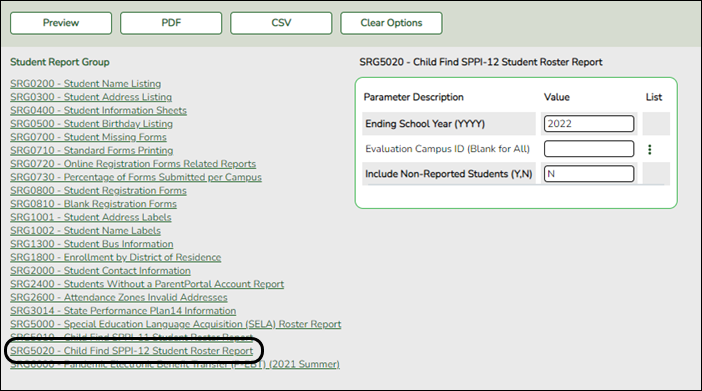
Students without an Evaluation Campus ID will display on the first page of the report followed by listings for each evaluating campus.

- Secondary Transition (SPPI-13)
Special Education > Maintenance > Student Sp Ed Data > SPEDS > Secondary Transition
Secondary Transition (SPPI-13) measures the percentage of youth with IEPs aged 16 up to age 21 with an IEP that includes:
- Appropriate measurable postsecondary goals that are annually updated and based upon an age-appropriate transition assessment;
- Transition services, including courses of study, that will reasonably enable the student to meet those postsecondary goals and
- Annual IEP goals related to the student's transition service needs.
Additionally, there must be documented evidence that the student was invited to the admission, review, and dismissal (ARD) committee meeting where transition services are to be discussed and evidence that, if appropriate, a representative of any participating agency that is likely to be responsible for providing or paying for transition services was invited to the ARD meeting with the prior consent of the parent or student who has reached the age of majority.
NOTE: There are no system restrictions on this screen. Users are able to add information, however once data is sent, users may receive a fatal error since the student does not meet the criteria for that indicator.
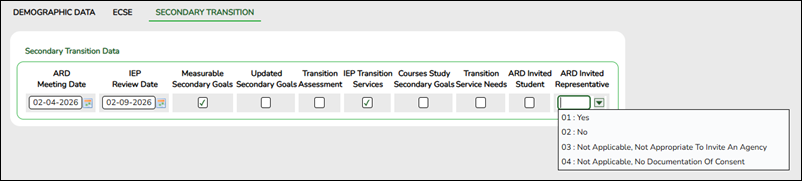
View data:
❏ To retrieve a student's records, select the student in one of the following ways:
Student Begin typing the student ID (with leading zeros) or last name. As you begin typing, a drop-down list displays students whose ID or last name begins with the numbers or characters you have typed. The drop-down list displays the students' full name and grade level. From the drop-down list you can select the student.
The student can also be located by typing the name in one of the following formats:
• Last name, comma, first name (smith, john)
• Last name initial, comma, first name initial (s,j)
• Comma, first name (,j)Texas Unique Stu ID Type all or part of the student's Texas Unique Student ID to retrieve students whose ID begins with the characters you typed.
If the student does not have a Unique ID, click TSDS Unique ID button to connect to the TSDS Unique ID Web Service and obtain an ID. Your LEA must have the appropriate credentials through Texas Education Agency Login (TEAL) before this functionality can be used.Review the Assign a TSDS Unique ID guide for additional information.
Directory Click to select a student from the Directory.
(photo) If a photo exists for the student, the student photo is displayed.
From Registration > Maintenance > Student Enrollment, you can change the student photo:
1. Hover over the image, and click Change. The Change Student Photo window opens.
2. Click Choose File. Locate and open the file for the new image.
3. Click Save. The window closes, and the new image is displayed.
Photos are not displayed in all applications. They are displayed in Attendance (Inquiry), Discipline, Grade Reporting, Graduation Plan, Health, Registration, and Scheduling. They are not displayed in Special Ed or Test Scores.
Secondary Transition Data:
ARD Meeting Date Enter the date of the most recent date the admission, review, and dismissal (ARD) committee met to update a student’s individualized education program (IEP). Use the MMDDYYYY format. Or, click
 to select the date from a calendar.
IEP Review Date Enter the date the Local Education Agency (LEA) reviewed the student's individualized education program (IEP) folder for documentation of the SPPI-13 indicator requirements. Use the MMDDYYYY format. Or, click
to select the date from a calendar.
Measurable Secondary Goals Select whether or not there were appropriate measurable postsecondary goals in the areas of training, education, employment, and, where appropriate, independent living skills in a student’s IEP.
Updated Secondary Goals Select whether or not the postsecondary goals set in the IEP were updated annually.
Transition Assessment Select whether or not there is evidence that the measurable postsecondary goals were based on age-appropriate transition assessments.
IEP Transition Services Select whether or not the student's IEP includes transition services that will reasonably enable the student to meet their postsecondary goals.
Courses Study Secondary Goals Select whether or not the transition services included courses of study that will reasonably enable the student to meet their postsecondary goals.
Transition Service Needs Select whether or not there is/are annual IEP goals related to the student’s transition service needs.
ARD Invited Student Select whether or not there is documented evidence the student was invited to the Admission, Review, and Dismissal (ARD) Committee meeting where transition services were discussed.
ARD Invited Representative Indicate whether or not there is evidence that a representative of any participating agency was invited to the Admission, Review, and Dismissal (ARD) Committee meeting with the prior consent of the parent or student who has reached age of majority.
❏ Click Save.
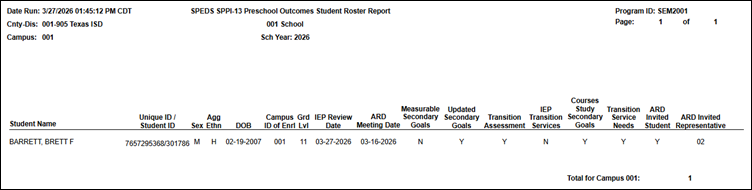
Report
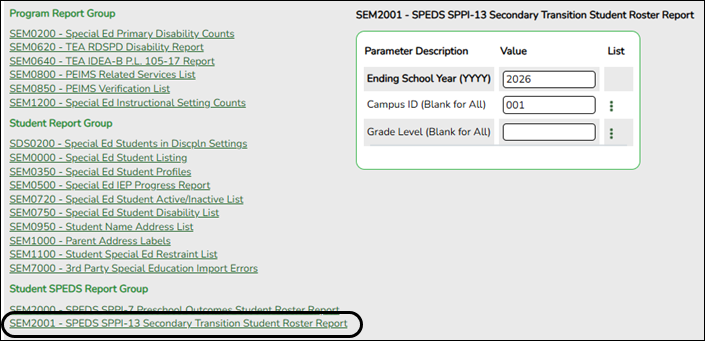
Use the SEM2001 - SPEDS SPPI-13 Secondary Transition Student Roster Report to verify SPPI-13 student data.


For a complete list of submission rules and edits, access the TSDS Web-Enabled Data Standards (TWEDS) website. In the top-right corner, select the appropriate School Year (20XX), Collection (XXXX), and Submission (XXX) and click Open.
Once on the TWEDS website, in the Overview tab, you can review Collections, Timelines (DUE DATES), and Data Submission Responsibilities. It is highly important to ensure that you review all of these details as they may change according to the School Year.
Additionally, you can use the other tabs on the TWEDS website to review Data Components, Descriptor Tables, References, Rules, Change Logs, and Early Notices.
academy/child_find_speds.1772210364.txt.gz · Last modified: 2026/02/27 16:39 by apape
Except where otherwise noted, content on this wiki is licensed under the following license: CC Attribution-Share Alike 4.0 International
Americans with Disabilities Act (ADA) and Web Accessibility
The Texas Computer Cooperative (TCC) is committed to making its websites accessible to all users. It is TCC policy to ensure that new and updated content complies with Web Content Accessibility Guidelines (WCAG) 2.0 Level AA. We welcome comments and suggestions to improve the accessibility of our websites. If the format of any material on our website interferes with your ability to access the information, use this form to leave a comment about the accessibility of our website.