
Sidebar
academy:summer_submission
Book Creator
Add this page to your book
Add this page to your book
Book Creator
Remove this page from your book
Remove this page from your book
PEIMS Summer Submission

The ASCENDER District Administration application provides programs to extract the appropriate data for each collection from the Business and Student systems. These programs are reviewed and modified annually, per the published Texas Web-Enabled Data Standards (TWEDS), to ensure that the data extracted to the district database is as accurate as possible. The extracts provide many of the edits as defined in the TWEDS.
The PEIMS Summer Collection (Collection 3) includes yearlong student attendance (regular and flexible), including the required calendar minutes reporting, as well as program data, course completions, disciplinary actions, student restraints, Title I Part A participation, and Foundation High School Program participation data.
The extract programs create the appropriate records in the district database, taking into account the school-start window and the as-of date. The as-of status code is automatically generated for each student record.
The Summer submission is due June 18, 2026.
IMPORTANT: Some of the images and/or examples provided in this document are for informational purposes only and may not completely represent your LEA’s (School System) process.
For a complete list of submission rules and edits, access the TSDS Web-Enabled Data Standards (TWEDS) website. In the top-right corner, select the appropriate School Year (20XX), Collection (XXXX), and Submission (XXX) and click Open.
Once on the TWEDS website, in the Overview tab, you can review Collections, Timelines (DUE DATES), and Data Submission Responsibilities. It is highly important to ensure that you review all of these details as they may change according to the School Year.
Additionally, you can use the other tabs on the TWEDS website to review Data Components, Descriptor Tables, References, Rules, Change Logs, and Early Notices.
Prerequisites
Prerequisites
Before starting the verification process, ensure the following tasks have been completed within the respective applications:
Security Administration
- Verify all roles and users are correct.
Grade Reporting
- Set all Section Information fields on Grade Reporting > Maintenance > Master Schedule > Campus Schedule > Section
Verify ASCENDER Student Data
For Submission 3, report students in membership within a Local Education Agency (LEA), receiving at least two hours of service per day, and may be served solely by a public school, by both a public and nonpublic school, or placed in specialized settings like special education nonpublic day schools or residential placements.
It also includes special education students who are enrolled but not in membership, particularly those who have experienced a restraint or discipline event.
Additionally, students who are enrolled but not in membership due to virtual learning, those participating in the Texas Virtual School Network (TxVSN), or those involved in University Interscholastic League (UIL) activities despite not being enrolled in the district, are also reported.
These students may be in unique educational situations, such as receiving services through individualized plans or being reported with a StudentResidentialFacilityAssociation common type.
Verify data for each element in the following ASCENDER Student applications. It is suggested that you run reports first, and then use the maintenance pages in the Student applications to update data where needed.
Calculated Elements
Hard-coded and calculated elements
The following elements are either hard-coded in or calculated by the software. Hard coded values are built into the program, are the same each time they are extracted, and cannot be changed by the user. Calculated values are determined by the program and can be changed if source data is updated or changed.
| Element | Data Element |
|---|---|
| E0923 | LocalStudentId |
| E3006 | AsOfStatusLastDayEnrollment |
| E0937 | TotalEligibleDaysPresent |
Attendance
- Preliminary Steps
Attendance > Maintenance > District > Posting Codes
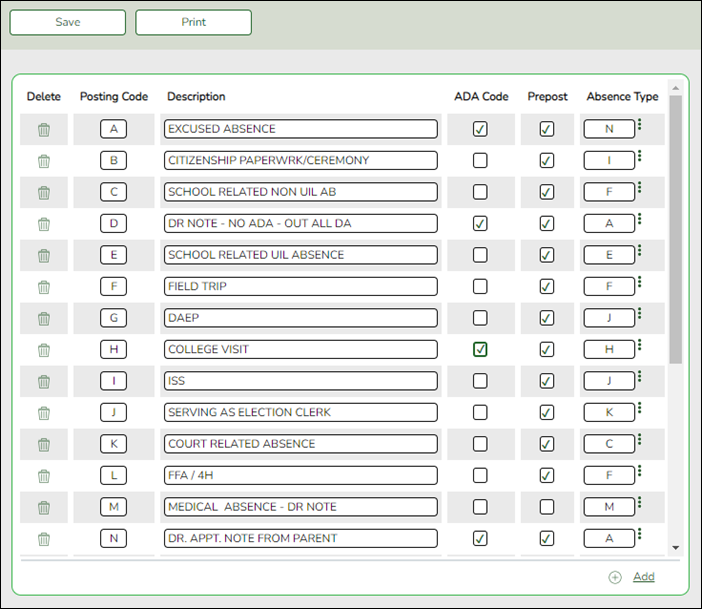
❏ Verify all district posting codes, paying close attention to those that have ADA Code selected.
- Attendance Reports
Attendance > Reports > Attendance Reports > Audit > SAT0500 - Campus Attendance Summary
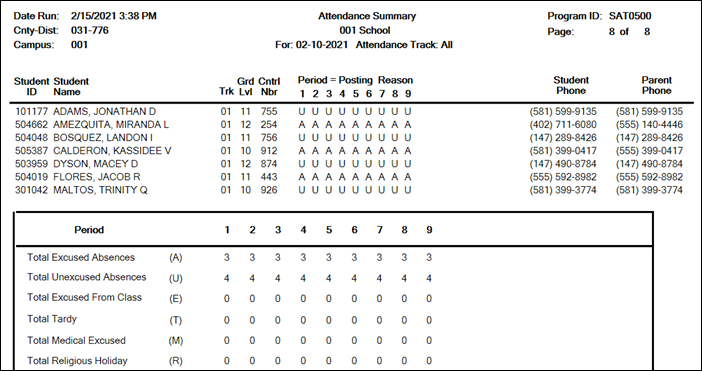
SAT0500 provides absence information by campus, track, and period. You can use the report to verify attendance for each day, period, and code.
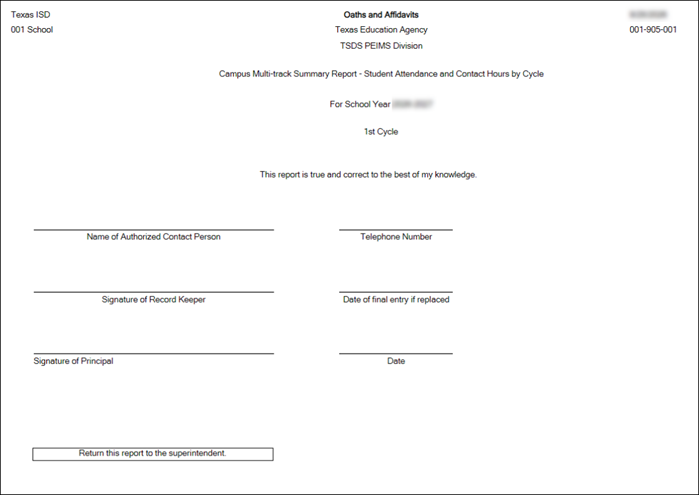
SAT0920 provides multi-track campus or district summary reports that meet the audit documentation requirements specified in the Student Attendance Accounting Handbook. The report is similar to SAT0900 but allows you to run the report for all tracks at once.
SAT0920 provides the eligible/ineligible attendance days present and absent and special program contact hours. SAT0920 should be run at the end of every cycle to verify data.
- Table I can be compared to TSDS reports PDM5-130-001, and PDM5-130-004.
- Table II can be used to verify CTE contact hours. It can be compared to TSDS reports PDM5-130-002 and PDM5-120-013.
- Table III can be used to verify special education data. It can be compared to TSDS reports PDM5-130-004 and PDM5-120-013.
NOTE: The Oath and Affidavits page must be signed and retained for audit purposes.
If CTE Hours on PDM5-130-002 and PDM5-120-013 reports do not match SAT0920:
- Run the SRG0600 - Student Special Program Listing report in Registration.
- Check the CTE section of this report for Service IDs (CourseCodes) that are showing more days eligible than are in the cycle.
This indicates a coding error that requires correction.
Attendance > Reports > Attendance Reports > Membership > SAT1700 - Entry/Withdrawal Summary
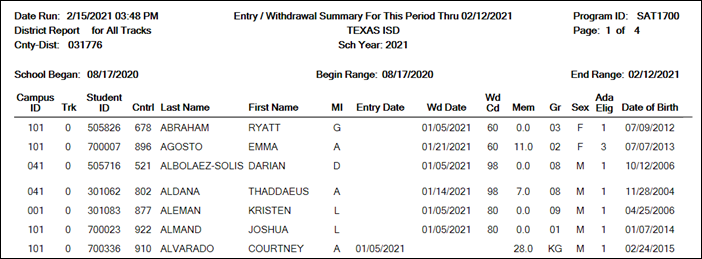
SAT1700 lists students who withdrew during a specified semester-cycle or date range, including students who withdrew and reentered. Verify all entry/withdrawal rows are correct.
Attendance > Reports > Attendance Reports > Students > SAT0400 - Daily Attendance Summary
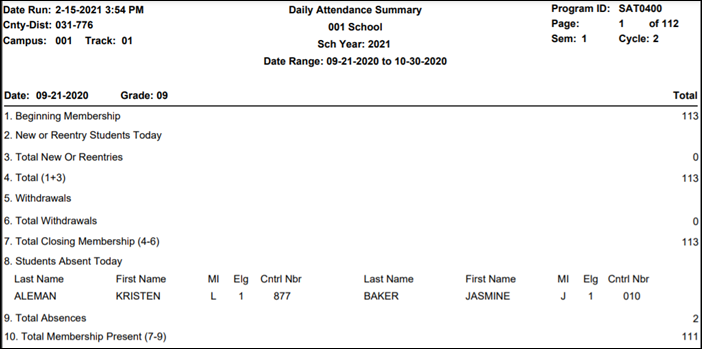
SAT0400 should be run daily and verified for accuracy against instructor records. Confirm that you have this report for all days of membership. Verify that you have withdrawal forms (section #5 on report) with matching dates on file in the student records.
Attendance > Reports > Attendance Reports > Students > SAT1900 - Perfect Attendance Report
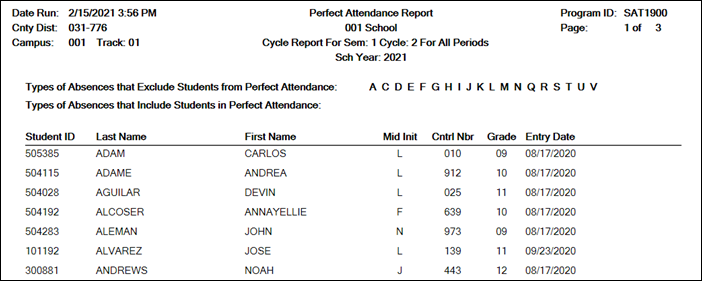
Run SAT1900 for the first semester-cycle of the school year through the final semester-cycle. Use this report to verify actual membership. Verify that all students on the report have course schedules and course completion records.
Attendance > Reports > Attendance Reports > Audit > SAT5000 - Flexible Attendance District Summary
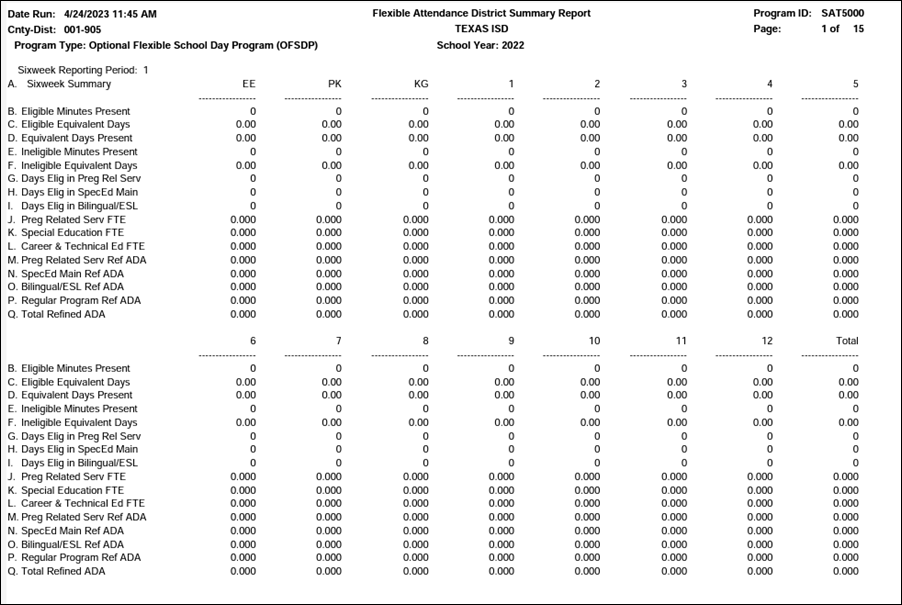
SAT5000 is for the entire district and school year. Verify all flexible attendance data entered.
Attendance > Reports > Attendance Reports > Campus Report Group > SAT2100 - Six Weeks FTE Report
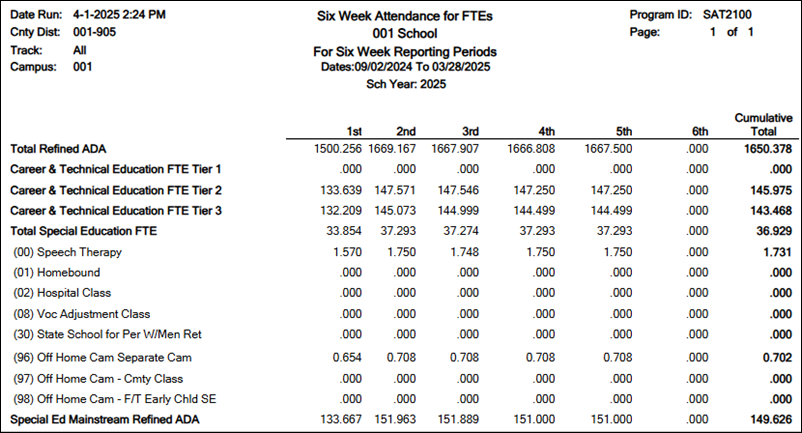
SAT2100 displays current year cumulative ADA enrollment and full-time equivalencies (FTEs) for one campus or all campuses in the district for the selected semester-cycle or date range. A summary by is included, with cumulative totals for ADA and FTE number.
NOTE: This report can be used to compare to the prior year SAT2100. Question if FTE decreased significantly in any area as this report is used to calculate funding.
- Attendance > Maintenance > Campus > Campus Options
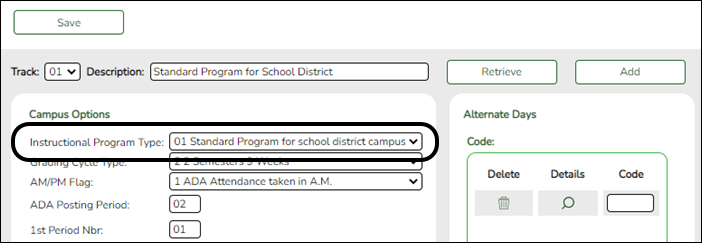
Reported Elements from Campus Options: reported in the Calendar Entity.
- Attendance > Maintenance > Student > Student Inquiry > Cumulative
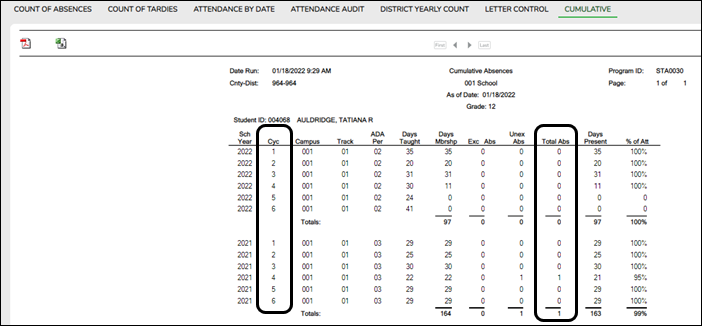
It is recommended to run the SAT1800 - Attendance Audit Report prior to each Attendance Submission.
- Attendance > Maintenance > Flexible Attendance > Weekly Register Worksheet

NOTE: If participating in Optional Flexible Year Program, use a separate attendance track to move students. Students should have been moved the first day of the cycle (where the OFYP dates are scheduled) using the Record Status Change.


Discipline
- Discipline Reports
Discipline > Reports > Discipline > SDS0200 - Special Ed Students in Discipline Settings
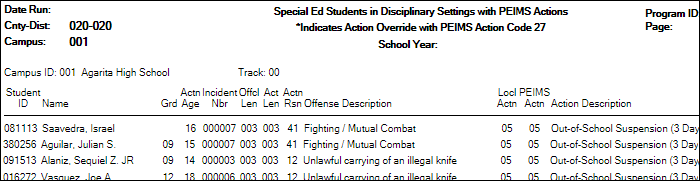
SDS0200 lists special education students who were assigned to a disciplinary setting. Special education services must be provided as outlined in the student’s IEP while the student is placed in an appropriate disciplinary alternative education setting (for example, in-school suspension or DAEP). Special education contact hours should be claimed only if the IEP services are provided. If the IEP special education services are not provided, special education contact hours must not be claimed. This restriction includes short-term removals of not more than 10 consecutive or cumulative school days. Verify all data.
Discipline > Reports > Discipline > SDS0250 - Discipline Student Restraint
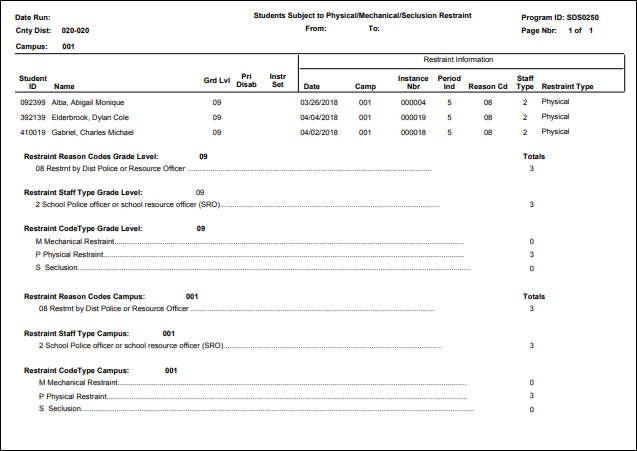
SDS0250 lists student totals for mechanical restraint, physical restraint, and seclusion incidents. Verify all data.
Discipline > Reports > Discipline > SDS0300 - Bil/ESL Students in Discipline Settings
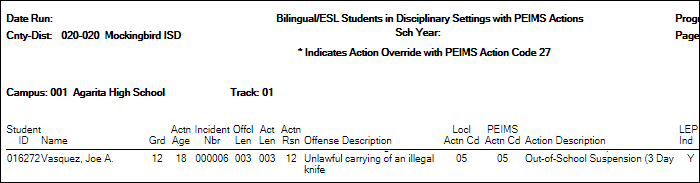
SDS0300 lists bilingual/ESL students who were assigned to a disciplinary setting. Students not receiving bilingual/ESL services for five or more days while in a DAEP setting must be withdrawn from the program during that time. Verify all data.
Discipline > Reports > Discipline > SDS1000 - PEIMS Report
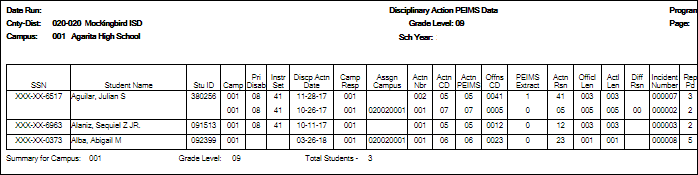
SDS1000 lists TSDS discipline data by grade level. Verify all data.
This report prints PEIMS discipline data by grade level and campus. For each incident listed, the first action and offense with a PEIMS code are displayed, and the offense code that will be extracted for PEIMS is indicated.
Discipline > Reports > Discipline > SDS1300 - Discipline Audit Report (PEIMS Edit)
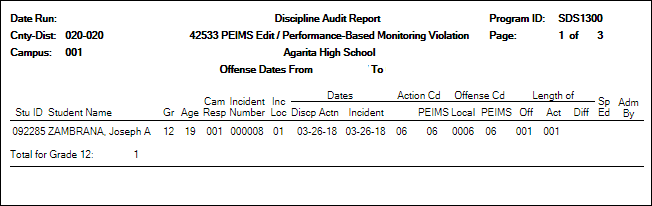
SDS1300 lists students who will trigger an edit and/or performance-based monitoring errors.
Discipline > Reports > Discipline > SDS1700 - Discipline Suspension Attendance Verification
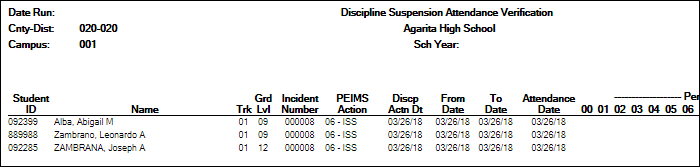
SDS1700 provides information from student discipline and attendance records, and flags discrepancies between the two, which allows you to review for attendance posting discrepancies on days that a student was suspended.
Discipline > Reports > Discipline > SDS1800 - Career Tech Students in Discipline Settings
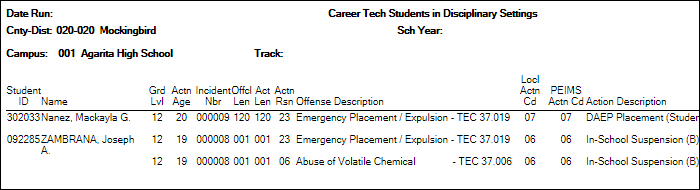
SDS1800 lists CTE students who were assigned to a disciplinary setting. CTE contact hours must not be claimed when a student receiving CTE services is placed in a disciplinary setting (for example, in-school suspension or DAEP) for more than five consecutive days if the same amount and type of CTE services are not provided by a CTE teacher. After five consecutive days without CTE services being provided, LEA personnel must remove the student from the TSDS PEIMS 42401 Special Programs Reporting Period Attendance Extension eligible days present effective the first day of placement in the disciplinary setting. Verify all data.
This report only works if the student has a CTE indicator on the Demo3 tab.
- Discipline > Maintenance > Student > Maintenance
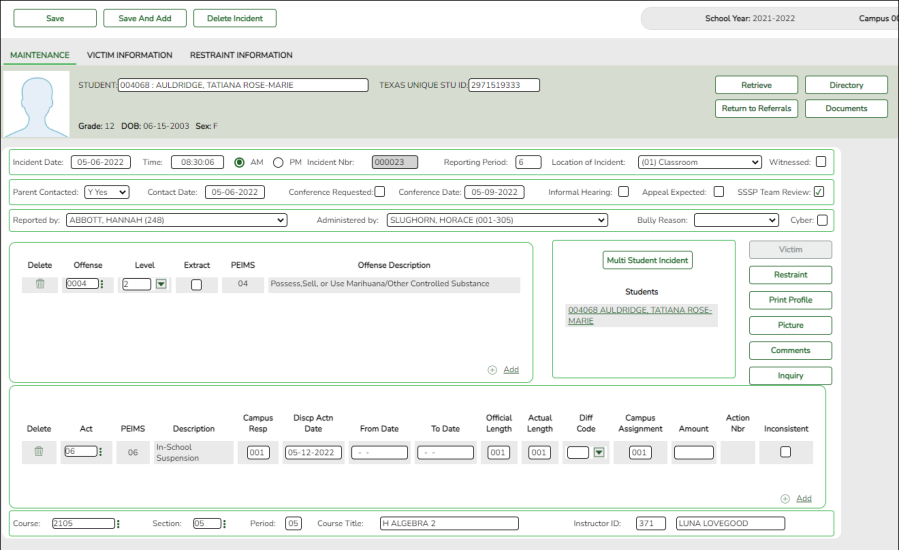
Reported Elements from Maintenance:
Element Descriptor Table Data Element ASCENDER Name E1728 – NumberOfCyberbullyingIncidents Cyber E1727 – NumberOfBullyingIncidents – E1083 C190 IncidentLocation Location of Incident E1006 C165 Behavior Offense E1734 – SafeSupportiveSchoolProgramTeamReview SSSP Team Review E0934 C130 ReportingPeriod Reporting Period E1005 C164 Discipline Act E1037 – ResponsibilitySchool Campus Resp E1036 – DisciplineDate Disp Actn Date E1007 – OfficialLengthOfDisciplinaryAssignment Official Length E1008 – ActualLengthOfDisciplinaryAssignment Actual Length E1003 – AssignmentSchool Campus Assignment E1035 – RestraintEventIdentifier E0934 C130 ReportingPeriod Inconsistent E1033 C173 RestraintEventReason Incident Nbr E1516 C194 RestraintStaffType SSSP Team Review
- Discipline > Maintenance > Student > Maintenance > Restraint Information
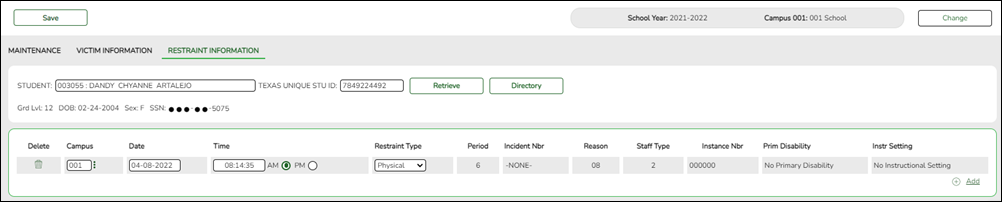
Reported Elements from Restraint Information:
The Discipline Restraint Information tab is used for all disciplinary restraint incidences, including disciplinary restraint for a special education student. The Special Education Child Restraint tab is only used when a special education student is restrained for non-disciplinary reasons.
NOTE: Spec Ed student restraint information must also be added on Special Education > Maintenance > Student Sp Ed Data > Current Year > Child RestraintElement Descriptor Table Data Element ASCENDER Name E3027 —- EventDate Date E0934 C130 ReportingPeriod Period E1033 C173 RestraintEventReason Reason E1516 C194 RestraintStaffType Staff Type E1035 —- RestraintEventIdentifier Instance Nbr E0173 C035 InstructionalSetting Instr Setting
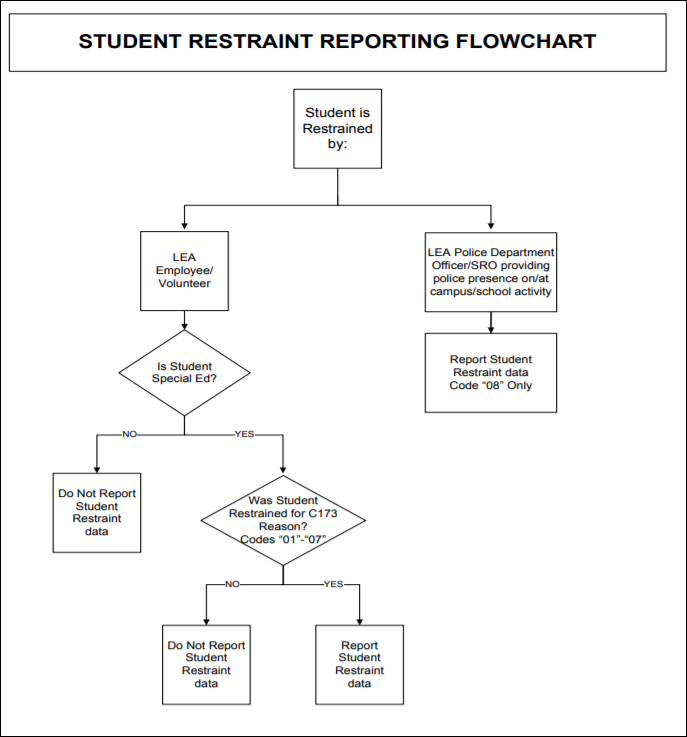
Refer to the following flow chart:
- Discipline > Reports > Create Discipline Reports
Discipline > Reports > Create Discipline Reports
SafeSupportiveSchoolProgramTeamReview (E1734) indicates whether the Safe and Supportive School Program (SSSP) team conducted a threat assessment related to a reported disciplinary incident.
The Safe Supportive School Program (SSSP) team must report to TEA, through guidelines developed by TEA, the following information regarding the team's activities and other information for each LEA campus the team serves plus the outcomes of assessment made by the team, including:
- any disciplinary action taken, including a change in school placement
- changes in school placement, including placement in a JJAEP or DAEP
- placements in ISS or OSS and incidents of expulsion
Create a Discipline Report for SSSP Team review.
❏ Select All Campuses.
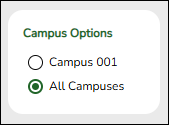
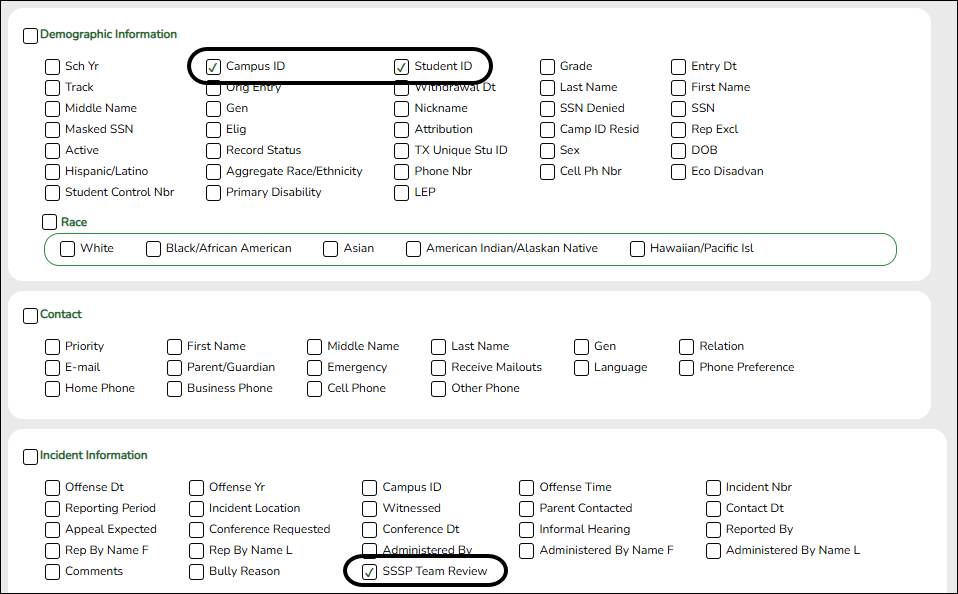
❏ Select the following:
- In the Demographic Information group box, select Campus ID and Student ID.
- In the Incident Information group box select SSSP Team Review.
❏ Click Create Report.
A Discipline User Created Report is generated.
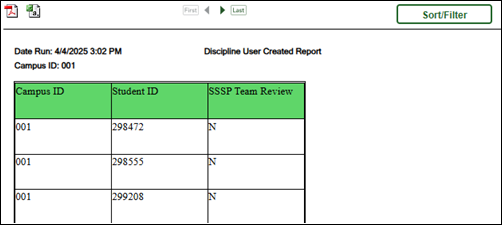
❏ Click Sort/Filter to filter data.
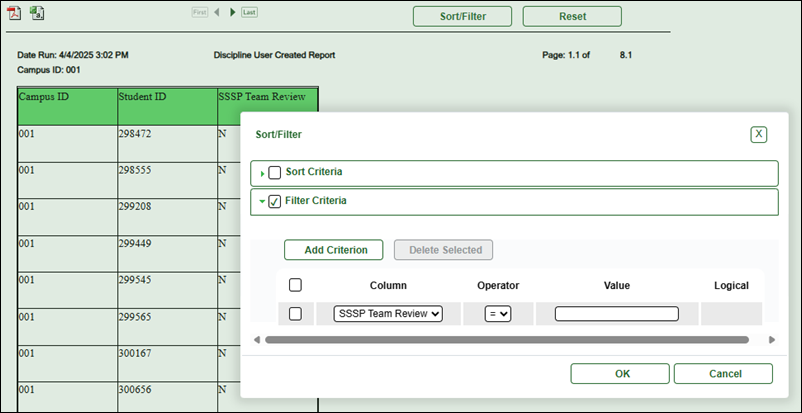


Grade Reporting
- Grade Reporting Reports
When possible, filter by the H Credit level parameter to verify High School credit level course completion data that affects CCMR, CTE Indicators, Programs of Study and CTE Tier calculations.
Grade Reporting > Reports > Grade Reporting Reports > Master Schedules > SGR0050 - District Master List (Grd Rpting)
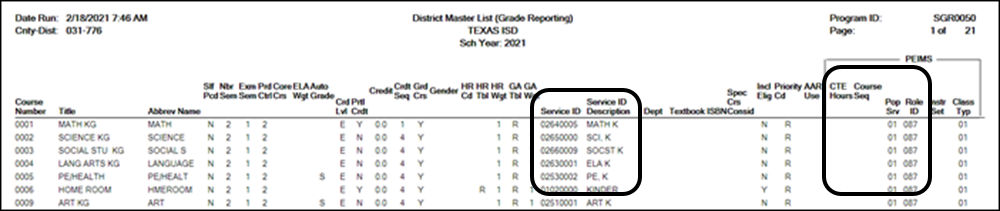
Verify the following at the district level: Service ID, CTE Hours, Course Sequence, Pop Served, and Role ID.
NOTE: Course Sequence codes are usually left blank and are automatically set during State Reporting extracts for reporting purposes.
Grade Reporting > Reports > Grade Reporting Reports > Instructors > SGR2550 - Teaching Assignments
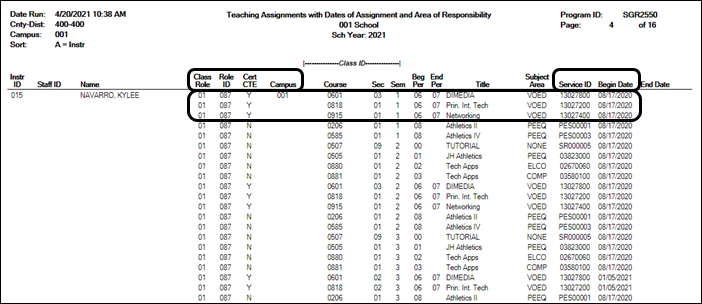
Verify the teacher section data, as well as the Cert CTE column. The Cert CTE column must have a Y to receive CTE funding for VOED courses.
NOTE:If you are a district of innovation, you may be eligible to receive funding for a teacher who is not CTE certified if it is stated in your plan.
Grade Reporting > Reports > Grade Reporting Reports > Master Schedules > SGR0100 - Master Schedule (Grd Rpting)
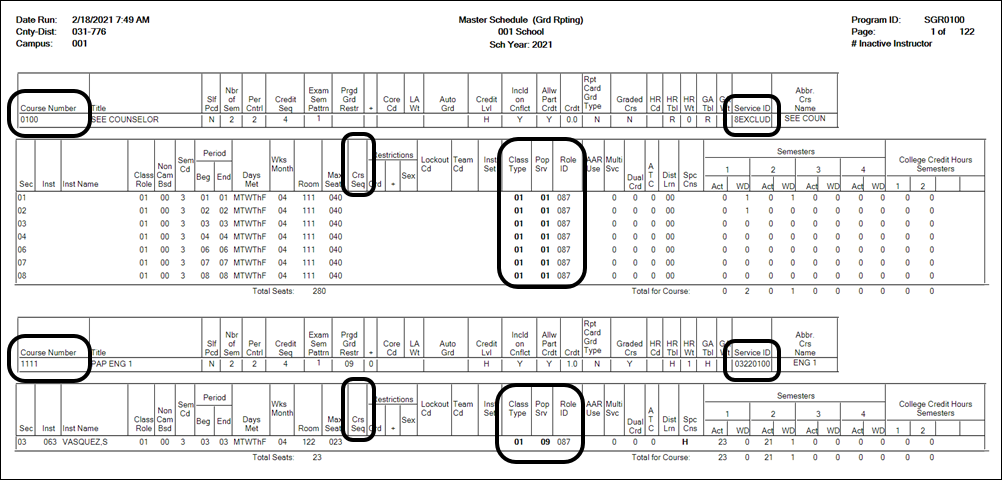
Verify the following at the campus level: Course Numbers, Service IDs, Course Sequence, Pop Served, and Non-Campus Based.
Verify all section data. Campus section level data will override the district-level data. (If one of the section PEIMS fields has been changed that field will not be bold on this report.)
Grade Reporting > Reports > Grade Reporting Reports > Master Schedules > SGR0110 - Master Schedule PEIMS (Grd Rpting)
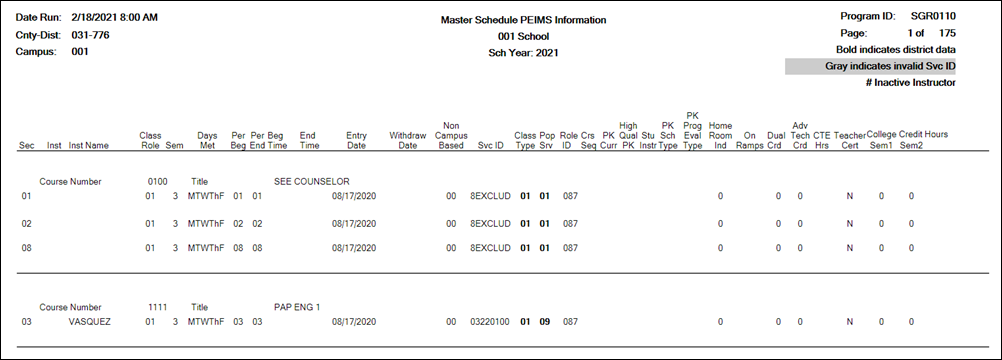
Verify the following at the campus level: Course Numbers, Service IDs, Course Sequence, and Pop Served.
Verify the following campus level dual credit fields are accurate: Dual Credit, College Sem1, College Sem2.
Grade Reporting > Reports > Grade Reporting Reports > Student Verification > SGR1600 - Career & Technology Code Verification
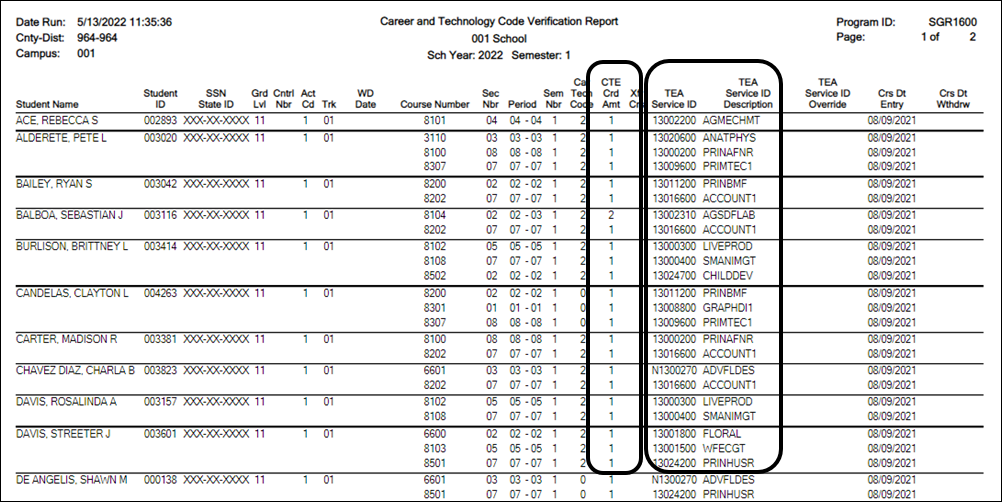
SGR1600 provides a list of all students who have a CTE course in their schedule. You can run the report by Semester or by an As-of Date.
Verify and update data for students in CTE and verify their enrollment in a CTE-eligible class. An asterisk (*) is printed in the CTE Crd Amt column for students who are ineligible for CTE contact hours. (Registration > Maintenance > Student Enrollment > W/R Enroll).
Verify the information in the columns Car Tech Code and TEA Service ID (sorting the report by these columns may be helpful).
The CTE Crd Amt field displays the number of hours earned for each course toward CTE contact hours which includes 7th and 8th grade students in a high school credit level CTE course.
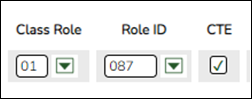
REMINDER:

Grade Reporting > Reports > Grade Reporting Reports > Student Verification > SGR1920 - Pass/Fail Verification List
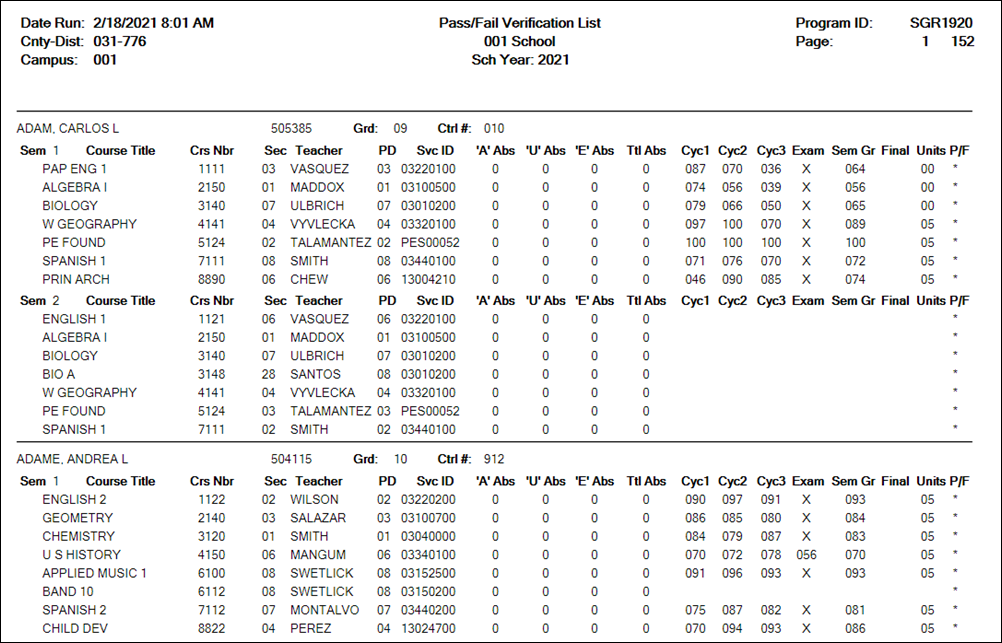
This report lists all students with their courses by semester, including cycle grade averages, exam grades, final grade, attendance, and the pass/fail indicator for each course. Ensure that all data is accurate.
NOTE: The P/F (Pass/Fail Indicator) column with an * indicates a blank Pass/Fail Indicator. It is common to have a blank Pass/Fail Indicator for students who have withdrawn or didn't complete a course due to a schedule change.
Grade Reporting > Maintenance > Master Schedule > District Schedule
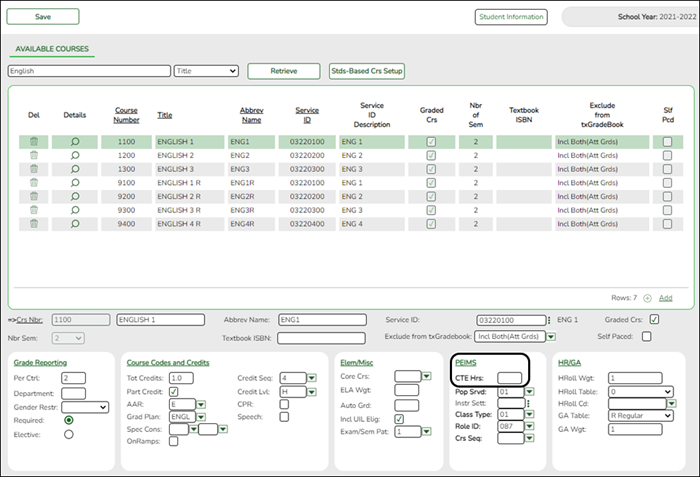
Reported Elements from District Schedule: reported in the Course Entity.This is determined as follows:
- The CTE Hrs field is set to 1, 2 or 3, accordingly in the district master schedule.
- On Grade Reporting > Maintenance > Student > Individual Maint > CTE, the student is enrolled in a CTE course with the CTE Hrs field set to 1, 2 or 3.
Grade Reporting > Maintenance > Master Schedule > Campus Schedule > Section
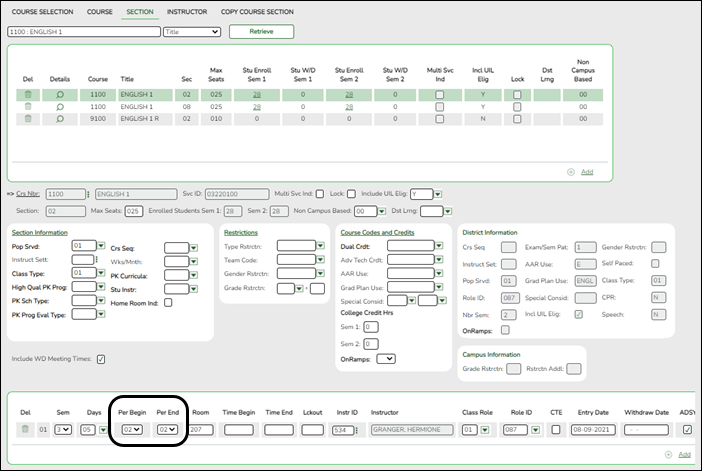
Reported Elements from Section:Element Descriptor Table Data Element ASCENDER Name E1056 —- SectionIdentifier Crs Nbr, Sec, Sem E1072 C182 NonCampusBasedInstruction Non Campus Based E0747 C030 PopulationServed Pop Served E0948 C135 CourseSequence Crs Seq E1011 —- DualCreditIndicator
NOTE: Dual credit courses cannot be reported as ATC courses.Dual Crdt E1058 —- ATCIndicator
NOTE: ATC courses cannot be reported as dual credit courses.Adv Tech Crdt E1081 —- CollegeCreditHours College Credit Hrs - Sem 1 and Sem 2
Grade Reporting > Maintenance > Student > Individual Maint > Crs Assign
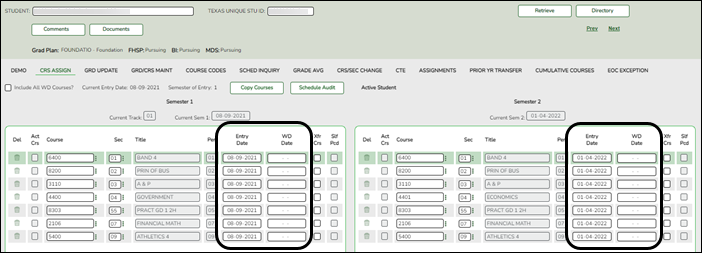
Reported Elements from Crs Assign:
Element Descriptor Table Data Element ASCENDER Name E3023 —- EntryDate Entry Date E3028 —- ExitWithdrawDate WD Date
Grade Reporting > Maintenance > Student > Individual Maint > Grd/Crs Maint
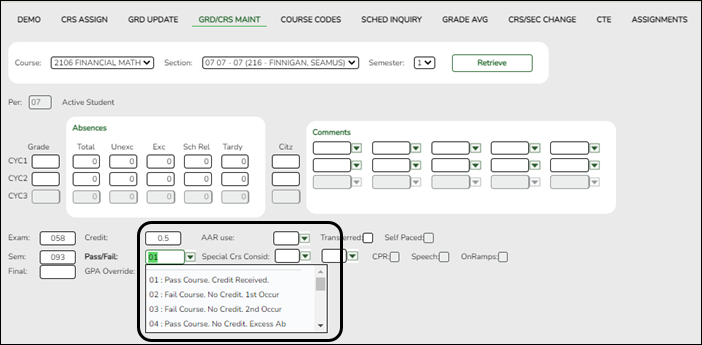
Reported Elements from Grd/Crs Maint:
If a student repeats a course during the year with different outcomes, each course completion must be reported.
Element Descriptor Table Data Element ASCENDER Name E3010 – BeginDate Entry Date E3020 – EndDate WD Date E0949 C136 CourseAttemptResult
NOTE: Ensure that the district has run the Assign Pass/Fail Indicators utility in accordance with the steps in the ASCENDER Secondary or Elementary Grade Reporting End of Semester 2 checklist. This ensures the CourseAttemptResult Pass/Fail (E0949) is set correctly for students.Pass/Fail
Grade Reporting > Utilities > Assign Pass Fail Indicators
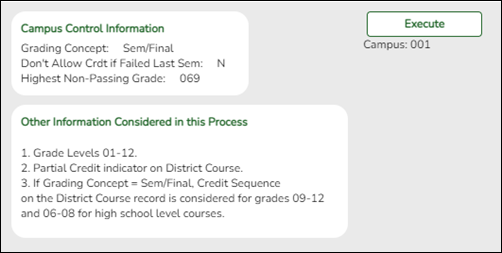
The pass/fail utility looks at the Sem (semester grade) field on Grade Reporting > Maintenance > Student > Individual Maint > Grd Update or Grade Reporting > Maintenance > Student > Individual Maint > Grd/Crs Maint.
Grade Reporting > Maintenance > Student > Individual Maint > CTE
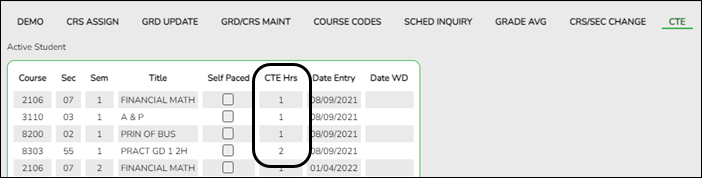
This is determined as follows:
- The student is enrolled in a CTE course with the CTE Hrs field set to 1, 2, 3, 4, 5, or 6 on the student's CTE maintenance page.
- On Grade Reporting > Maintenance > Master Schedule > District Schedule, the CTE Hrs field for that course is set to 1, 2, 3, 4, 5, or 6, respectively.
Grade Reporting > Maintenance > Student > Accelerated Instruction
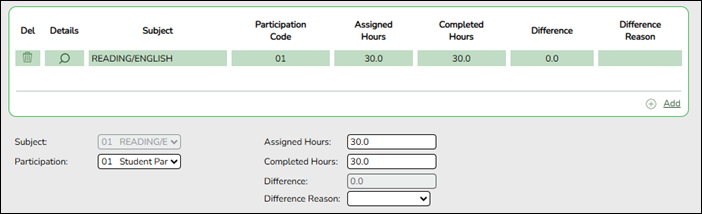
Reported Elements from Accelerated Learning:
Element Descriptor Table Data Element ASCENDER Name E3084 C352 AcceleratedInstructionSubject Subject E3085 C353 StudentAcceleratedInstructionParticipation Participation E3086 —- AssignedHoursAcceleratedInstruction Assigned Hours E3087 —- CompletedHoursAcceleratedInstruction Completed Hours E3088 C354 DifferenceReasonHoursAcceleratedInstruction Difference Reason
Graduation Plan
- Graduation Plan Reports
Graduation Plan > Reports > SGP1000 - Student Personal Graduation Plan
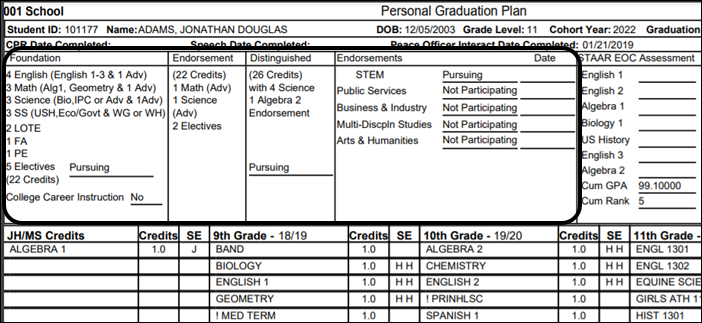
SGP1000 allows you to view students personal graduation plans (PGPs). Verify data for each student who has a graduation plan.
- Graduation Plan > Maintenance > Student > Individual Maintenance > Performance Acknowledgement
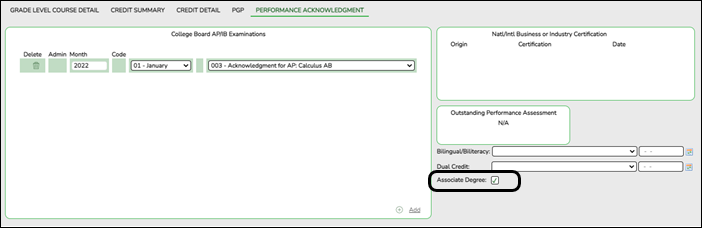
Reported Elements from Performance Acknowledgement:
Element Descriptor Table Data Element ASCENDER Name E1596 —- AssociateDegreeIndicator Associate Degree
- Graduation Plan > Maintenance > Student > Individual Maintenance > PGP
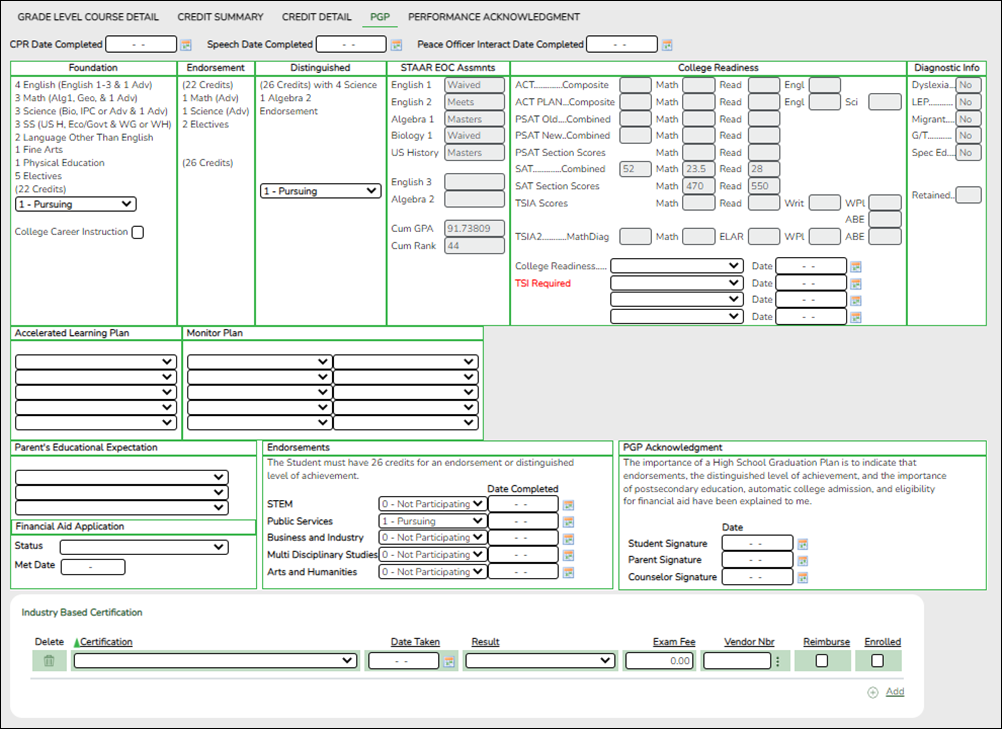
NOTE: Certifications that have been earned, have a PEIMS code assigned, and have the Enrolled checkbox selected are extracted to State Reporting.
Reported Elements from PGP:
Element Descriptor Table Data Element ASCENDER Name E3030 —- FHSPParticipant Foundation E3029 —- FHSPDistingLevelParticipant Distinguished E3022 C333 EndorsementPursuing STEM
see EndorsementPursuingE3022 C333 EndorsementPursuing Public Services
see EndorsementPursuingE3022 C333 EndorsementPursuing Business and Industry
see EndorsementPursuingE3022 C333 EndorsementPursuing Multi Disciplinary Studies
see EndorsementPursuingE3022 C333 EndorsementPursuing Arts and Humanities
see EndorsementPursuingE1563 —- IndividualGraduationCommitteeReview —-
Registration
- Registration Reports
Registration > Reports > Create Registration Report
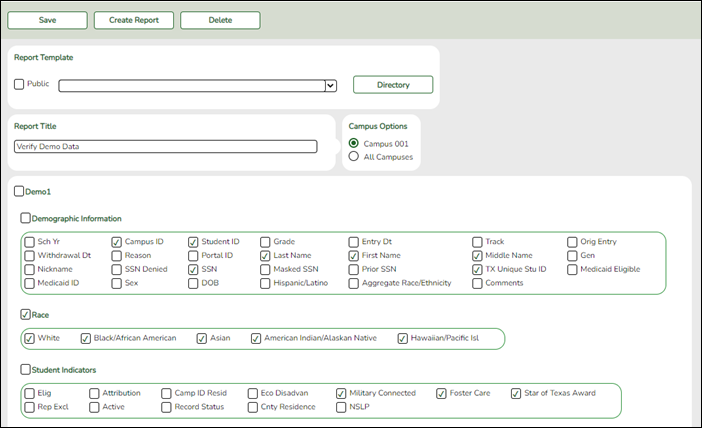
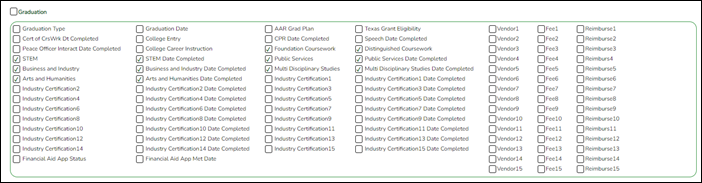

Demo1 and Demo3 data can be verified by creating a customized report.
If the student does not have a graduation plan, grad plan data can also be verified by creating a customized report.
Select the fields for the various elements, and click Create Report.
Reports may be created to view all Registration elements reported in the Summer PEIMS Submission. Create reports should be used in addition to the following Registration reports.
Registration > Reports > Registration Reports > Student > SRG0200 - Student Name Listing
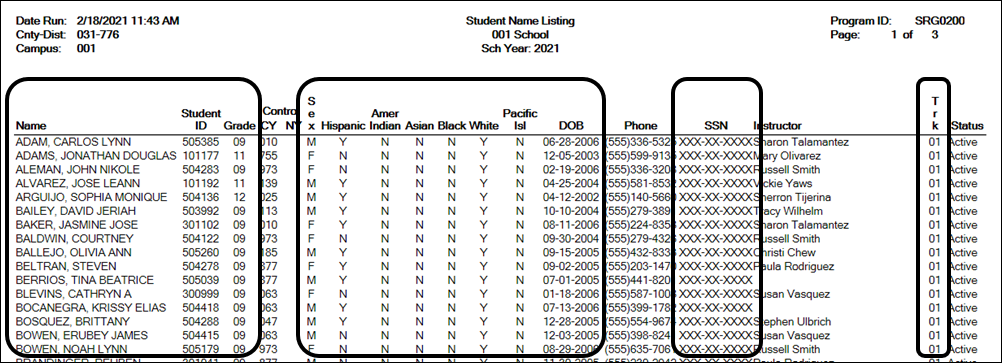
SRG00200 can be used to verify the demographic elements that are reported in the Summer Submission. Be sure the parameter Only New Students This Year (Y,N) is set to N.
Registration > Reports > Registration Reports > Student > SRG0600 - Student Special Program Listing
This report lists students in all grade levels and the special programs in which they are currently enrolled.
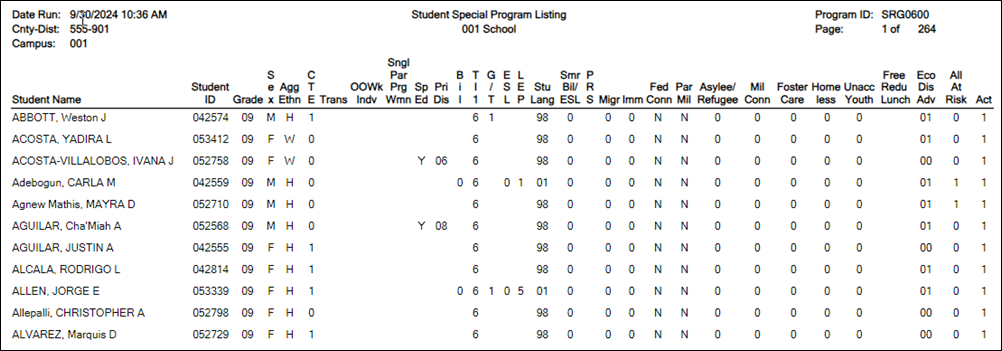
Use this report to verify Economic Disadvantage, Military Connected, Foster Care, Homeless, Immigrant, Migrant, Asylee/Refugee, Unaccompanied Youth, Single Parent Single Pregnant Woman, Out of Workforce, and Transportation CTE Support Services.

Filter the report to view one program at a time. Have the person at your district responsible for each special program sign off on these reports.
Registration > Reports > Registration Reports > Program > SRG1200 - Student Status Changes by Program
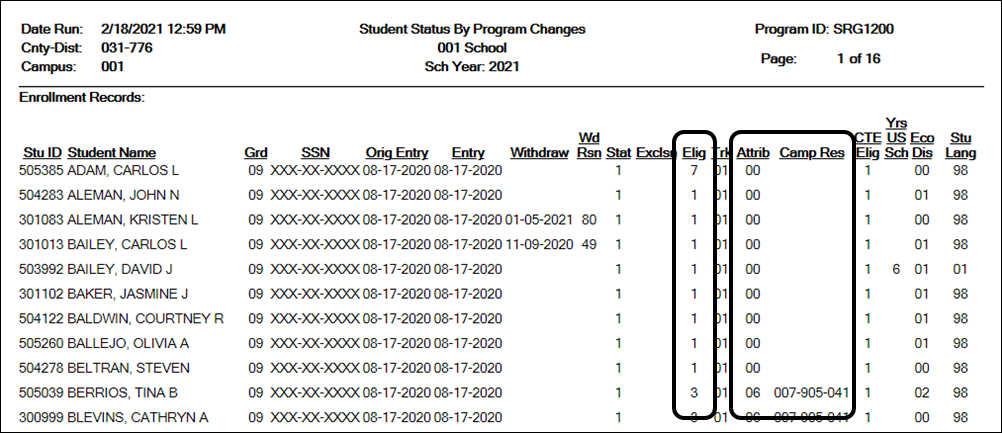
SRG1200 lists student status in all programs. Type Y for each program and print each report separately.
- This report will need to be run several times with different parameters.
- This report can only be run by campus.
Examples:
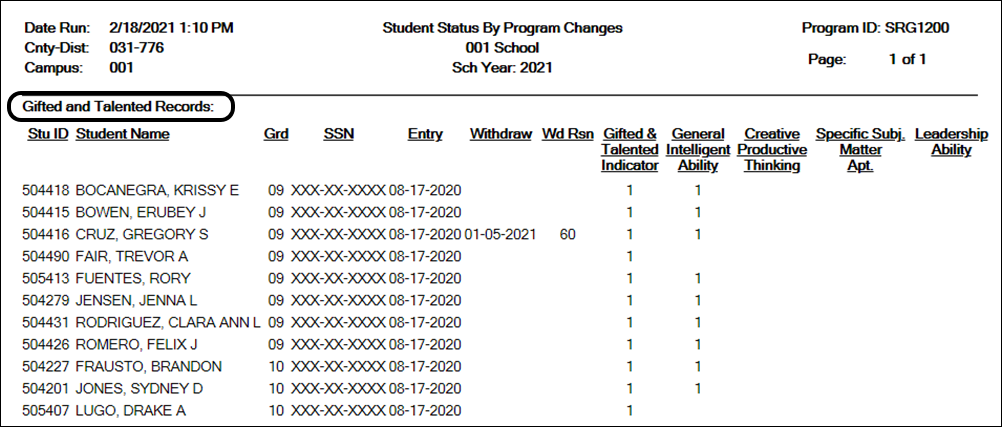
SRG1200 provides a list of student status in all programs. Set the Print Enroll Records parameter to Y. Use the report to verify eligibility, attribution code, and campus of residence.
- Verify eligibility codes. Kindergarten students enrolled in PK last year are normally marked full day eligible (1 or 3).
- Verify/Update Campus of Residence for transfer students. A student's campus of residence must match the grade level in AskTED for the district the student resides in. (“i.e.” if a student went from grade 8 to grade 9 campus number may have changed)
- Students with a Campus of Residence must have an Attribution Code. (Transfer students should have an attribution code of a 06).
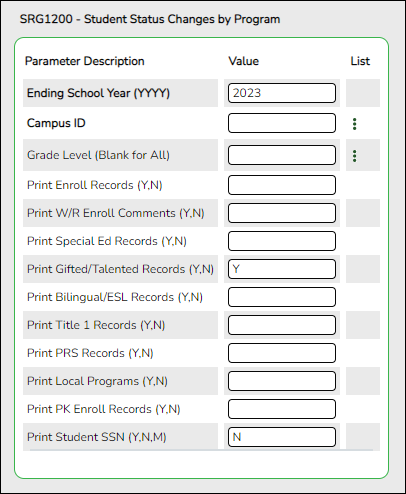
- Other elements to verify on SRG1200: GT, Bil/ESL, Title I, PRS, and PK Enroll records. It is recommended that users run the report for each program individually and have it signed off on by the person responsible for checking that program data.
Registration > Reports > Registration Reports > Student > SRG1900 Local Program Enrollment Count
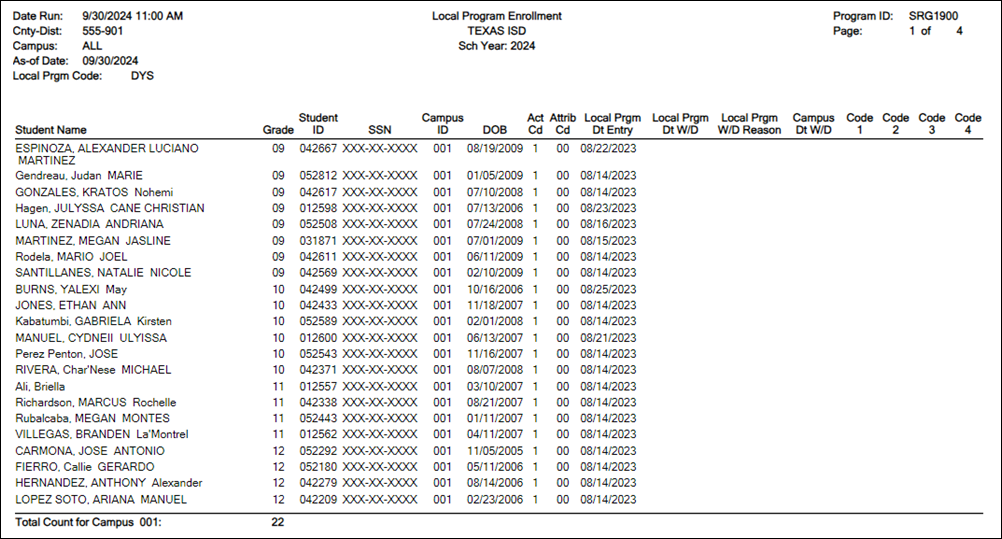
SRG1900 provides a list of students who have been enrolled in a specific local program, as well as special program withdrawal dates and reasons. Campus totals are displayed for each included campus. A report total is displayed at the end of the report.
Verify all entry and withdrawal dates and special program services.
NOTE: To set up local program codes for the district, go to Registration > Maintenance > District Profile > Local Program Codes. The campus must select the program in Registration > Maintenance > Campus Profile > Campus Local Program Codes to make it available at the campus.
The student should have a row on Local Programs where the Local Programs for TEA field is set to the Local Program code for ECHS, T-STEM, P-TECH, 504, Intervention Strategies, General Ed Homebound, Migrant, Immigrant, Dyslexia, Star of Texas, New Tech, Adult Previous Attendance, and Virtual Student not in Membership or the crisis code if applicable.
NOTE: IGC should be set up as a Local Program. The student should have a row on Local Programs with a row where Other Local Programs is set to the Local Program code for IGC if applicable.
IGC is the only local program entered in the Other Local Programs group box. All other local programs should be entered in the Local Programs for TEA group box.
Registration > Reports > Registration Reports > Non-Enrolled Student > SRG9000 - UIL Activity Participation

This report displays the roster for non-enrolled students participating in UIL programs at the selected district/campus.
Registration > Maintenance > Campus Profile > Campus Information Maintenance > Control Info
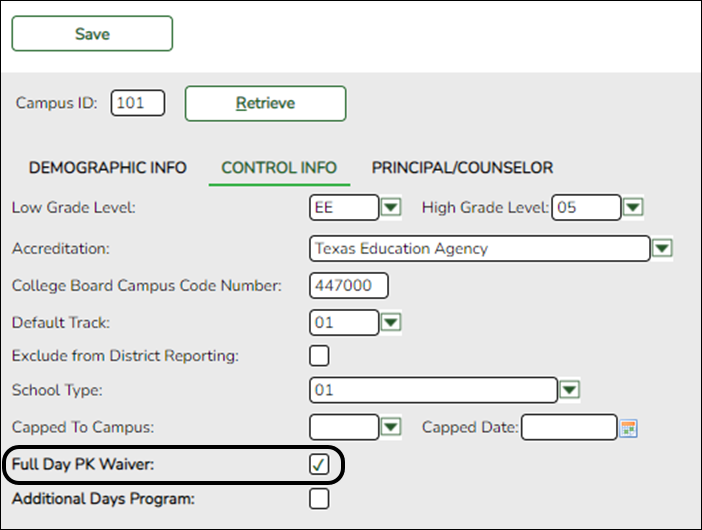
Reported Elements from Control Info:
Element Code Table Data Element ASCENDER Name E1646 —- PKFullDayWaiver Full Day PK Waiver E1671 —- AdditionalDaysProgram Additional Days Program - Check the Full Day PK Waiver box if your campus has received an exemption from offering a full-day pre-kindergarten program.
Registration > Maintenance > Campus Profile > Campus Programs > Expanded Learning (ELO)
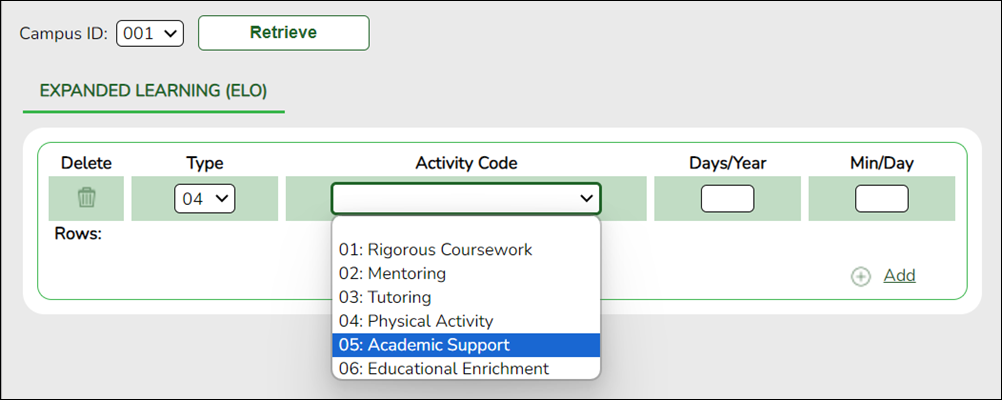
Reported Elements from Expanded Learning (ELO):
Element Code Table Data Element ASCENDER Name E1614 C218}CampusEnrollmentType Type E1719 C229 ELOActivity Activity Code E1720 —- ELODaysScheduledPerYear Days/Year E1621 —- ELOMinutesScheduledPerDay Min/Day E1613 —- ExpandedLearningOpportunity —-
RUN REPORT TO VERIFY DATA:
Registration > Reports > Registration Reports > Program > SRG0100 - Campus Information
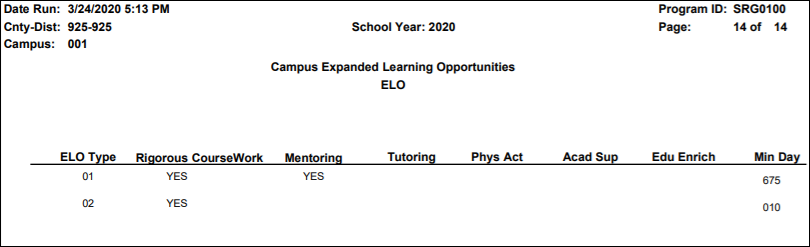
❏ See the Campus Expanded Learning Opportunities ELO section of the report.
Expanded Learning Opportunities (ELO) are structured learning programs outside of the regular school day, including before and after school programs and summer programs.
- If a district/campus offers an Expanded Learning Opportunities (ELO) Program, enter the information on this screen in Registration.
- Programs must be at least 45 minutes long to qualify for ELO.
- See the Campus Expanded Learning Opportunities (ELO) section of the report.
Registration > Maintenance > Student Enrollment > Demo1

Reported Elements from Demo1:
Element Code Table Data Element ASCENDER Name E0703 —- FirstName Name - First E0704 —- MiddleName Name - Middle E0705 —- LastSurname Name - Last E0706 C012 GenerationCode Name - Gen E0001 —- StudentId SSN E1523 —- StudentUniqueId Texas Unique Student ID E0004 C013 Sex Sex E0006 —- BirthDate DOB E1064 —- HispanicLatinoEthnicity Hispanic/Latino E3050 C304 Race White E3050 C304 Race Black/African American E3050 C304 Race Asian E3050 C304 Race American Indian/ Alaskan Native E3050 C304 Race Hawaiian/Pacific Isl E0785 C054 EconomicDisadvantage Eco Disadvan E1529 C197 MilitaryConnectedStudent Military Connected E1528 C196 FosterCareType Foster Care E0017 C050 GradeLevel Grade E1000 C161 StudentAttribution Attribution Cd E0903 —- CampusIdOfResidence Camp ID Resid Registration > Maintenance > Student Enrollment > Demo3
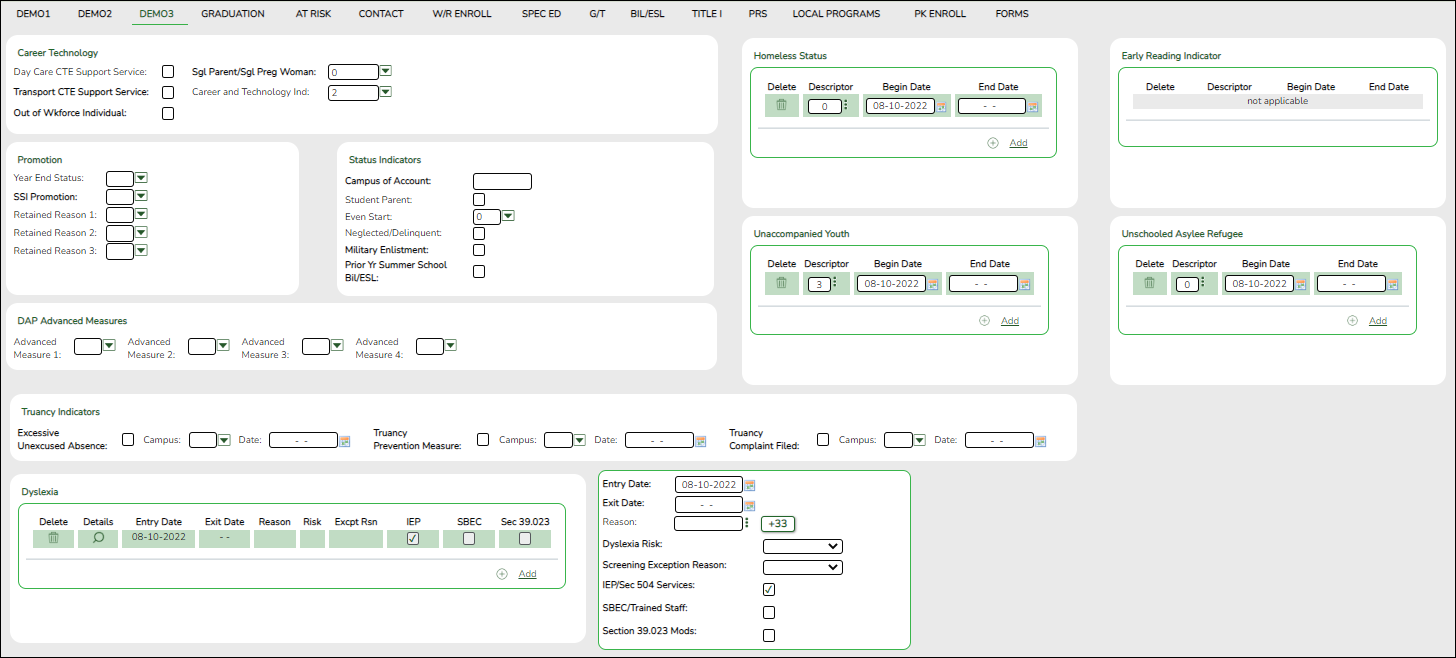
NOTE: If the student has a graduation plan, the fields must be updated on Graduation Plan > Maintenance > Student > Individual Maintenance > PGP instead (as described previously under Graduation Plan).
Early Reading Indicator
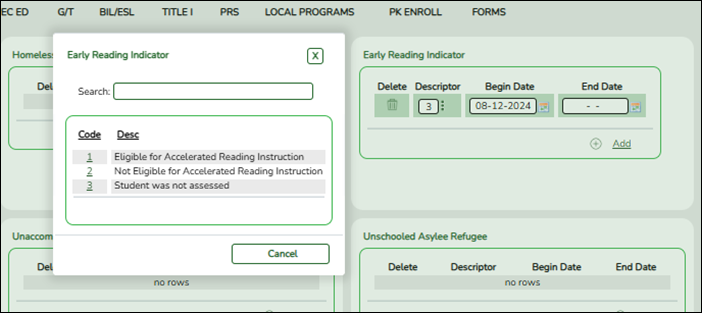
The Early Reading Indicator indicates if the student is eligible for accelerated reading instruction due to reading difficulties or dyslexia. This field applies only to grade levels KG-2 and is required for those students.
NOTE: Grade level reading status is based on the latest assessment results available.
Truancy Indicators

For each student with an Excessive Unexcused Absence indicator, check Truancy Prevention Measure and/or Truancy Complaint Filed if applicable. To prevent getting a grade level error in the batch manager, verify there are no missing fields or invalid dates.NOTE: This utility can be run as often as needed. Each student will be marked for the first occurrence of 10 or more unexcused absences. This information will not be deleted when the utility is run again unless unexcused absences were removed and the student no longer has 10 unexcused absences. It is advisable to run the utility at the end of each cycle and at the end of the school year.
Dyslexia
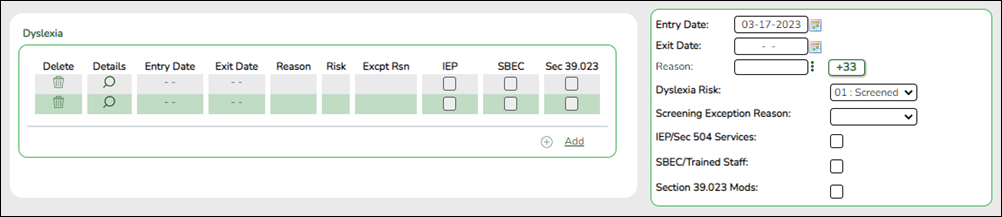
- Dyslexia Risk – Verify this field is marked for only KG and 1st Graders.
- Kindergarten screening (EOY)/1st grade by January 31st of each year. - Dyslexia Services – Verify these fields are marked for all students receiving dyslexia services. More than one box can be selected, however, at least one service must be checked in order to receive funding.
- 01 – Section 504 Services/IEP’s
- 02 – SBEC/Trained Staff
- 03 – Section 39.023 Mods
NOTE: If a student has a Dyslexia Indicator and there is no Dyslexia Services Code marked on Registration > Maintenance > Student Enrollment > Demo3, then when the State Reporting > Utilities > Create TSDS PEIMS Interchanges is run, the system will automatically create the tagline with Code 00 (C224 Code 00 - Student identified with dyslexia or a related disorder under TEC 48.009 does not receive services).
Reported Elements from Demo3:
Element Descriptor Table Data Element ASCENDER Name E3010 —- BeginDate Begin Date E3020 —- EndDate End Date E3012 C064 Transportation CTE Support Services Transportation CTE Support Service E3012 C064 Out Of Workforce Individual Out of Wkforce Individual E3012 C064 Pregnant Woman Sgl Parent/Sgl Preg Woman E3063 C344 Adult Previous Attendance Adult Prev Att E1650 C224 DyslexiaServices Dyslexia Services E1076 C183 UnschooledAsyleeRefugee Asylee/Refugee Cd E1082 C189 HomelessStatus Homeless Status Cd E1084 C192 UnaccompaniedYouth Unaccomp Youth Status Cd E1522 C195 EarlyReadIndicator Early Reading Cd E1644 C222 DyslexiaRisk Dyslexia Risk E1640 C214 PostSecondaryCertificationLicensure
For students who have a graduation plan, this information is entered on Graduation Plan > Maintenance > Student > Individual Maintenance > PGP.Industry Credentials or Certification E1027 —- CampusIdOfAccountability Campus of Account E3030 —- FHSPParticipant Foundation Coursework E3029 —- FHSPDistingLevelParticipant Distinguished Coursework E3068 C346 Excessive Unexcused Absences Excessive Unexcused Absence E3068 C346 Truancy Prevention Measures Truancy Prevention Measure E3068 C346 Truancy Complaint Filed Truancy Complaint Filed
NOTE: If the student has a graduation plan, the fields must be updated on Graduation Plan > Maintenance > Student > Individual Maintenance > PGP instead (as described previously under Graduation Plan).Registration > Maintenance > Student Enrollment > Graduation
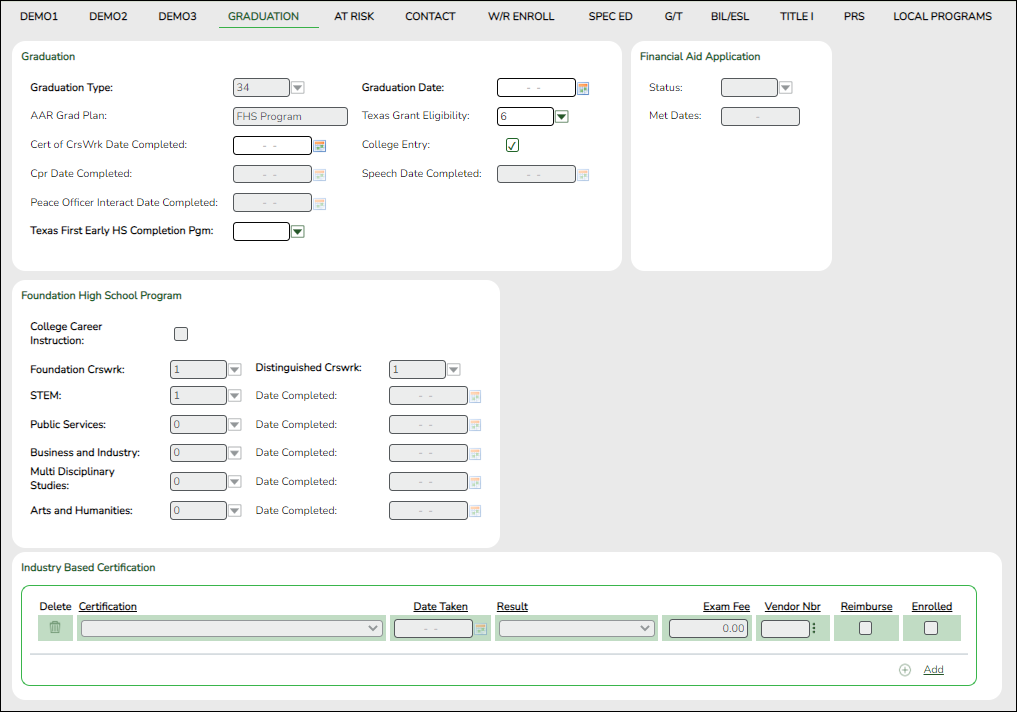
Reported Elements from Graduation:
Element Code Table Data Element ASCENDER Name E1654 —- IBCExamFeeAmount Exam Fee
NOTE: This field will be pre-populated if completed on the Credentials or Certification tab on Graduation Plan > Maintenance > District > Tables.
E1655 C226 IBCVendor Vendor
NOTE: This field will be pre-populated if completed on the Credentials or Certification tab on Graduation Plan > Maintenance > District > Tables.
E1640 C214 PostSecondaryCertificationLicensure Industry Credentials or Certification
For students who have a graduation plan, this information is entered on Graduation Plan > Maintenance > Student > Individual Maintenance > PGP.
E3030 —- FHSPParticipant Foundation Coursework E3029 —- FHSPDistingLevelParticipant Distinguished Coursework E3022 C333 EndorsementPursuing STEM
see EndorsementPursuingE3022 C333 EndorsementPursuing Public Services
see EndorsementPursuingE3022 C333 EndorsementPursuing Business and Industry
see EndorsementPursuingE3022 C333 EndorsementPursuing Multi Disciplinary Studies
see EndorsementPursuingE3022 C333 EndorsementPursuing Arts and Humanities
see EndorsementPursuingE3021 C332 EndorsementCompleted —-
Registration > Maintenance > Student Enrollment > W/R Enroll
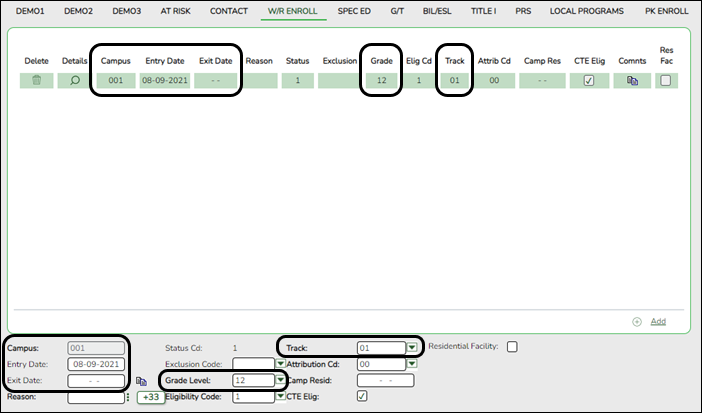
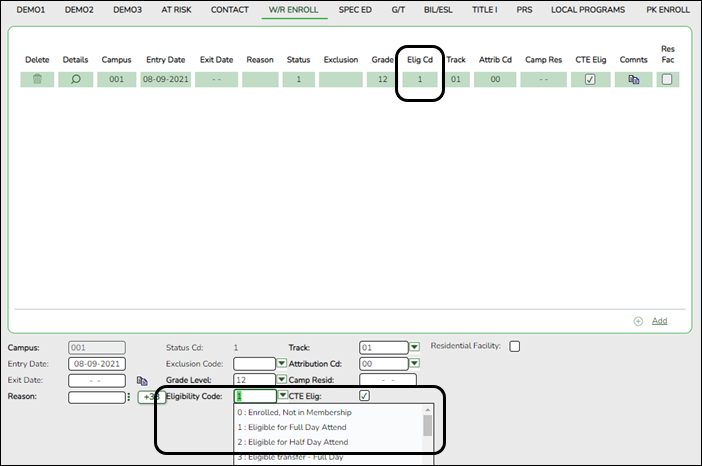
Reported Elements from W/R Enroll:
Element Code Table Data Element ASCENDER Name E3023 —- EntryDate Entry Date E0975 —- CalendarCode Track E0017 —- GradeLevel Grade Level E0936 — TotalIneligibleDaysPresent —-
To make a Status Change:
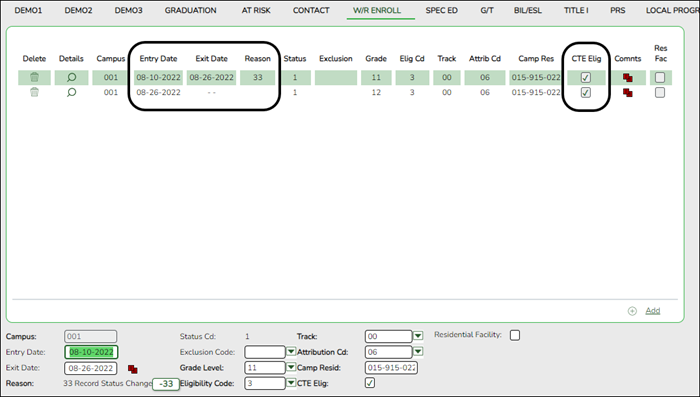
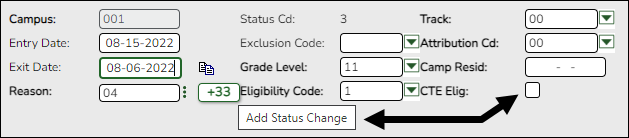
1. Click Code 33 to do a status change.
- A row is added to the grid that displays the default entry date, which is the same as the withdrawal date. This ensures that you do not lose any membership days by typing the incorrect entry date for the status change.
- The fields below the grid are enabled. The fields display the data from the previous row by default.
2. Modify any information that changed for the entry date.
3. Click Save to save the status change.NOTE: If the entry date and exit date are the same on the row, this button is not available.
Registration > Maintenance > Student Enrollment > SpecEd
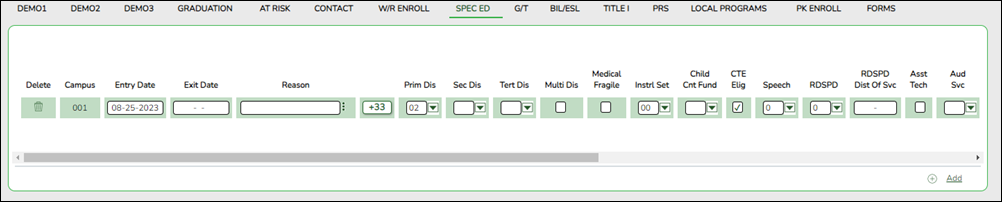
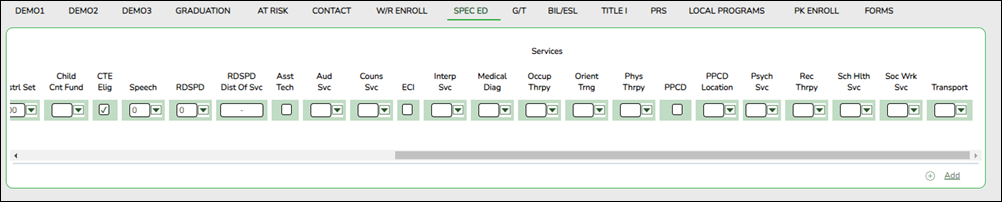
Reported Elements from SpecEd:
Element Code Table Data Element ASCENDER Name E0173 C035 InstructionalSetting Instrl Set E0833 C067 RegionalDaySchoolProgramForDeaf Regional Day School Deaf E1527 —- LEAOfRDSPDService Fiscal Agent E0882 —- MultiplyDisabled Multi Dis E3039 —- OrderofDisability Prim Dis, Sec Dis, Tert Dis Registration > Maintenance > Student Enrollment > G/T
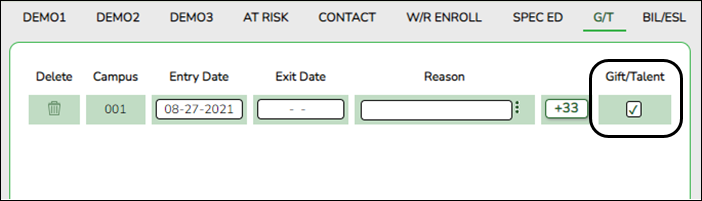
Reported Element from G/T:
Element Code Table Data Element ASCENDER Name E3063 C344 StudentCharacteristic Gift/Talent
see StudentCharacteristic
Registration > Maintenance > Student Enrollment > Bil/ESL

Reported Elements from Bil/ESL:
Element Code Table Data Element ASCENDER Name E0790 C061 EmergentBilingualIndicator EB Cd E0938 —- TotalEligBilingualESLDaysPresent Entry/Exit Date E1651 C225 BilingualESLFunding Bil/ESL Fund Cd
Registration > Maintenance > Student Enrollment > Title I
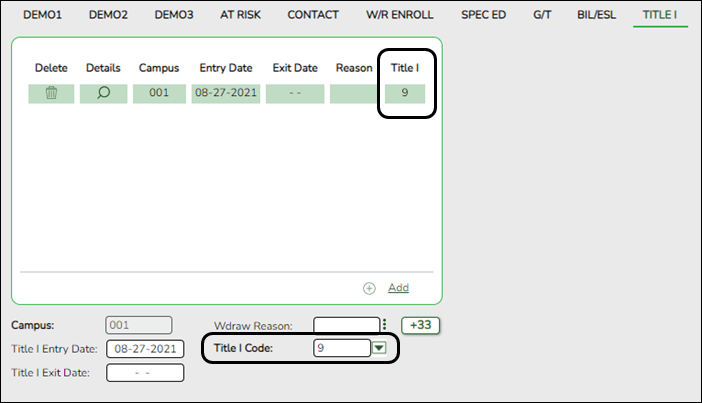
Reported Elements from Title I:
Element Code Table Data Element ASCENDER Name E0894 C122 TitleIPartAParticipant Title I Code NOTE: Verify Title I entry and withdrawal dates for all Title I students. All students attending a Title I, Part A Schoolwide Program School must be reported with a TITLE-1-PART-A-INDICATOR-CODE 6.
For a schoolwide Title I campus, you can use the Title I Code Conversion utility to set Title I Code to 6 for all students:
1. Go to Registration > Utilities > Title 1 Code Conversion.
2. In the Title 1 Code field, select 6 Attends Schoolwide Title I Program School.
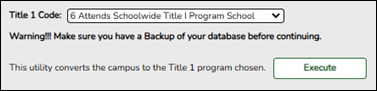
3. Click Execute.
Registration > Maintenance > Student Enrollment > PRS

Reported Elements from PRS:
Element Code Table Data Element ASCENDER Name E3063 C344 StudentCharacteristic PRS
see StudentCharacteristicE0939 —- TotalEligPregRelSvcsDaysPresent Entry/Exit Date and CEHI
Registration > Maintenance > Student Enrollment > Local Programs
NOTE: ECHS, T-STEM, P-TECH, 504, Intervention Strategies, and any needed crisis codes should be set up as local programs on Registration > Maintenance > Campus Profile > Campus Local Program Codes. The student should have a row on the Local Programs tab where the Local Program field is set to the local code for ECHS, T-STEM, P-TECH, 504, Intervention Strategies, or the crisis code if applicable.
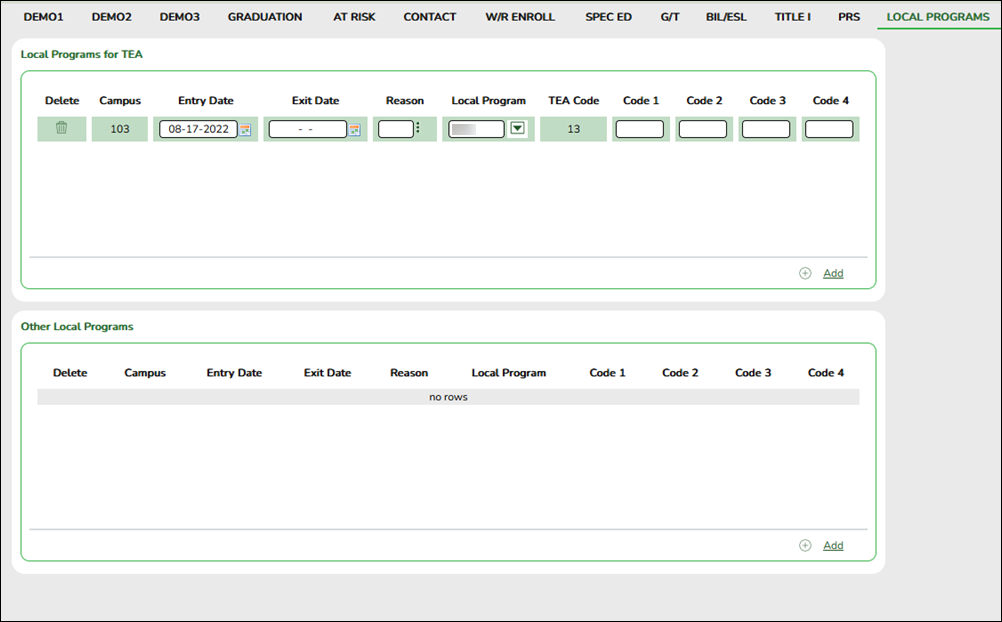
Reported Elements from Local Programs:
Element Code Table Data Element ASCENDER Name E3063 C344 StudentCharacteristic Local Program
see StudentCharacteristicE0266 —- SchoolId Campus
NOTE: IGC should be set up as a local program on Registration > Maintenance > Campus Profile > Campus Local Program Codes. The student should have a row on the Local Programs tab with a row where Local Program is set to the local code for IGC if applicable.
E1563 —- IndividualGraduationCommitteeReview Local Program
Registration > Maintenance > Student Enrollment > PK Enroll
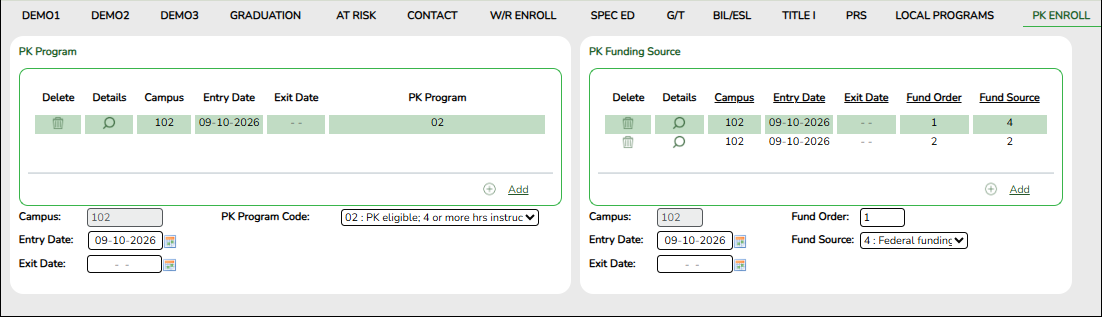
Reported Elements from PK Enroll:
Element Code Table Data Element ASCENDER Name E1078 C185 PKProgramType PK Program Code E3044 C186 PKFundingSource PK Funding Source E3040 —- OrderOfPKFundingSource
Registration > Maintenance > Non-Enrolled Student > Demo
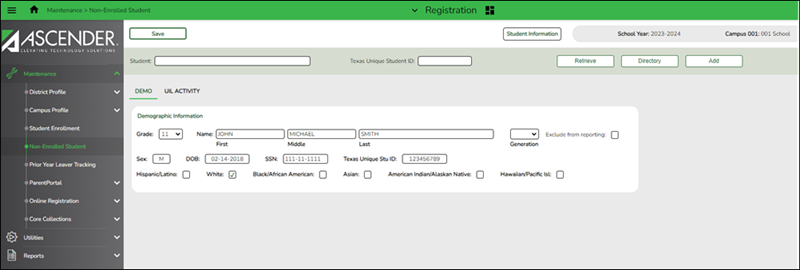
Reported Elements from Demo:
Element Code Table Data Element ASCENDER Name E0017 C050 GradeLevel Grade E0703 —- FirstName Name - First E0704 —- MiddleName Name - Middle E0705 —- LastSurname Name - Last E0706 C012 GenerationCode Legal - Generation E0004 C013 Sex Sex E0006 —- BirthDate DOB E0001 —- StudentId SSN E1523 —- StudentUniqueId Texas Unique Student E1064 —- HispanicLatinoEthnicity Hispanic/Latino E3050 C304 Race American Indian/Alaskan Native E3050 C304 Race Asian E3050 C304 Race Black African American E3050 C304 Race Hawaiian/Pacific Islander E3050 C304 Race White
Registration > Maintenance > Non-Enrolled Student > UIL Activity
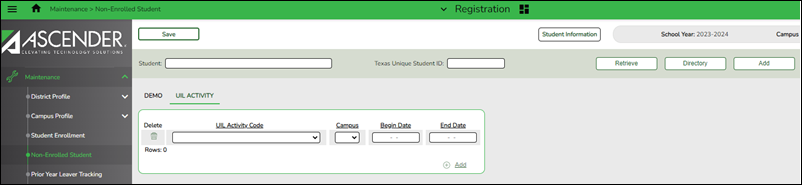
Reported Elements from UIL Activity:
Element Code Table Data Element ASCENDER Name E1739 C234 NonEnrolledStudentUILActivity UIL Activity Code E0266 —- SchoolId Campus E3010 —- BeginDate Begin Date E3020 —- EndDate End Date
Reported Elements from UIL Activity: reported in the following:
Student Entity
School EntityRegistration > Utilities > Excessive Unexcused Absence Indicator
This utility sets the Excessive Unexcused Absence Indicator, campus and date on Registration > Maintenance > Student Enrollment > Demo3 for all students with 10 or more unexcused absences.
If unexcused absences are removed and a student no longer has 10 or more unexcused absences, running the utility again will remove the current Excessive Unexcused Absence Indicator.
It is recommended to run the utility weekly or at least every six weeks.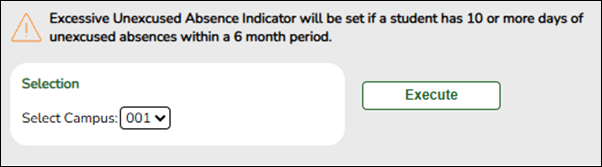
Run utility
❏ Select campus in the from the Select Campus drop-down menu.
❏ Click Execute.
Run report
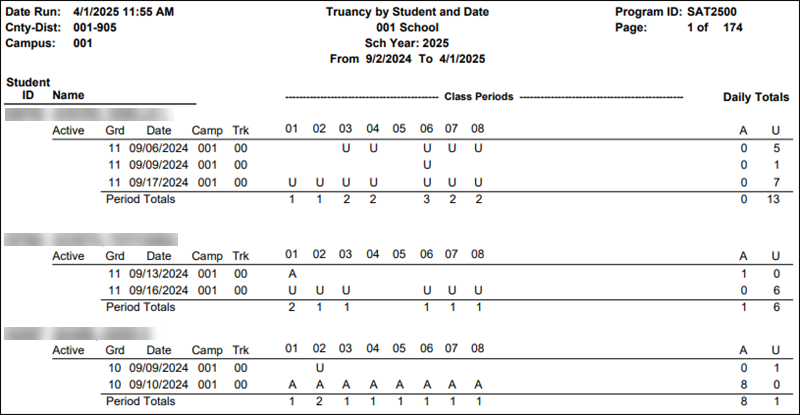
Run Attendance report SAT2500 - Truancy Report to verify students that have 10 or more unexcused absences. Each day with at least one unexcused absence for at least one period counts as one of the 10 or more days.
Special Education
- Special Education Reports
Special Education > Reports > Student Sp Ed > Student > SEM1100 - Student Special Ed Restraint List
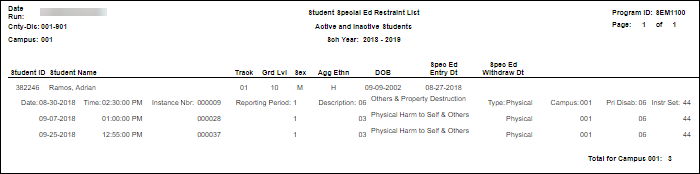
Ensure all special education restraints have been entered.NOTE: Special Education students that are restrained for disciplinary reasons should not appear on this report. Those restraints should be entered in Discipline.
- Special Education > Maintenance > Student Sp Ed Data > Current Year > Child Restraint
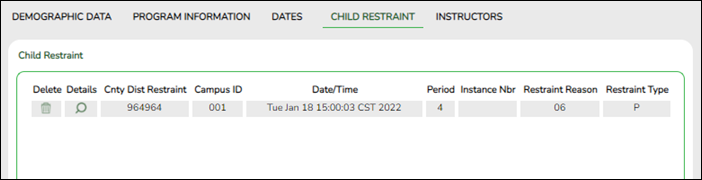
Reported Elements from Child Restraint: reported in the RestraintEvent Entity.
The Special Education Child Restraint tab is only used when a special education student is restrained for non-disciplinary reasons. For all other restraint incidences, including disciplinary restraint for a special education student, use Discipline > Maintenance > Student > Maintenance > Restraint Information.
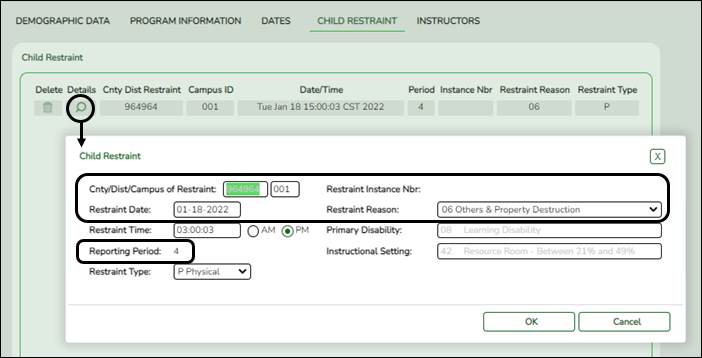
- EventDate Restraint Date (E3027)
- ReportingPeriod Reporting Period (E0934) (Descriptor table: C130)
- RestraintEventReason Restraint Reason (E1033) (Descriptor table: C173)
- RestraintEventIdentifier Restraint Instance Nbr (E1035)
- InstructionalSetting Instructional Setting (E0173) (Descriptor table: C035)
Some fields are displayed on the Details window, which is displayed if you click the spyglass icon.


academy/summer_submission.txt · Last modified: 2026/02/11 20:54 by apape
Except where otherwise noted, content on this wiki is licensed under the following license: CC Attribution-Share Alike 4.0 International
Americans with Disabilities Act (ADA) and Web Accessibility
The Texas Computer Cooperative (TCC) is committed to making its websites accessible to all users. It is TCC policy to ensure that new and updated content complies with Web Content Accessibility Guidelines (WCAG) 2.0 Level AA. We welcome comments and suggestions to improve the accessibility of our websites. If the format of any material on our website interferes with your ability to access the information, use this form to leave a comment about the accessibility of our website.