
User Tools
Sidebar
academy:district_admin_preparing_tsds_upgrade
Book Creator
Add this page to your book
Add this page to your book
Book Creator
Remove this page from your book
Remove this page from your book
This is an old revision of the document!
Preparing for the TSDS Upgrade Guide
IN PROGRESS

Helpful TEA TSDS Links:
https://techdocs.ed-fi.org/display/EFDS30/Response+Codes
https://www.texasstudentdatasystem.org/tsds/teds/ods-upgrade-data-standards
https://www.texasstudentdatasystem.org/tsds/about/training-and-support/tsds-upgrade-project-training-materials
Registration
- Registration > Maintenance > District Profile > District Maintenance > Demographic Info
❏ Verify the ESC County/District number is correct (it should NOT be the LEA number).
The District Profile > Demographic Info tab allows you to maintain the district's demographic data, such as the district's name, address, and superintendent.
Registration > Maintenance > District Profile > District Maintenance > Demographic Info
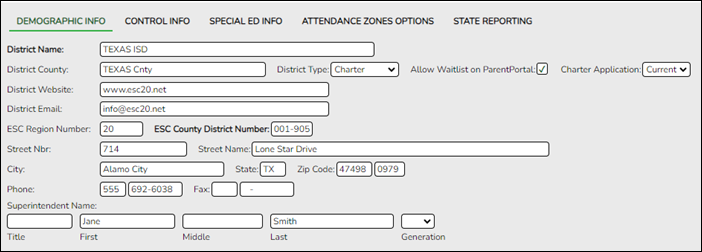
Update data:
District Name (Required) Type the name of the district, up to 34 characters. District County Type the name of the county where the district is located, up to 20 characters. District Type Indicate whether the district is independent, private, or charter. Allow Waitlist on ParentPortal Select to enable the display of the Charter School Application Form Apply button on the ASCENDER ParentPortal Login page.
This field only displays if the District Type field is set to Charter.Charter Application Select Current or Next to indicate the Charter School Application Form school year in ASCENDER ParentPortal.
This field only displays if the District Type field is set to Charter.District Website Type the address of the district's website, up to 255 characters.
IMPORTANT: If your district website is down when you save, you will receive an error message because the program is trying to connect to the website to validate the entry. Try again when your website is working properly.
District Email Type an email address for contacting the district, up to 255 characters.
ESC Region Number (Required) Type the region number for the education service center that serves the district. The field must be two digits (e.g., type 01 for ESC-1). ESC County District Number Type the six-digit ESC county-district number (NOT the LEA number) as assigned by the Texas Education Agency (TEA). Street Nbr
Street Name
City
State
Zip Code +4Enter the address for the district, up to 60 characters. Phone
FaxType the area code and phone numbers for the district. Superintendent Name Type the title, first name, middle name, and last name of the district superintendent. Select the generation code if applicable. ❏ Click Save.
- Registration > Maintenance > District Profile > District Maintenance > State Reporting
❏ Verify the information entered on State Reporting is correct.
The State Reporting tab allows the user to enter data reported in the Education Organization Domain.
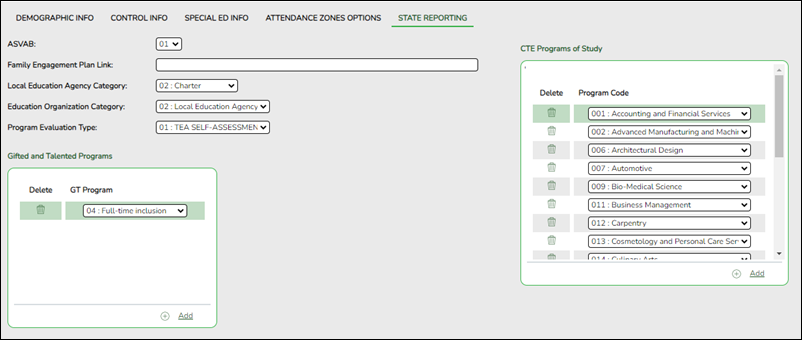
Update data:
ASVAB ARMED-SERVICES-VOC-APT-BATTERY-INDICATOR-CODE (E1625) (S1) (Code table C217)
Select the code indicating if the district or open-enrollment charter school provides students in grade levels 10-12 an opportunity to take the Armed Services Vocational Aptitude Battery (ASVAB) test or a comparable substitute. This field is not displayed prior to 2018-2019.
NOTE: As of the 2019-2020 school year, the field is not mandatory at campuses that do not offer grade levels 10-12, per TEDS 2020.2.0. The field is required at campuses with grade levels 10-12.
Family Engagement Plan Link FAMILY-ENGAGEMENT-PLAN-LINK (E1583) (S3)
Type the website address used by the LEA to provide its Family Engagement Plan.Local Education Agency Category Select the Local Education Agency Category and the Local Education Agency Category Description for the School Year. Education Organization Category Select the Education Organization Category and the Education Organization Category Description for the School Year. Program Evaluation Type PROGRAM-EVALUATION-TYPE (E1626) (Code table C216)
Select the Program Evaluation Type that indicates the type of program evaluation tool LEAs use to report the progress of students participating in a High-Quality PK program.
❏ Click Save.
❏ Under Gifted and Talented Programs:❏ Click +Add to add a record.

Delete a row. 1. Click
to delete a row. The row is shaded red to indicate that it will be deleted when the record is saved. You can select multiple rows to be deleted at the same time.
2. Click Save. You are prompted to confirm that you want to delete the row. Click Yes to continue. Otherwise, click No.
You can save edits and delete records in the same step (i.e., the changes are all committed when the record is saved).
GT Program GIFTED-TALENTED-PROGRAM-CODE (E1645) (Code table C223) indicates a gifted and talented program the LEA has established that is consistent with the state plan developed under TEC 29.123.
Select the program code from the drop-down menu.
❏ Under CTE Programs of Study:
❏ Click +Add to add a record.
Delete a row. 1. Click
to delete a row. The row is shaded red to indicate that it will be deleted when the record is saved. You can select multiple rows to be deleted at the same time.
2. Click Save. You are prompted to confirm that you want to delete the row. Click Yes to continue. Otherwise, click No.
You can save edits and delete records in the same step (i.e., the changes are all committed when the record is saved).
Program Code PROGRAM-OF-STUDY (E1643) (Code table C220) indicates a program of study the LEA offers.
A program of study is a comprehensive, structured approach for delivering academic and career and technical education to prepare a student for postsecondary education and career success.
Select the program code from the drop-down menu.❏ Click Save.
- Registration > Maintenance > District Profile > Local Program Codes
❏ Enter the Local Program to TEA PEIMS Codes.
The Local Program Codes tab allows you to maintain a table of district-level codes for local programs such as dyslexia, 504, crisis code, or any short-term programs that arise in the district. At the campus level, the codes are chosen from the codes set up on this page. Campuses cannot select programs that do not exist on this page. Campuses use the codes to enroll students in these local programs.
You can also generate a report that allows you to see which local programs will be written to the next year record when ASDR is run.
StudentCharacteristic Elements (E3063) (Code table C344):
Descriptor Description 01 At Risk 02 Immigrant 03 Migratory 04 Dyslexia 06 ECHS 07 P-TECH 08 New Tech 09 IEP Continuer 10 Star of Texas 11 PK Eligible Prior Year 12 Section 504 13 Intervention Strategy 14 Pregnancy Related Services 15 Gifted and Talented 16 Adult Previous Attendance 17 General Education Homebound 18 Parent Request Retention 19 Bilingual/ESL Summer School 20 Addtional Days Program Participation 21 Virtual Student Not In Membership 22 R-PEP Participation 23 Dropout Recovery Program IndividualGraduationCommitteeGraduateIndicator - (E1562)
CrisisEvent - (E1054) (Code table - C178)
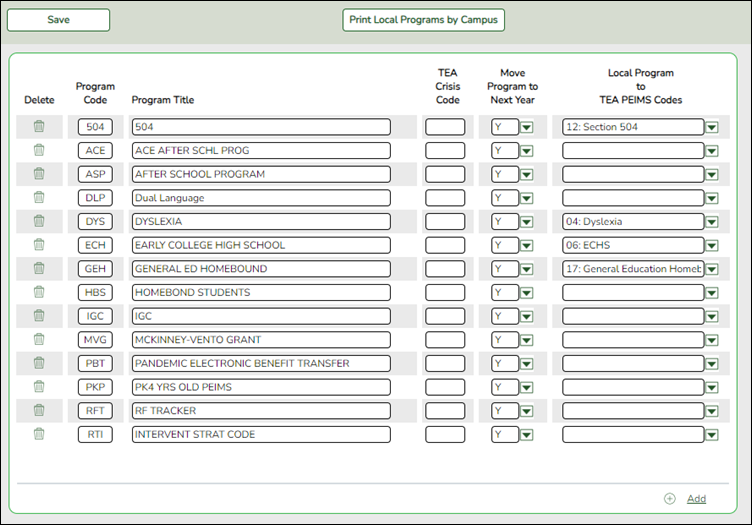
Update data:
Existing codes are displayed in order by code.
❏ From the Local Program to TEA PEIMS Codes drop-down menu, choose 20: Additional Days Program Participation.
❏ Click +Add.A blank row is added to the grid.
Program Code Type the three-character code for the program. Program Title Type a description for the program, up to 40 characters. TEA Crisis Code For local programs created to track students displaced by a crisis, type the corresponding crisis code, as designated by the Texas Education Commissioner: Move Program to Next Year Indicating how Annual Student Data Rollover (ASDR) handles local programs for the district.
N or blank - Disable the Move Program to Next Year field on the Campus Local Program Codes page. The program will be dropped when ASDR is run.
Y - Allow the program to be moved to next year.Local Program to TEA PEIMS Codes Select the local program code.
DATA ELEMENT: StudentCharacteristic (E3063) (Code Table C344) captures important characteristics of the student's environment or situation.
❏ Click Save.
❏ To update a description, type over the existing description and save.
You can only update the description; you cannot update a code. To change a code, you must delete and re-enter the code and description.
- Registration > Maintenance > Campus Profile > Campus Information Maintenance > Demographic Info
The Campus Profile > Demographic Info tab allows you to maintain campus demographic data, such as the campus name, address, and phone number.
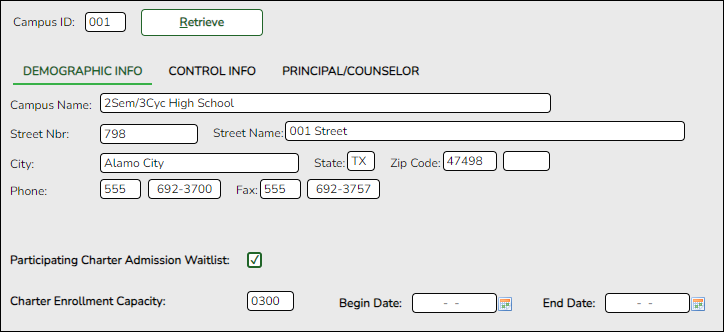
Update data:
Campus ID The campus to which you are logged in is displayed. To view another campus or add a new campus, type the three-digit campus ID and click Retrieve.
To enter a new campus, type an unused three-digit campus ID for the new campus and click Retrieve. The fields are cleared allowing you to enter and save data for the new campus.
According to TEA guidelines:
001-040 are used for high school campuses.
041-100 are used for junior high and middle school campuses.
101-698 are used for elementary school campuses.
Existing demographic information for the campus is displayed.
Campus Name Type the name of the campus, up to 34 characters. Street Nbr
Street Name
City
State
Zip Code +4Enter the address for the campus, up to 60 characters. Phone
FaxType the area code and phone numbers for the campus.
The following fields only display if the District Type field is set to Charter on the Registration > Maintenance > District Profile > District Information > Demographic Info tab.Participating Charter Admission Waitlist For each charter school campus, select to indicate whether or not the campus will have a waitlist for admission. Charter Enrollment Capacity Type the maximum approved student enrollment number (up to four digits) for which the campus is able to provide instruction without exceeding staffing and facility limitations. Begin Date Type the begin date using the MMDDYYYY format. Or, click calendar icon to select the date from a calendar. End Date Type the end date using the MMDDYYYY format. Or, click calendar icon to select the date from a calendar. ❏ Click Save.
- Registration > Maintenance > Campus Profile > Campus Information Maintenance > Control Info
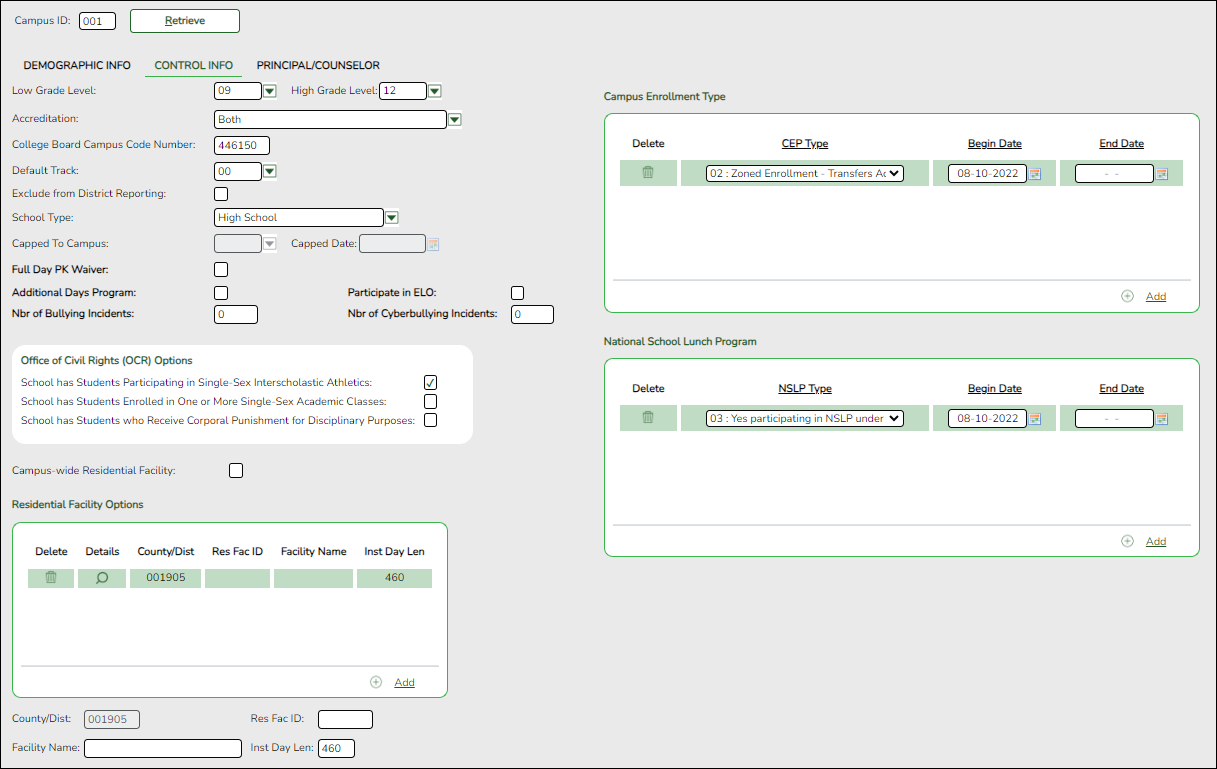
The Control Info tab allows you to set up control options for the campus related to Registration and OCR.
NOTE: Changes made in Discipline will affect the Nbr of Bullying Incidents and Nbr of Cyberbullying Incidents totals. The Nbr of Bullying Incidents is calculated when PEIMS Code 61 is used and the Nbr of Cyberbullying Incidents is calculated when PEIMS Code 61 and the Cyber checkbox is selected.
Update data:
Campus ID The campus to which you are logged in is displayed. To view another campus or add a new campus, type the three-digit campus ID and click Retrieve.
Existing control information for the campus is displayed.
❏ Update as needed.
Low/High Grade Level Select the lowest and highest grade levels taught at the campus. Accreditation Select the code for the organization(s) that accredit the campus. College Board Campus Code Number Type the six-character ID used by the educational testing service to identify the campus. This applies only to high schools. Default Track Select the attendance track you want to use as the default when enrolling students. For a new student campus with no attendance options, use 00.
Business campuses can be created on District Admin.Exclude from District Reporting Select to exclude the campus from district reports in all ASCENDER Student applications.
This option can be used for students who are tracked in their home district for TEA reporting purposes but also need to be tracked at the district that serves them, such as through a special education program, DAEP, or JJAEP. The district that serves the students can track attendance, grades, and other data, and provide the information to the home district for TEA reporting. If this option is selected, the campus is excluded from district reports, the UID export, and PEIMS TSDS.
Excluded campuses are excluded in the following reports, unless the report is generated specifically for that campus:
Attendance: SAT0900, SAT0950, SAT1100, SAT1700, SAT2100, SAT2300, SAT2400, SAT2500, SAT5000, Create Attendance Report
Discipline: SDS0100, SDS0200, SDS0300, SDS0500, SDS0700, SDS0800, SDS0900, SDS1000, SDS1100, SDS1200, SDS1300, Create Discipline Report
Grade Reporting: SGR0110, SGR0120, SGR0130, SGR0140, SGR0200, SGR2046, SGR2060, SRG2081, SGR2091, SGR2500, SRG2550, Create Grade Reporting Report
Health: SHS0110, SHS0295, SHS0296, SHS0297, SHS0298, Create Demo
Registration: SDS0300, SGR1950, SRG0200, SRG0300, SRG0600, SRG1001, SRG1100, SRG1400, SRG1500, SRG1600, SRG1700, SRG1800, SRG1900, SRG2300, Create Registration Report
Special Education: SDS0200, SEM0200, SEM0400, SEM0620, SEM0640, SEM0720, SEM0750, SEM0800, SEM0850, SEM0900, SEM0950, SEM1000, SEM1100, SEM1200, Create Special Ed CY, Create Special Ed NY
School Type Select the code for the type of school, which is required for the TSDS Student Extractor. The drop-down list contains codes from the TSDS table DC111.
Leave blank if the LEA is not using the Student Dashboard.Capped To Campus This field is only enabled if Enable Attendance Zones is selected on Registration > Maintenance > District Profile > District Maintenance > Attendance Zones Options, and is used to prevent over enrolling students at a particular campus.
Select the campus at which a student will be enrolled if the campus you are logged onto is capped.
For a student to be allowed to enrolled at the capped campus, the student's entry date must be later than the Capped Date, and that student's Transfer Factor must be 0 (CY/NY Xfer Factor on Registration > Maintenance > Student Enrollment > Demo1).Capped Date If Capped To Campus is used, enter the date after which students can be enrolled at the capped campus. The date must be a valid school or working date. Full Day PK Waiver Select if the campus has received an exemption from offering a full-day PK program.
TWEDS Data Element: PK-FULL-DAY-WAIVER-INDICATOR-CODE (E1646)
Code table: C088Additional Days Program Select if the campus offers an Additional Days Program to students in PK - 5.
TWEDS Data Element: ADDITIONAL-DAYS-PROGRAM-INDICATOR-CODE (E1671)
Code table: C088Participate in ELO Select if the student participates in an Extended Learning Opportunity (ELO) program. Nbr of Bullying Incidents NUMBER-OF-BULLYING-INCIDENTS (E1727) indicates the number of reported incidents of bullying at each campus.
Enter the number of Bullying incidents.
NOTE: Any changes made on Discipline > Student > Maintenance to student incidents will automatically update totals.Nbr of Cyberbullying Incidents NUMBER-OF-BULLYING-INCIDENTS (E1727) indicates the number of reported incidents of bullying at each campus.
Enter the number of Bullying incidents.
NOTE: Any changes made on Discipline > Student > Maintenance to student incidents will automatically update totals.Office of Civil Rights (OCR) Options Select applicable fields for the campus. If selected, these selections are extracted to OCR.
School has Students Participating in Single-Sex Interscholastic Athletics (School Part 2 > Exam, Staff, and Retention > ATHL-1)
School has Students Enrolled in One or More Single-Sex Academic Classes (School Part I > COUR-12)
School has Students who Receive Corporal Punishment for Disciplinary Purposes (School Part 2 > Discipline > DISC-3)Campus-wide Residential Facility Select if all students at the campus are residing in a residential facility.
❏ Under Residential Facility Options:❏ Click +Add to add the residential facilities attended by students within the campus boundaries.
The following fields are displayed below the grid.
This list populates the Residential Facility ID field on Registration > Maintenance > Student Enrollment > W/R Enroll for students who reside in a residential facility.NOTE: These settings are campus specific. If the same facility exists on multiple campuses, the information must be entered for each campus.
County/Dist The county-district number you are logged on to is displayed and cannot be changed.
TWEDS Data Element: DISTRICT-ID (E0212)Res Fac ID Type the six-digit residential facility ID.
TWEDS Data Element: RESIDENTIAL-FACILITY-ID (E1627)Facility Name Type the name of the residential facility, up to 60 characters. Inst Day Len The field is automatically populated with the Instructional Daily Minutes as entered for the default campus-track on Attendance > Maintenance > Campus > Campus Options. If the number of minutes in the school day at the residential facility is different, this field can be modified.
TWEDS Data Element: RESIDENTIAL-FACILITY-STUDENT-SCHOOL-DAY-LENGTH (E1637)}Delete a facility. 1. Click
to delete a row. The row is shaded red to indicate that it will be deleted when the record is saved. You can select multiple rows to be deleted at the same time.
2. Click Save. You are prompted to confirm that you want to delete the row. Click Yes to continue. Otherwise, click No.
You can save edits and delete records in the same step (i.e., the changes are all committed when the record is saved).

Click to view modify the information. The data is displayed in fields below the grid allowing you to make changes. County/Dist The county-district number you are logged on to is displayed and cannot be changed. Facility Name Type the name of the residential facility, up to 60 characters. Res Fac ID Type the six-digit residential facility ID. Inst Day Len Type the number of minutes a residential facility student receives instruction based on their Individualized Education Plan (IEP).
❏ Click Save.
❏ Under Campus Enrollment Type:
❏ Click +Add to add the campus enrollment type.The following fields are displayed below the grid.
NOTE: These settings are campus specific. If the same facility exists on multiple campuses, the information must be entered for each campus.
CEP Type Select the type of campus where the student is enrolled. Begin Date Type the begin date using the MMDDYYYY format. Or, click calendar icon to select the date from a calendar. End Date Type the end date using the MMDDYYYY format. Or, click calendar icon to select the date from a calendar.
❏ Under National School Lunch Program:
❏ Click +Add to add the lunch program type.The following fields are displayed below the grid.
NOTE: These settings are campus specific. If the same program exists on multiple campuses, the information must be entered for each campus.
NSLP Type Select the type of lunch program in which the student is enrolled. Begin Date Type the begin date using the MMDDYYYY format. Or, click calendar icon to select the date from a calendar. End Date Type the end date using the MMDDYYYY format. Or, click calendar icon to select the date from a calendar. ❏ Click Save.
- Registration > Maintenance > Student Enrollment > Demo1
Information provided in this guide is limited to the TSDS Upgrade only. Additional information for Demo1 can be found on Registration > Maintenance > Student Enrollment > Demo1.
Update data:
❏ Under Student Indicators:
As of Status Last Friday October Indicate the student's status as of the last Friday in October.
This status will calculate daily (Monday-Friday) at 6:00 pm.As of Status Last Day Enrollment Indicate the student's status as of the last day enrollment.
Additional guidance to come at a later date.
❏ Click Save.


Prior Year Leaver data will be updated for the prior year on the following screens:
- Registration > Maintenance > Student Enrollment > Demo1
Allow data elements to be editable for one prior year in the Phone/Address group box if the student is listed in the Prior Year Leaver Tracking Directory.
- Registration > Maintenance > Student Enrollment > Demo3
Allow data elements to be editable for one prior year for Military Enlistment in the Status Indicators group box if the student is listed in the Prior Year Leaver Tracking Directory.
- Registration > Maintenance > Student Enrollment > Contact (PY Leaver)
Allow data elements to be editable for one prior year for contacts who are: Priority = 1 and Guardian = 1 if the student is listed in the Prior Year Leaver Tracking Directory.
- Registration > Maintenance > Student Enrollment > W/R Enroll
Allow data elements to be editable for one prior year in the Reason field if the student is listed in the Prior Year Leaver Tracking Directory.
Grade Reporting
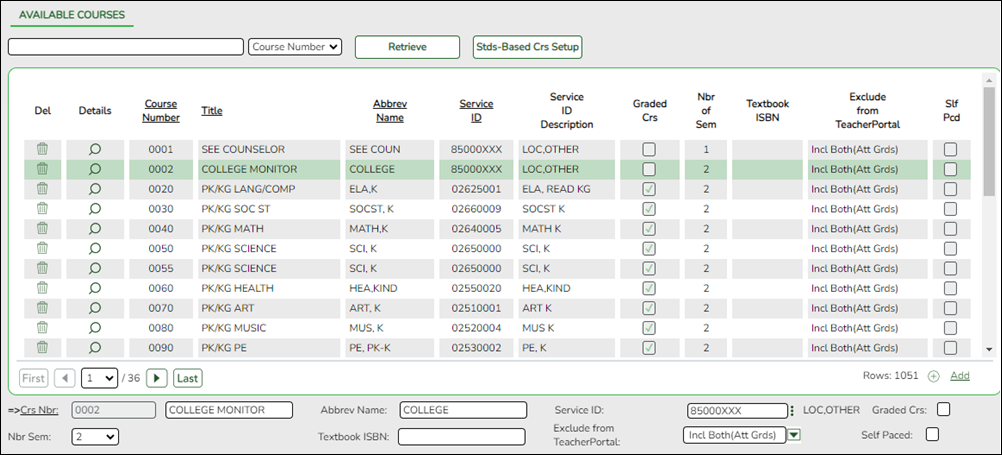
- Grade Reporting > Maintenance > Master Schedule > District Schedule > Available Courses
❏ Update all local service IDs to be unique for each course.
For Ed-Fi TSDS reporting, ALL local Service IDs (that begin with 8) created by the district will need to be a unique value per course. The XXX value must be changed to a unique alphanumeric value.
- Grade Reporting > Maintenance > Master Schedule > Campus Schedule > Section
❏ Verify all Instructional Staff responsibility records are entered.
All Instructional Staff responsibility records must be entered on this screen. These are your Role ID/StaffClassification Codes 087 (Teacher), 047 (Substitute), and 033 (Pre-Kindergarten Aides).
Instructional Staff and Pre-Kindergarten Educational Aides (StaffClassification 033) are reported using the Course, CourseOffering, Section, and StaffSectionAssociationentities in the TeachingandLearningDomain.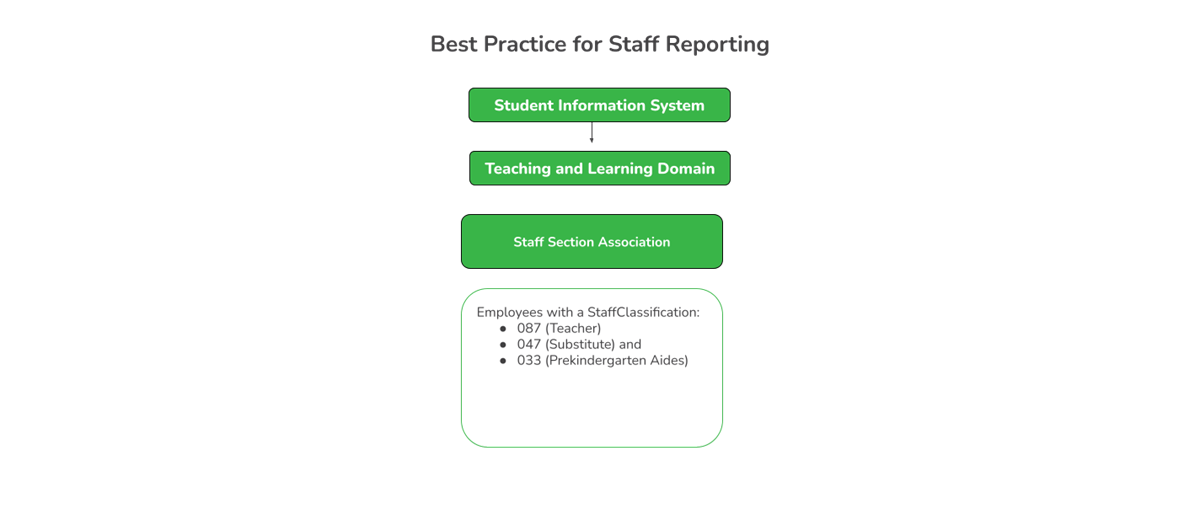
- Grade Reporting > Maintenance > Tables > TSDS Crosswalks
The Grade Reporting > Maintenance > Tables > TSDS Crosswalks tab allows you to convert data in your district format to the standard TEA format for the fall.
Update Data:Crosswalk Type Select the crosswalk table for which you want to convert data.
- The selected crosswalk table is displayed. The list can be re-sorted.
You can re-sort the grid by clicking on an underlined column heading. It will sort in ascending order. Click it again to sort in descending order.
A white triangle next to the column heading indicates the column by which the grid is currently sorted and whether it is sorted in ascending or descending order. - A blank row is added to the bottom of the grid.
Crosswalk Type:
042 Responsibilities - From Campus/Period to Minutes
043 Responsibilities - From Campus/Service ID to Minutes
A blank row is added to the bottom of the grid.
Row Nbr The rows are automatically numbered.
From Type the district code you want to convert.
To Type the TEA format code to which you want to convert.
The From and To values must be different.
❏ Click +Add to add a new row.
❏ Click Save.
Crosswalk Type:
044 PE Responsibilities - Campus/Crs/Sec
This crosswalk allows you to enter the number of days and minutes in which the PE teacher provides physical education instruction each week at the campus for the four weeks in October that include the last Friday in October. This is required for all teachers of record for course-sections associated with the following physical education (PE) service IDs:
02530002
02530003
02530004
02530005
02530006
02530007
02530008
02850000
03823000
82210XXX
82931XXX
83210XXX
84200XXX
PES00051
PES00053
PES00056All districts will use this crosswalk, except for Business-only districts whose responsibility records come from Human Resources, or if PE service IDs are not used for PE courses, or if your PE service ID courses do not have students.
Important: Minutes for any holidays should be included.
NOTE:
These fields are not reported for employees with PE substitution responsibilities (i.e., employees with service IDs PES00000-PES00015).
Records are created for non-campus-based PE courses (i.e., Non Campus Based is greater than 00 in the campus master schedule) if the course is taught during semester 1 and at least one student is enrolled in the class.
This crosswalk is not used for Business-only districts whose responsibility records come from Personnel, or if PE service IDs are not used for PE courses, or if your PE service ID courses do not have students. All other districts should use this crosswalk.
Create or update the crosswalk:
❏ In the Crosswalk Table field, select 044-PE Responsibilities - Campus/Crs/Sec.
❏ The first time you access the page, there will be rows from the previous year displayed. Click Delete then click Create to add current year courses.A list of course-sections associated with physical education (PE) service IDs is listed. This list is predefined and cannot be changed.
The From column lists course-sections in the campus-course-section format, where:- The first three digits are the campus ID.
- The next digits are the course number, which may contain between four and eight digits.
- The last two digits are the section number.
- The course-sections are for semester 1.
❏ For the Teacher of Record for each course-section listed, enter the following information for the four weeks in October that include the last Friday in October:- In the Day Week 1-4 fields, type the number of days in which the employee provides physical education instruction each week at the campus. Valid entries are one digit between 0-5.
- In the Mins Week 1-4 fields, type the number of minutes the employee provides physical education instruction each week at the campus. Valid entries are up to four digits between 0-3000.
These fields are automatically populated according to the Days code entered on Grade Reporting > Maintenance > Master Schedule > Campus Schedule > Section for each course-section meeting time. The program calculates the minutes in the days from the section Time Begin/End and sums for each meeting time the days per week for that meeting time, then multiplies the minutes per day for that meeting time to calculate the minutes for each week.
❏ Click Save.
❏ Click Print to print the data displayed.
❏ If new PE responsibilities records are found the next time you access the page, the Create button will be replaced with the Refresh button. Click Refresh to add new records to the grid.
NOTE: You cannot delete data row by row. You must click Delete to delete all rows on the page. Then, click Create to populate the page with PE course-sections. Then, you can re-enter all data.
WARNING: If you click Delete, all rows are deleted.
Crosswalk Type:
ADP Additional Days School Year Courses
A blank row is added to the bottom of the grid.
Row Nbr The rows are automatically numbered.
Course Type the course code you want to convert.
Campus Type the campus number to which you want the course to transfer.
❏ Click +Add to add a new row.
❏ Click Save.
Other functions and features:
Print Print the crosswalk report.
Review the report using the following buttons:
Click to go to the first page of the report.
Click to go back one page.
Click to go forward one page.
Click to go to the last page of the report.
The report can be viewed and saved in various file formats.
Click to save and print the report in PDF format.
Click to save and print the report in CSV format. (This option is not available for all reports.) When a report is exported to the CSV format, the report headers may not be included.
Click to close the report window. Some reports may have a Close Report, Exit, or Cancel button instead.
Retrieve Retrieve data from the last save. Click to discard unsaved changes and retrieve information from the last time data was saved.
Delete a row. Click to delete the selected row. The row is shaded red to indicate that it will be deleted when the record is saved.
Click Save. A message is displayed confirming that you want to delete the row.
- Click OK to delete the row.
- Click Cancel not to delete the row.


Finance
- Finance > Tables > TSDS Crosswalks
The Finance > TSDS Crosswalks tab allows you to map financial data (actual and budget) from your LEA's set of accounts to TEA's Chart of Accounts. These crosswalks only affect the data in the State Reporting tables and allow you to continue maintaining your data as-is in the Business system.
The TSDS Business crosswalks are associated with the logged-on file ID; therefore, LEAs can have different crosswalks per file ID.
Modify a record:
Field Description Crosswalk Type Click the drop-down arrow to select the crosswalk table type for which you want to crosswalk data. A list of existing from and to account code elements is displayed for the selected crosswalk type. Review the list of Finance TSDS Crosswalk Tables.
❏ Click +Add to add a row.
From Based on the selected crosswalk, type the from account code element(s) to crosswalk. To Based on the selected crosswalk, type the to account code element to crosswalk.
❏ Click Save.
Other functions and features:
Retrieve Click to discard unsaved changes and retrieve information from the last time data was saved.
Print Click to print the report. Review the report. Click to delete a row. The row is shaded red to indicate that it will be deleted when the record is saved.
Click Save.
Personnel
- Personnel > Maintenance > Staff Demo > Responsibility
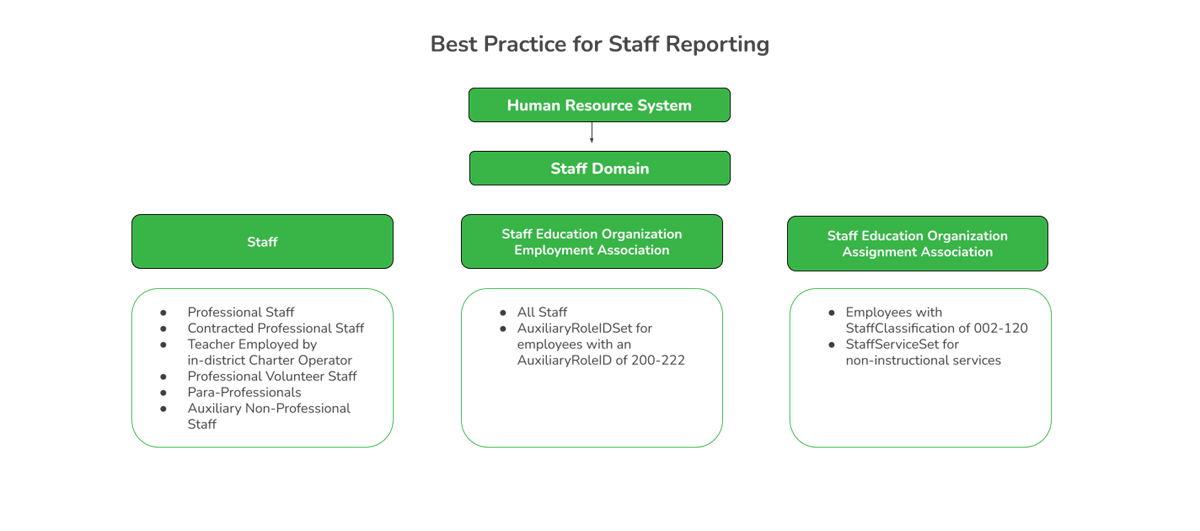
All Non-Instructional Staff responsibility records must be entered on this screen. These records will use the Staffservice Code Table.
Non-Instructional Staff and Non-Pre-Kindergarten Educational Aides (StaffClassification 033) are reported using the StaffEducationOrganizationAssignmentAssociationentity in the StaffDomain.

District Administration
- District Administration > Tables > District Information > Campus Name/Address
Campus Name/Address - DA1200
District Administration > Tables > District Information > Campus Name/Address
This tab is used to record the campus demographic information such as campus number, name, address, phone number, and fax number. The table is shared between the ASCENDER Business and Student systems.
Note: If this tab is not selected or is set to read- on the user’s profile in Security Administration, the fields are disabled.
Manage campus information:
Field Description Year Verify that the correct school year is displayed. If not, type the four-digit school year for which you want to add or retrieve data and click Retrieve. ❏ Click
 to select a campus and click Retrieve. The campus demographic fields are displayed.
Campus ID Type the campus ID. If an existing campus was retrieved, the campus ID is displayed. The campus ID must be numeric and cannot include alpha characters. Campus Name Type the campus name.
Street Nbr Type the campus street number.
Street Name Type the campus street name.
City Type the name of the city where the campus is located.
State Click
 to select the two-character state code.
Zip Type the five-digit zip code and suffix.
Phone Type the campus phone number in the ###-###-#### format.
Fax Type the campus fax number in the ###-###-#### format.
Exclude from reporting to TEA Select to exclude this campus record from TEA reporting.
Note: This option should be selected for all non-instructional campuses to exclude records from TSDS reporting.
• If selected, the Campus Name / Address report displays 1 in the Exclude Dist column.
• If unselected, the Campus Name / Address report displays 0 in the Exclude Dist column.❏ Click Save.
Other functions and features:
Retrieve Click to retrieve information from the last save. If you click Retrieve, any unsaved changes will be lost.
Add Click to add a campus. The fields are cleared allowing you to enter the campus information.
Delete Click to delete the selected campus. A message is displayed prompting you to confirm that you want to delete the campus.
Click Yes to delete the campus.
Click No to not delete the campus and return to the Campus/Name Address tab.Print Click to print the Campus Name/Address report. A window is displayed with the following options:
Print Current Campus Name/Address Record - If selected, only the campus information displayed on the tab is printed.
Print All Saved Campus Name/Address Records - If selected, campus information for all saved campuses is printed.
Select the report(s) to be printed.
Click Yes to continue to the selected report(s).
Click No to return to the Campus Name/Address tab.
- District Administration > Options > TSDS > Options
Options - DA2100
District Administration > Options > TSDS > Options
This tab is used to define email distribution lists to communicate various information about TSDS extracts. For example, the TSDS extract that is automatically scheduled to run Monday-Friday at 6:00 PM will generate an error report, which will be emailed to the designated recipients on this tab.
Providing email address(es) is optional. However, if no email address is entered under Personnel/Payroll Extract Distribution List, reports for employees with more than 365 days employed or with zero days employed will not be emailed.
Modify a record:
Field Description Submission Year Type the submission year set by the Texas Education Agency (TEA) in the YYYY format. This is the ending year of the school year for which you will be submitting data (e.g., 2024-2025 school year; Submission Year = 2025). The submission year is edited to ensure a valid year is entered and that code table data is loaded for the year specified. ❏ Click Retrieve. The corresponding record is displayed. If a record is not available, the fields on the page are blank and you can create the applicable record.
PEIMS Fall Enrollment Snapshot Date Type the fall as-of date set by the Texas Education Agency (TEA) in the MM-DD-YYYY format. Or, click the field to select the date from a calendar. This date is used in the fall for staff extracts. PEIMS Fall Snapshot Date Type the fall as-of date set by the Texas Education Agency (TEA) in the MM-DD-YYYY format. Or, click the field to select the date from a calendar. This date is used in the fall for staff extracts. School Start Window (SSW) Date Type the school-start window date set by TEA for the current school year in the MM-DD-YYYY format. Or, click the field to select a date from a calendar. Under Finance Extract Distribution List:
❏ Click +Add to add a row.
Email Type the email address to receive information about the Finance extract. The address can be a maximum of 100 characters. Under Personnel/Payroll Extract Distribution List:
❏ Click +Add to add a row.
Email Type the email address to receive information about the Personnel/Payroll extract. The address can be a maximum of 100 characters. Under TSDS Extract Errors Distribution List:
❏ Click +Add to add a row.
Email Type the email address to receive information about TSDS Extract Errors. The address can be a maximum of 100 characters. ❏ Click Save.
Other functions and features:
Retrieve Click to retrieve information from the last save. If you click Retrieve, any unsaved changes will be lost.
Click to delete a row. The row is shaded red to indicate that it will be deleted when the record is saved.
Click Save. A message is displayed asking if you want to delete the row. Click OK.
Click Cancel to not delete the row. - District Administration > Options > TSDS > Connection
Connection - DA2100
District Administration > Options > TSDS > Connection
This tab allows you to maintain the appropriate credentials for accessing your LEA's Ed-Fi Operational Data Store (ODS), which is a secure platform used to store data from multiple systems in a central location.
You must get this information from TEA’s TSDS Data Management Center (DMC). However, to obtain this information, you must first log on to the Texas Education Agency Login (TEAL) system.
Note: If this tab contains information, then at least one email address is required for each distribution list on the Options tab.
Exchange clients: When the migration flag is set to Y and the URL contains “Exchange”, the API URL, Key, and Secret fields are disabled. If a connection to the EODS cannot be established, the fields will remain disabled and a message will be displayed referring you to contact the Exchange or your ESC for assistance.
Modify a record:
Field Description Submission Year Type the submission year set by the Texas Education Agency (TEA) in the YYYY format. This is the ending year of the school year for which you will be submitting data (e.g., 2024-2025 school year; Submission Year = 2025). The submission year is edited to ensure a valid year is entered and that code table data is loaded for the year specified. ❏ Click Retrieve.
API URL Type your LEA's Ed-Fi Operational Data Store (ODS) address. This field can be a maximum of 255 characters. Key Type the key. This field can be a maximum of 50 characters. Secret Type the secret. This field can be a maximum of 50 characters. ❏ Click Save.
Other functions and features:
Retrieve Exchange Credentials
Onboard to The Exchange
Reset Exchange CredentialsThe button label changes based on the LEA's Exchange status.
Non-Exchange Clients:
Click the Retrieve Exchange Credentials button to create credentials for The Exchange. This process is for LEAs that have not previously been issued credentials.
For example:
- LEAs that currently have TEA credentials.
- LEAs that need to create a new connection record (e.g., new ASCENDER client).
- LEAs that have not yet converted to The Exchange and need to create a credentials record for the new school year.
Note: When the Retrieve Exchange Credentials button is clicked, the button updates the API URL field, the Key field, the Secret field, and changes the button to Onboard to The Exchange.
Click the Onboard to The Exchange button only during the One Touch Onboarding window to initiate the transfer of data from ASCENDER to The Exchange.
NOTE: LEAs will be notified by their ASCENDER Manager as to when it is time to initiate the transfer.After clicking the Onboard to The Exchange button, a pop-up window opens with the following warning message:
You are about to onboard this district to The Exchange by creating Exchange credentials in ASCENDER.
This process will establish a connection from ASCENDER to The Exchange. Existing TEA credentials will not be shared with The Exchange automatically.
The initial Extract and API processing may take an extended amount of time due to the extraction and processing of data.
Do NOT proceed until the Data Privacy Agreement and Exchange License Agreement have been completed with your local ESC, and your local ESC has confirmed that you are ready to onboard to The Exchange.
By clicking Yes to proceed, you acknowledge the potential risks and confirm that you have met the above requirements.Note: When the Onboard to The Exchange button is clicked, the button updates the API URL field (with the Exchange URL), the Key field, the Secret field, and changes the button to Reset Exchange Credentials.
Existing Exchange Clients: Click the Reset Exchange Credentials button to reset credentials. The client ID will stay the same and a new secret will be generated.
Note: When the Reset Exchange Credentials button is clicked, the button only updates the Secret field, the API URL and Key fields remain the same.
Retrieve Click to retrieve information from the last save. If you click Retrieve, any unsaved changes will be lost.
- District Administration > Options > TSDS > Domains & Entities
Domains & Entities - DA2100
District Administration > Options > TSDS > Domains & Entities
This tab is used to extract and send Texas Student Data System (TSDS) data to Texas Education Agency (TEA) for Ed-Fi processing.
IMPORTANT: Use the ASCENDER TSDS New School Year Best Practice Guide to assist you in making selections of the domains and entities to send to TSDS.
Submission Levels:
This tab consists of four submission levels, each including the specified domains and entities per TEA requirements. Each submission level is dependent on the prior level. For example, you must first select all First Level Submission domains prior to selecting and saving any Second Level Submission domains/entities, and so on.
- Once a domain/entity has been selected and successfully submitted and accepted by TEA, the associated checkbox remains selected and disabled for the remainder of the submission school year (Submission Year).
- Any changes within the submitted domain/entity will continue to be included in Ed-Fi processing for the specified submission school year.
- It is recommended that you do not select all Submission Levels during the same instance.
Additional Dependencies:
Note: These dependencies originate from Ed-Fi/TSDS but are being separated to enhance clarity and processing efficiency.
- Enrollment Domain depends on Student Identification and Demographic > Student
- Student Identification and Demographic Domain > StudentEducationOrganizationAssociation depends on Enrollment Domain
- Teaching and Learning > Course Offering depends on Teaching and Learning > Course
- Teaching and Learning > Section depends on Teaching and Learning > CourseOffering
- Teaching and Learning > StaffSectionAssociation depends on Teaching and Learning > Section
- Teaching and Learning > StudentSectionAssociation depends on Teaching and Learning > Section
- Student Attendance > StudentProgramAttendanceEvent depends on Alternative and Supplemental Services Domain
Saving and Sending Data:
After considering the above dependencies, select and save the applicable domains. The saved selections on this tab are not dependent on the logged-on user and once saved, will be used in the Extract & Send process to extract and send data to TEA.
Data transmission occurs in two ways:
Method Description Automatic Scheduled extracts run every weekday (Monday-Friday) starting at 6:15 PM until 2 AM. At 2 AM, the overnight system backups begin. The weekend run only includes Saturday and begins at 5:30 AM until 11:30 PM.
Note: If the LEA has been migrated to Ed-Fi Sync, the overnight Chron job only processes once per night. For all remaining LEAs, no additional TSDS Chron jobs should be kicked off after midnight so those starting after midnight thru the 4:15 AM timeframe will be stopped.Manual Users can initiate data transmission to TEA on demand by clicking the Extract & Send button. Note: If a manual data transmission is already in progress, the scheduled extract will not run.
Extract & Send Process:
The automatic nightly TSDS Extract/Send process is disabled for prior school years effective the day after the fourth Thursday in August. To generate or send data for a prior school year, use the Extract & Send button.
Note: The Extract & Send button is disabled if the Ed-Fi API Connection Migration flag is set to Y. This allows only API commands to process data.
The data is extracted from ASCENDER tables, transformed per TEA requirements to meet the national Ed-Fi data standard, and loaded into the ASCENDER Ed-Fi staging tables.
❏ If the Extract & Send process occurs via the automatic scheduled extract, the TSDS extract emails are generated at 6:15 AM. These emails include the TSDS Extract Error report as well as the Prior Year Actuals, Budget, and Payroll reports (as applicable), and are sent to the defined TSDS Extract Errors Distribution List on the District Administration > Options > TSDS > Options tab.
❏ If the Extract & Send process occurs manually via the Extract & Send button, the TSDS Extract Errors report is not generated and emailed; however, you can navigate to the District Administration > Inquiry > TSDS Level 1 Errors page and click Extract Errors Reprint to generate the TSDS Extract Errors report from the last instance of the Extract & Send process.
Notes:
- The TSDS Extract Errors report is not cumulative and only displays errors from one day.
- The listed errors are only displayed on the error report until they are corrected.
- Data errors listed on the TSDS Extract Errors report do not necessarily mean that you will have TSDS Level 1 Errors.
- TSDS extract errors are typically data errors that require record(s) in ASCENDER to be corrected.
- If the Extract TSDS database column is set to 0, the Budget and Payroll extract file/PDF will not be generated and sent via email. This discontinues the emails for Budget and Payroll until after the Fiscal Year Close process is done for the current year. If the Extract TSDS database column is set to 1, 2 or 3, the Budget and Payroll extract/PDF will be generated and emailed as usual.
After the data extracted, transformed, and loaded into the ASCENDER Ed-Fi staging tables, the data is then transmitted in an Ed-Fi JSON file via Application Programming Interface (API) processing to an Operational Data Store (ODS) at TEA where it may or may not land successfully.
- Data errors are marked as so in the staging tables and listed in the TSDS Level 1 Error Report.
- You must research errors and correct data in ASCENDER.
- If you are unable resolve an error, contact your regional ESC consultant for further assistance.
ASCENDER Resources:
Texas Education Agency (TEA) Resources:
- TSDS Resources - Includes a link to the official TSDS Domain Dependency chart.
Retrieve a record:
Field Description Submission Year Type the submission year set by the Texas Education Agency (TEA) in the YYYY format. This is the ending year of the school year for which you will be submitting data (e.g., 2024-2025 school year; Submission Year = 2025). The submission year is edited to ensure a valid year is entered and that code table data is loaded for the year specified. ❏ Click Retrieve. The record for the specified submission year is displayed.
❏ Select the applicable submission levels (domains/entities).
TIP: Be sure to review and consider the dependencies outlined in the introduction (green box).
❏ Under First Level Submission:
Education Organization Domain & Descriptors • LocalEducationAgency
• EducationServiceCenter
• SSAOrgAssociationExt(TX)
• SchoolSchool Calendar Domain • Calendar
• CalendarDate
• Session
• ReportingPeriodExt(TX)
• Grading Period*Exchange clients only: An asterisk (*) indicates a Data Beyond TSDS Domain/Entity. If any issues are encountered with this data, submit an Exchange ticket.
❏ Under Second Level Submission:
Student Application Domain • StudentApplication(TX) Student Identification and Demographic Domain:
Student Parent StudentParentAssociation StudentEducationOrganizationAssociation Enrollment Domain • StudentSchoolAssociation
• StudentEducationOrganizationResponsibilityAssociation
• GraduationPlan*Staff Domain • Staff
• StaffEducationOrganizationAssignmentAssociation
• StaffEducationOrganizationEmploymentAssociation
• StaffSchoolAssociationPrior Year Leaver Domain • PriorYearLeaver(TX)
• PriorYearLeaverParent
• PriorYearLeaverStudentParentAssociationExchange clients only: An asterisk (*) indicates a Data Beyond TSDS Domain/Entity. If any issues are encountered with this data, submit an Exchange ticket.
❏ Under Third Level Submission:
Finance Domain • PriorYearActualExt(TX)
• BudgetExt(TX)
• SharedServiceArrangementExt(TX)
• PayrollExt(TX)
• ContractedInstructionalStaffFTEExt(TX)Alternative and Supplemental Services Domain • Program
• StudentCTEProgramAssociation
• StudentTitle1PartAProgramAssociation
• Student Special EducationProgramAssociation
• StudentLanguageInstructionProgramAssociationTeaching and Learning Domain:
Course CourseOffering Section StaffSectionAssociation StudentSectionAssociation Student Grade Domain • Grade* Exchange clients only: An asterisk (*) indicates a Data Beyond TSDS Domain/Entity. If any issues are encountered with this data, submit an Exchange ticket.
❏ Under Fourth Level Submission:
Discipline Domain • DisciplineIncident
• StudentDisciplineIncidentBehaviorAssociation
• DisciplineActionRestraint Event Domain • RestraintEvent Student Academic Record Domain • StudentAcademicRecord
• CourseTranscriptStudent Attendance Domain:
StudentSchoolAttendanceEvent StudentProgramAttendanceEvent • BasicReportingPeriodAttendance(TX)
• SpecialProgramsReportingPeriodAttendance(TX)
• SpecialEducationProgramReportingPeriodAttendance(TX)
• CTEProgramReportingPeriodAttendance(TX)
• BilingualESLProgramReportingPeriodAttendance(TX)
• FlexibleRegularProgramReportingPeriodAttendance(TX)
•FlexibleSpecialEducationProgramReportingPeriodAttendance(TX)
• FlexibleCTEProgramReportingPeriodAttendance(TX)
• FlexibleBilingualESLProgramReportingPeriodAttendance(TX)
• ExtendedSchoolYearServicesAttendance(TX)Student Special Education Program Eligibility Association Domain • StudentSpecialEducationProgramEligibilityAssociation(TX) ❏ Click Save. If any errors exist on the tab, the TSDS Errors pop-up window is displayed. Review and correct the errors to continue. The selections must be successfully saved prior to clicking Extract & Send.
❏ Once you are satisfied with the status of your data, click Extract & Send to manually start the Extract & Send process. The Extract & Send pop-up window is displayed with a warning about the effects of continuing the process.
- Click Yes to continue. The Extract & Send process is initiated.
- The Extract & Send and Save buttons are disabled.
- A message is displayed at the top of the tab indicating that the Extract & Send process is currently in progress with an as-of time/date stamp.
- The message is displayed on the tab until the process is completed.
- The message informs other users who access the tab that the process is in progress.
- Click No to return to the Domains & Entities tab.
❏ Click Send Status to view the extract status details. Domains/entities with no data sent are excluded from this list. The Send Status pop-up window is displayed with the following details:
- Domain
- Entity
- Total Nbr Records
- Success percentage
- Extract Start Time - Indicates the time the extract started sending data to the staging table.
- Extract End Time - Indicates the time the extract completed sending data to the staging table.
- Send Start Time - Indicates the time the API started sending data to the Operational Data Store (ODS).
- Send End Time - Indicates the time the API completed sending data to the Operational Data Store (ODS).
❏ If you have the appropriate access, you will see checkboxes for each Domain/Entity (row). You can use the extract and send buttons to extract/send data as needed. Only one Domain/Entity (row) can be selected and processed at a time.
❏ Click Extract & Send to extract data to the staging table and send data via the API to the Operational Data Store (ODS).
❏ Click Extract Only to only extract data to the staging table.
❏ Click Send Only to only send data via the API to the Operational Data Store (ODS).
Click here to see how the Time fields correspond to the execution of the Extract & Send, Extract Only, and Send Only buttons.
❏ Click Cancel to return to the Domains & Entities tab.
Notes:
- This information can be used as a measure in the decision to continue adding entities/domains to the Extract & Send process.
- If the success rate is lower than the recommended threshold of 90%, a warning message is displayed next to the Send Status button to inform users that it is not recommended to add and send additional domains/entities at this time.
- Incomplete or low success percentage entities will likely lead to errors for dependent endpoints.
- Access the TSDS Resources page and click Domain Dependencies to view the current TSDS Domain Dependency chart. Use the chart to troubleshoot errors.
Other functions and features:
Retrieve Click to retrieve information from the last save. If you click Retrieve, any unsaved changes will be lost.
Reset If the last attempt to run the process takes longer than 4 hours, the Reset button is enabled, allowing you to restart the process. Click Reset to clear the attempt.
Before restarting the process, ensure your TSDS Level 1 Errors are addressed. After doing so, you can either click Extract & Send to manually start the process again or wait for the automatic scheduled extract (Monday-Friday at 6:00 PM) to occur. - District Administration > Inquiry > TSDS Level 1 Errors
TSDS Level 1 Errors - DA4550
District Administration > Inquiry > TSDS Level 1 Errors
This page is used to view and print a listing of Level 1 errors that occurred in various domains/entities when the API interface files begin processing into the TEA database. ASCENDER does not control the content of these errors.
All TSDS Level 1 Error reports are displayed and printed in landscape orientation by default.
School Year Select a school year from the drop-down menu or select ALL so all available school years can be selected and included in the reports. View and print errors:
A list of domains and entities is displayed along with the number of errors associated.
Select ❏ next to the domains (rows) to be included in the report. If multiple domains are selected, the report prints in dependency order (Domain > Entity), which is the same order used in the Ed-Fi error log.
Field Description Domain Displays the Ed-Fi domain name where the error(s) occurred (e.g. Education Organization). Entity Displays the entity within the Ed-Fi domain where the error(s) occurred (e.g. LocalEducationAgency). Number of Errors Displays the number of errors that occurred within the entity. ❏ Click Print. The report is displayed with the error details as reported by TEA. The report includes key details for each entity within the domain; however, some endpoints may or may not be populated depending on the error.
Note: If included in the report, the Action Type column displays the expected action of the record that was sent to the Operational Data Store (ODS):
- I - Insert
- U - Update
- D - Delete
TSDS Level 1 Errors Guidance
Application Programming Interface (API) Error Response CodesAPI Error Response Codes Guidance
API Error Response Codes Guidance
HTTP Code Example Message How to Fix 400 Validation of 'RESOURCE' failed. FIELD is required. An element of the JSON that is required is missing and needs to be added. Required fields are marked with '*' in swagger https://api.ed-fi.org/v6.1/docs/swagger/index.html?urls.primaryName=Resources 400 'RESOURCE' failed. 'RESOURCE' reference could not be resolved. A resource that was referenced from an entity does not yet exist: load the dependency resource first. See https://techdocs.ed-fi.org/display/ODSAPIS3V61/Resource+Dependency+Order 401 Unauthorized Unauthorized. The request requires authentication. The OAuth bearer token was either not provided or is invalid/expired. 403 Authorization denied. The claim does not have any established relationships with the requested resource Likely Causes:
1. Your API credentials are not associated with the proper EducationOrganization or Namespace. See information under the section of this guide on “Authorization”.
2. The API cannot tie the resource you are creating or updating to a “root” entity for which you are authorized. For example, you may be trying to update a Student, but if that student is not enrolled (via StudentSchoolAssociation) the request will fail, as the API cannot determine that your client is authorized.
3. When the record is person-based (e.g., Attendance, Grades, Section Associations), it usually means the Student, Staff, or Parent record is not in the ODS so the records being sent for that person cannot be created.409 A natural key conflict occurred when attempting to create a new resource 'RESOURCE' with a duplicate key. The Ed-Fi API has a natural key system alongside a standard REST ID system. This error is often protecting against the erroneous creation of a duplicate record in the API. Unique Key Violation, referential errors: particularly anything that doesn't involve people or EdOrgs. 409 The resource (or a subordinate entity of the resource) cannot be deleted because it is a dependency of the 'RESOURCE' entity The resource that the application is attempting to delete is referenced from another entity. Delete the other dependent entity first.
TSDS Level 1 ErrorsTSDS Level 1 Errors - Load Order
Load Order
Domain Name Resource/Entity Education Organization Domain EducationServiceCenter
LocalEducationAgency
School
SSAOrgAssociationExt(TX)Student Identification and Demographics Domain Parent
Student
StudentParentAssociationSchool Calendar Domain Calendar
CalendarDate
SessionStaff Domain Staff
StaffEducationOrganizationAssignmentAssociation
StaffEducationOrganizationEmploymentAssociation
StaffSchoolAssociationEnrollment Domain StudentSchoolAssociation
StudentEducationOrganizationAssociation
StudentEducationOrganizationResponsibilityAssociationRestraint Event Domain Entity RestraintEventExtension Finance Domain PriorYearActualExt
BudgetExt
PayrollExt
SharedServiceArrangementExtDiscipline Domain Disciplinelncident
StudentDisciplinelncidentAssociation
DisciplineActionStudent Application Domain StudentApplication Teaching and Learning Domain CourseOffering
Section
StaffSectionAssociation
StudentSectionAssociationStudent Academic Record Domain CourseTranscript
StudentAcademicRecordAlternative and Supplemental Services Domain Program
StudentCTEProgramAssociation
StudentLanguageInstructionProgramAssociation
StudentSpecialEducationProgramAssociation
StudentTitleIPartAProgramAssociationPrior Year Leaver Domain PriorYearLeaver
PriorYearLeaverParents
PriorYearLeaverStudentParentAssociationAssessment Domain Assessment
Student AssessmentStudent Cohort Cohort
StaffCohortAssociation
StudentCohortAssociationTSDS Level 1 Errors - Education Organization Domain
Education Organization Domain
Resource/Entity Error Message Issue Schools 400 BAD_REQUEST
{message: “Validation of 'School' failed.\n\tSchoolGradeLevels requires at least one object in the collection.\n.”}Check Low and High Grade Level. TSDS Level 1 Errors - School Calendar Domain
School Calendar Domain
Resource/Entity Error Message Issue CalendarDate 409 CONFLICT
{message: “The value supplied for the related 'calendar' resource does not exist.”}Calendar date does not associate with a calendar. CalendarDate 400 BAD_REQUEST
{message: “Validation of 'CalendarDate' failed. Validation of 'Extensions' failed. CalendarDateExtension (TX): The field SchoolDayOperationalMinutes must be between 0 and 600.”}Review Calendar Operational Minutes. Session 400 BAD REQUEST
{message: “Validation of 'Session' failed. Unable to resolve value 'uri:/local.texas.gov/TermDescriptor#1' to an existing 'TermDescriptor' resource.”}
NOTE: May affect other domains.The TEA-defined Claim Sets do not allow vendors to create and send local descriptor values. By default, vendors are only able to send TEA or Ed-Fi namespace values. TEA will be updating their Claim Sets to allow vendors to create and send local values.
Workaround: A user-defined Claim Set can be created in the interim to allow for local values to be created and supplied by the vendor. Users can clone the existing TEA-defined Claim Sets and modify the create, read, update, and delete rights on the descriptor resources.TSDS Level 1 Errors - Student Identification and Demographics Domain
Student Identification and Demographics Domain
Resource/Entity Error Message Issue Parent 400 BAD_REQUEST
{message: “Validation of 'Parent' failed.\n\tValidation of 'ParentAddresses' failed.\n\t\tParentAddress[0]: AddressTypeDescriptorId is required.\n\t\tParentAddress[0]: PostalCode is required.\n\t\tParentAddress[0]: StreetNumberName is required}.Street name, street number, and the parent's postal code are required fields that are missing. Parent 400 BAD_REQUEST
{message: “Validation of 'Parent' failed.\n\tValidation of 'ParentAddresses' failed.\n\t\tParentAddress[0]: AddressTypeDescriptorId is required.\n”}.Parent Street name information is missing. Parent 403 FORBIDDEN
{message: “Authorization denied. No relationships have been established between the caller's education organization id claim (194902) and the resource item's 'ParentUniqueId' value.”}Check the ODS to see if the Parent is loaded. Parent 400 BAD_REQUEST
{message: “Validation of 'Parent' failed. FirstName is required.”}Parent's first name is missing. Student 400 BAD_REQUEST
{message: “Unable to resolve value “uri:/tea.texas.gov/AsOfStatusLastDayEnrollmentDescriptor#B” to an existing “AsOfStatusLastDayEnrollmentDescriptor” resource.”}AsOfStatus must be 'H' or “I'. Student 400 BAD_REQUEST
{message: “Validation of 'Student' failed. Unable to resolve value 'uri:/tea.texas.gov/CrisisEventDescriptor#10' to an existing 'CrisisEventDescriptor' resource.”}Value must be valid in C178- CrisisEvent. Student 403 FORBIDDEN
{message: “Authorization denied. No relationships have been established between the caller's education organization id claim (194902) and the resource item's 'StudentUniqueId' value.”}—- StudentParentAssociation 409 CONFLICT
{message: “Access to the resource item could not be authorized because the 'Student' was not found.”}Student was not loaded to ODS. StudentParentAssociation 400 BAD_REQUEST
{message: “Validation of 'StudentParentAssociation' failed. Parent reference could not be resolved.”}Parent was not loaded to ODS. StudentParentAssociation 403 FORBIDDEN
{message: “Authorization denied. No relationships have been established between the caller's education organization id claim (194902) and one or more of the following properties of the resource item: 'ParentUniqueId', 'StudentUniqueId'”}Parent/student are not associated together. StudentParentAssociation 403 FORBIDDEN
{message: “Authorization denied. No relationships have been established between the caller's education organization id claim (194902) and the resource item's 'StudentUniqueId' value.”}Student or parent was not loaded to ODS. TSDS Level 1 Errors - Teaching and Learning Domain
Teaching and Learning Domain
Resource/Entity Error Message Issue EDFI_CRS_OFFRNG_STG 409 CONFLICT
{message: “The value supplied for the related 'course' resource does not exist.”}Course does not exist in ODS. EDFI_CRS_OFFRNG_STG 400 BAD_REQUEST
{message: “Unable to resolve value 'uri:/tea.texas.gov/GradeLevelDescriptor#5' to an existing 'GradeLevelDescriptor' resource.”}Grade level is missing leading 0. EDFI_CRS_OFFRNG_STG 409 CONFLICT
{message: “The value supplied for the related 'session' resource does not exist.”}Session does not exist in ODS. Section 400 BAD_REQUEST
{message: “Validation of 'Section' failed. Validation of 'AggregateExtensions' failed. Validation of 'SectionSets (TX)' failed. SectionSet[0]: The field CTEHours must be between 1 and 3.”}CTE Hours must be between '1' and '3'. Section 409 CONFLICT
{message: “The value supplied for the related 'courseOffering' resource does not exist.”}Course for section does not exist in course offering. StaffSectionAssociation 403 FORBIDDEN
{message: “Authorization denied. No relationships have been established between the caller's education organization id claim (194902) and one or more of the following properties of the resource item: 'SchoolId', 'StaffUniqueId'.}Verify if Staff member is loaded to the ODS. StaffSectionAssociation 409 CONFLICT
{message: “The value supplied for the related 'section' resource does not exist.”}Section does not exist in ODS. StudentSectionAssociation 409 CONFLICT
{message: “Access to the resource item could not be authorized because the 'Staff' was not found.”}Student does not exist in ODS. StudentSectionAssociation 409 CONFLICT
{message: “The value supplied for the related 'section' resource does not exist.”}Section does not exist in ODS. StudentSectionAssociation 403 FORBIDDEN
{message: “Authorization denied. No relationships have been established between the caller's education organization id claim (194902) and one or more of the following properties of the resource item: 'SchoolId', 'StudentUniqueId'.”}Student is not associated with School. TSDS Level 1 Errors - Staff Domain
Staff Domain
Resource/Entity Error Message Issue Staff 400 BAD_REQUEST
{message: “Validation of 'Staff' failed. Validation of 'StaffAddresses' failed. StaffAddress[0]: StreetNumberName property is part of the primary key and therefore its value cannot contain leading or trailing whitespace.”}Review Staff address for leading or trailing blank space. StaffEducationOrganizationEmploymentAssociation 400 BAD_REQUEST
{message: “Validation of 'StaffEducationOrganizationEmploymentAssociation' failed. Staff reference could not be resolved.”}Verify if Staff member is loaded to the ODS. StaffEducationOrganizationEmploymentAssociation 400 BAD_REQUEST
{message: “Validation of 'StaffEducationOrganizationEmploymentAssociation' failed. Validation of 'Extensions' failed. StaffEducationOrganizationEmploymentAssociationExtension (TX): The field NumberDaysEmployed must be between 1 and 3.”}Value must be greater than 0. TSDS Level 1 Errors - Enrollment Domain
Enrollment Domain
Resource/Entity Error Message Issue StudentSchoolAssociation 400 BAD_REQUEST
{message: “Validation of 'StudentSchoolAssociation' failed. Student reference could not be resolved.”}Student reference does not match with School. StudentSchoolAssociation 409 CONFLICT
{message: “The value supplied for the related 'calendar' resource does not exist.”}Track does not match with calendar. StudentEducationOrganizationAssociation 409 CONFLICT
{message: “Access to the resource item could not be authorized because the 'Student' was not found.”}Student does not exist in ODS. StudentEducationOrganizationAssociation 400 BAD_REQUEST
{message: “Validation of 'StudentEducationOrganizationAssociation' failed. Unable to resolve value 'uri:/tea.texas.gov/HomelessStatusDescriptor#1' to an existing 'HomelessStatusDescriptor' resource.”}HomelessStatus value is not accepted by TEA. TSDS Level 1 Errors - Student Academic Record Domain
Student Academic Record Domain
Resource/Entity Error Message Issue StudentAcademicRecord 409 CONFLICT
{message: “Access to the resource item could not be authorized because the 'Student' was not found.”}Student does not exist in ODS. TSDS Level 1 Errors - Finance Domain
Finance Domain
Resource/Entity Error Message Issue PriorYearActualExt 400 BAD_REQUEST
{message: “Unable to resolve value 'uri:/tea.texas.gov/ProgramIntentDescriptor#32' to an existing 'ProgramIntentDescriptor' resource.”}Program Intent value is not accepted by TEA. PriorYearActualExt 400 BAD_REQUEST
{message: “Unable to resolve value 'uri:/tea.texas.gov/ObjectDescriptor#3700' to an existing 'ObjectDescriptor' resource.”}Object value is not accepted by TEA. PayrollExt 400 BAD_REQUEST
{message: “Unable to resolve value 'uri:/tea.texas.gov/ProgramIntentDescriptor#30' to an existing 'ObjectDescriptor' resource.”}Program Intent value is not accepted by TEA. PayrollExt 403 FORBIDDEN
{message: “Authorization denied. No relationships have been established between the caller's education organization id claim (194902) and the resource item's 'StaffUniqueId' value.”}Staff member does not exist in ODS. PayrollExt 409 CONFLICT
{message: “Access to the resource item could not be authorized because the 'Staff' was not found.”}Staff member does not exist in ODS. ContractedInstructionalStaffFTEExt 400 BAD_REQUEST
{message: “Validation of 'ContractedInstructionalStaffFTEExt' failed. The field TotalContractedInstrStaffFTE must be between 0.01 and 999.99.”}TotalContractedInstrStaffFTE must be between 0.01 and 999.99. TSDS Level 1 Errors - Alternative and Supplemental Services Domain
Alternative and Supplemental Services Domain
Resource/Entity Error Message Issue StudentCTEProgramAssociation 400 BAD_REQUEST
{message: “Validation of 'StudentCTEProgramAssociation' failed.\n\tStudent reference could not be resolved.\n.”}Verify that the student is loaded into the ODS. StudentLanguageInstructionProgramAssociation 400 BAD_REQUEST
{message: “Validation of 'StudentLanguageInstructionProgramAssociation' failed. Student reference could not be resolved.”}Verify that the student is loaded into the ODS. StudentSpecialEducationProgramAssociation 400 BAD_REQUEST
{message: “Validation of 'StudentSpecialEducationProgramAssociation' failed. Student reference could not be resolved. ”}Verify that the student is loaded into the ODS. StudentSpecialEducationProgramAssociation 400 BAD_REQUEST
{message: “Validation of 'StudentSpecialEducationProgramAssociation' failed.\n\tUnable to resolve value 'uri:/tea.texas.gov/ToolOrAssessmentUsedDescriptor#01' to an existing 'ToolOrAssessmentUsedDescriptor' resource.\n.”}Value must be valid in C320 - ToolOrAssessmentUsed. StudentSpecialEducationProgramAssociation 400 BAD_REQUEST
{message: “Validation of 'StudentSpecialEducationProgramAssociation' failed. Validation of 'AggregateExtensions' failed. Validation of 'StudentSpecialEducationProgramAssociationStudentResidentialFacilityAssociations (TX)' failed.”}Review Residential Facility data. StudentTitleIPartAProgramAssociation 400 BAD_REQUEST
{message: “Validation of 'StudentTitleIPartAProgramAssociation' failed. Student reference could not be resolved.”}Verify that the student is loaded into the ODS. <color #ed1c24>tbd</color> 409 CONFLICT
{message: “Access to the resource item could not be authorized because the 'Student' was not found.”}Verify that the student is loaded into the ODS. TSDS Level 1 Errors - Discipline Domain
Discipline Domain
Resource/Entity Error Message Issue StudentDisciplineIncidentAssociation 409 CONFLICT
{message: “Access to the resource item could not be authorized because the 'Student' was not found.”}Verify that the student is loaded into the ODS. StudentDisciplineIncidentAssociation 403 FORBIDDEN
{message: “Authorization denied. No relationships have been established between the caller's education organization id claim (194902) and one or more of the following properties of the resource item: 'SchoolId', 'StudentUniqueId'.”}Check if Schools are loaded, then check to see if the student with that specific, unique student ID is loaded for the specific School in the ODS. TSDS Level 1 Errors - Prior Year Leaver Domain
Prior Year Leaver Domain
Resource/Entity Error Message Issue Prior Year Leaver 400 BAD_REQUEST
{message: “Validation of 'PriorYearLeaver' failed. FirstName is required.”}Leaver student First Name is missing. Prior Year Leaver 400 BAD_REQUEST
{message: “Validation of 'PriorYearLeaver' failed. AsOfStatusLastFridayOctoberDescriptorId is required.”}AsOfStatusLastFridayOctoberDescriptor is a required field and that information is missing. Prior Year Leaver 400 BAD_REQUEST
{message: “Validation of 'PriorYearLeaver' failed. Unable to resolve value 'uri:/tea.texas.gov/ExitWithdrawTypeDescriptor#80' to an existing 'ExitWithdrawTypeDescriptor' resource.”}Value must be valid in C162 - ExitWithdrawType. Prior Year Leaver 400 BAD_REQUEST
{message: “The request is invalid.”,“modelState”: {“request. Id”: [“The value 'id' is not valid for Id.”],“request. BirthCity”: [],“request. BirthDate”: [“The value 'birthDate' is not valid for BirthDate”}Leaver Birth City and Birth Date are required fields and are missing. Birth Date format is missing hyphen. Prior Year Leaver 400 BAD_REQUEST
{message: “Validation of 'PriorYearLeaver' failed. Validation of 'PriorYearLeaverIndustryBasedCertificationSets' failed. PriorYearLeaverIndustryBasedCertificationSet[0]: PostSecondaryCertLicensureResultDescriptorId is required.”}The Result field for Industry Based Certification is missing. Change school year to prior year. If district uses the GradPlan application, go to Graduation Plan > Maintenance > Student > Individual Maintenance > PGP tab > Industry Based Certification section. If district does not use GradPlan application, go to Registration > Maintenance > Student Enrollment > Graduation tab > Industry Based Certification section. Other functions and features:
The following buttons allow you to reprint the extract reports from the last instance of TSDS Processing. These reports are not resent to the TSDS email distribution lists on the District Administration > Options > TSDS > Options tab.
Extract Errors Reprint Click to print the TSDS Extract Errors report. The report opens in a separate preview window and can be printed in PDF format. Review the report. Extract Prior Year Reprint Click to print the TSDS Prior Year Actuals report. The report opens in a separate preview window and can be printed in PDF format. Review the report. Extract Budget Reprint Click to print the TSDS Budget Data Extract report. The report opens in a separate preview window and can be printed in PDF format. Review the report. Extract Payroll Reprint Click to print the TSDS Payroll Extract report. The report opens in a separate preview window and can be printed in PDF format. Review the report.

Job Aids
| Submission | Level of Error | Fatal Narrative | Link to Job Aid |
|---|---|---|---|
| Summer | L2, L3 | Fatal – 42410-0016 | Click https://docs.google.com/document/d/1IqPO3xRs9M9bIGfe_hNTJeRQWavmtXFh5H8Dt-LhOy4/edit?tab=t.0 here to view job aid. |
| All | L1 | 400 BAD REQUEST: This request is invalid | Click here to view job aid. |
| All | L1 | 400 Bad Request: Validation of 'StaffEducationOrganizationEmploymentAssociation' failed. | Click here to view job aid. |
| Summer | L2, L3 - Fatal | 40110-0128 | Click here to view job aid. |
| All | L1 | 400 BAD REQUEST: This request is invalid | Click here to view job aid. |
| All | L1 | 409 Conflict: Access to the resource item could not be authorized because the 'Student' was not found. | Click here to view job aid. |
| Summer | L2, L3 - Fatal | 44425-000J | Click here to view job aid. |
| Summer | L2, L3 - Fatal | 40100-0232 | Click here to view job aid. |
| Summer | L2, L3 - Fatal | 40100-0233 | Click here to view job aid. |
| Summer | L2, L3 - Fatal | 40110-0228 | Click here to view job aid. |
| Class Roster | L2, L3 - Fatal | 40110-0023 | Click here to view job aid. |
| Class Roster | L2, L3 - Fatal | 40100-0197 & 40110-0224 | Click here to view job aid. |
| Summer | L2, L3 - Fatal | 40100-0254 | Click here to view job aid. |
Technical Information
- Extracts will run 6:00 PM, Monday - Friday.
- DO NOT schedule TEA TSDS Level 2 Errors for the first two weeks of the initial data submission.
Initial Data Submission to TEA
TCC hosted and managed ESCs:
- Initial extract and API start will need to be coordinated through a Technical ASD ticket.
- Submit the Technical ASD ticket the Monday prior to the LEA’s TSDS Parallel initial submission kick-off date.
- Select the new System Category TSDS Parallel Setup.
- List the County/District Number and the Name of the LEA participating in the TSDS Parallel Submission.
- Only one ticket is needed for parallel LEAs starting the initial submission on the same date.
- All LEA Names and County District Numbers need to be listed in the ticket correctly.
- The initial data extract/API will begin 3:00 AM, Saturdays.
Self-hosted and managed ESCs:
- For guidance on how to start the extract/API, visit: https://wiki.ascendertx.com/display/TCCTD/TSDS+Extract+processing+and+API+Submission
academy/district_admin_preparing_tsds_upgrade.1749470960.txt.gz · Last modified: 2025/06/09 12:09 by apape
Except where otherwise noted, content on this wiki is licensed under the following license: CC Attribution-Share Alike 4.0 International
Americans with Disabilities Act (ADA) and Web Accessibility
The Texas Computer Cooperative (TCC) is committed to making its websites accessible to all users. It is TCC policy to ensure that new and updated content complies with Web Content Accessibility Guidelines (WCAG) 2.0 Level AA. We welcome comments and suggestions to improve the accessibility of our websites. If the format of any material on our website interferes with your ability to access the information, use this form to leave a comment about the accessibility of our website.