
Sidebar
general:augustaccrualshomepage
This is an old revision of the document!
DRAFT - Address August Accruals
The purpose of this document is to guide users through calculating and posting accrued pay and related benefits for employees who work in one fiscal year (August) but do not get paid until the next fiscal year (September). For example, any employee who has worked days in August 2018 for the 2018-2019 school year but does not receive their first pay check for these days until September 2018 needs to be included in the end-of-year payroll accruals.
Reminder: If an employee does not accrue during the year, use the Human Resources > Payroll Processing > EOY Payroll Accruals > Reversal for Non-Accrual tab to reverse accruals if they have not been previously addressed.
IMPORTANT:
- Each LEA will have unique situations (e.g., 11-month employees that do not accrue monthly, new employees who receive 13 payments in the first year, etc.) that may need to be individually addressed.
- This process is not designed for 11-month employees as they are already accruing when this process begins IF they accrue monthly.
- Some of the images and examples provided in this document are for informational purposes and may not completely represent your LEA’s process.
Why do we accrue?
TEA Finance Accountability System Resource Guide:
❏ Monthly Accruals: “Expenditures should be recorded and reported in the period in which they are incurred. Therefore, unpaid salaries and related benefits that have been earned, but not yet paid should be recorded as accrued expenditures.”
❏ EOY Accruals: “Effective August 31, 1994, school districts were no longer allowed to defer the recognition of those expenditures incurred during one fiscal year that relates primarily to the next fiscal year.”
• The process of accruing salaries enables an LEA to accurately reflect expenses after each payday.
• This process enables LEAs to maintain earned but unpaid salary amounts for each employee in School YTD.
Non Standard Employee Accruals
If the TRS Year field is selected for an employee on the Payroll > Maintenance > Staff Job/Pay Data > Job Info tab (non-standard employee) and the employee is accrued, a school YTD record is created for the new school year when payroll is calculated for July and August. The program determines whether a new school YTD record should be created if the TRS Year is selected and the contract begin date year is equal to the pay date year.
Before You Begin
❏ Review the EOY Flowchart for September Start LEAs.
❏ Review the Accrual Overview.
❏ Use the End-of-Year Payroll Verification document to verify that the necessary steps are addressed prior to performing the August Accruals Process.
Perform the Accrual Process
Complete the following accrual processing steps.
As you proceed to each step (tab), the subsequent tab is enabled allowing you to continue the process. This feature allows for an accurate accounting of the hours or days to be expensed to the current school year (2017-2018) and carried forward to Human Resources for the next school year (2018-2019).
Employees with a termination date and reason are not extracted for August accruals.
1
Set up the Accrual Table
Set up accrual table
Log on to the next year payroll frequency (i.e., D, E, or F).
Payroll > Payroll Processing > EOY Payroll Accruals > Accrual Table

❏ Under Next Year Frequency, select one of the following payroll frequencies:
- D - Biweekly
- E - Semimonthly
- F - Monthly
Notes:
- If the user is not authorized to access a payroll frequency, it is disabled.
- Only one payroll frequency can be selected at a time.
❏ Under Table Type, select one of the following to distinguish the records for hourly and daily employee jobs:
- Hourly (pay type 3 and/or 4 employees) - Select to display all existing hourly start dates, estimated hours, and job codes. If no data exists, none is displayed.
- Daily (pay type 1 and 2 employees) - Select to display all existing daily start dates, estimated days, and job codes. If no data exists, none is displayed.
❏ Click Populate Table. The EOY Accrual Populate Hourly/Daily table pop-up window opens.

Start dates for inactive jobs are included. Dates that have a year value that is the same or greater than the current computer date are displayed.
- Select August Start Dates (and July, if applicable, for employees returning early) for employees who will begin working in August but will not receive their first paycheck until September. Do not select Delete.
- Select Start Dates and Delete for those dates that represent employees who have already received payroll compensation on their new contracts.
- In the Estimated Days field, type the estimated hours/days that the employee will work in August.
❏ Click Execute to display a list of all the job codes from the employee's job info record (Job Info tab) where the date in the Begin Date field matches the Start Date. The information is then displayed on the Accrual Table tab. If hours or days are not entered, the corresponding list of job codes is not extracted.
The start dates on the Accrual Table tab are from the Begin Date field on the Job Info tab or are the dates that are currently displayed on the Accrual table. The Delete flag is automatically selected if the start date from the accrual table does not match the employee's Begin Date field on the Job Info tab. This is a display-only page; new rows cannot be added and existing rows cannot be deleted.
- When the hourly table pay type is selected, the contract begin dates that currently exist for all pay type 3 or 4 jobs are displayed and selected.
- When the daily table pay type is selected, the contract begin dates that currently exist for all pay type 1 or 2 jobs are displayed and selected.
- If Delete is selected, this is a start date that only exists in the accrual table and does not have any associated job records. If you select Delete, the associated accrual table records are deleted.
- If you continue processing, the start date is deleted from the daily table without inserting new records for the start date.
- Clear the checkbox to retain these records in the daily table.
- In the Estimated Hours or Estimated Days field (depends on the table type selected), type the estimated hours or days for the start date.
Note: All previous entries for the start date in the Hourly or Daily accrual table are deleted prior to creating the new records. Therefore, any specific jobs with hours/days that differ from the entered values for the selected start date are replaced with the values entered on this page. If the estimated hours/days for a start date are zero and Delete is not selected, new entries are not inserted in the accrual table and the original entries for that same date are not deleted.
❏ Click +Add to add a row.
| Field | Description |
|---|---|
| Start Date | Type the start date for the job code. The same start date can be used for multiple job codes. |
| Estimated Hours/Days | (Depends on the selected table type.) Type the estimated hours or days to be used for the job code. |
| Job Code | Type a job code, or with the cursor in the field press F2. Click  to select from the Job Code lookup. This job code is added to the accrual table for the associated start date. to select from the Job Code lookup. This job code is added to the accrual table for the associated start date. |

Verify the job codes that are attached to the start dates and estimated days.
❏ Click Save to update the start dates, estimated days, and job codes that are associated with those employees who work in August (and July, if applicable, for employees returning early) but will not receive their first paycheck until September. This information is populated on the Accrual Table tab.
2
Decrement
Decrement
Log on to the NYR payroll frequency.
Payroll > Payroll Processing > EOY Payroll Accruals > Decrement
Note: The system default is to decrement (subtract by one) the fiscal year in the account distribution code in the next year payroll files. If you do not want to decrement a Fund activity, then the fund must be added to this tab to prevent it from being decremented. For example, if your LEA needs the August accruals for federal funds to be posted to the new fund/yr, then that fund/yr should be added to this tab.

❏ Under Next Year Frequency, select one of the following payroll frequencies:
- D - Biweekly
- E - Semimonthly
- F - Monthly
Notes:
- If the user is not authorized to access a payroll frequency, it is disabled.
- Only one payroll frequency can be selected at a time.
❏ Click +Add to manually add fund/yrs.
| Field | Description |
|---|---|
| Fund/Yr | Click  to select the federal funds that should not have the FY decremented (decreased). to select the federal funds that should not have the FY decremented (decreased).For multiple entries, click Funds/Yr List. A list of available fund/yrs is displayed.  To select multiple rows when the funds/fiscal years are consecutive, select a fund/fiscal year to start at, and then press and hold SHIFT while selecting a fund/fiscal year to end the selection process. All funds/fiscal years (between the first and last item) in the sequence are selected. To select multiple rows when the funds/fiscal years are not consecutive, select a fund/fiscal year, and then other individual funds/fiscal years from different areas of the list. Click OK to select the funds/fiscal years and close the listing. Otherwise, click Cancel. |
| Description | This field is automatically populated when the Fund/Yr field is populated from the Funds/Yr List. If a fund/yr is manually added, click Refresh Description to populate this field. |

❏ Click Save.
3
Run Calculations
Run calculations
Log on to the NYR payroll frequency.
Payroll > Payroll Processing > EOY Payroll Accruals > Run Calculations

All applicable pay frequencies should be included in the calculation run.
It is recommended to change the calculation date to the date used to post the payroll accrual records (typically August 31st) and to create/interface the Finance general journal.
❏ Click Retrieve to display a list of applicable employees.
| Calculation Date |
This field is populated with the current system date, but it can be changed. This date is used as the pay date for the YTD payroll records. This date is also used to create the Finance general journal number and the month reported in the general journal description. |
|---|
❏ Select from the following options:
| Exclude Non-Standard Employees |
Select to exclude all nonstandard employees who have received the first payment of their new contract. Nonstandard employees are those employees with 11-, 12- (July/August starts), and 13-month contracts with the TRS Year field selected on the Payroll > Maintenance > Staff Job/Pay > Job Info tab. |
|---|---|
| Exclude Substitutes |
Select to exclude all substitutes (pay type 4). |
The applicable employees are displayed.
Use the arrow buttons to move ALL employees from the left side to the right side of the page. If necessary, you can select and move individual employees back to the left side of the page to exclude them from the process.

The Run button is enabled when employees are moved from the left side to the right side of the page.
❏ Click Run. The accrual calculations are performed. If calculation errors are encountered, the EOY Accruals Calculations Errors report is displayed. It is recommended that you print or save this report for your records.
Employees listed with a Failure error in this report are excluded from the accrual calculations.

❏ Verify that the employees listed with a Failure message should be excluded. If the employees should not be excluded, correct the employee record in the next year payroll frequency and return to Step 1.
TIPS:
- When you return to the first two tabs, retrieve your saved data to enable and return to the Run Calculations tab.
- If employees were moved to the right side of the page because of a begin date matching the accrual table or they accrued last year, and you are aware that they do not accrue, move the employees back to the left side of the page before continuing the process.
❏ Click Close to close the report.
4
Generate Accrual Reports
Generate accrual reports
Log on to the NYR payroll frequency.
Payroll > Payroll Processing > EOY Payroll Accruals > Accrual Reports
After running the accrual calculations, run the following reports to verify that the list of employees for August accruals is accurate and that the employees should be included/excluded in the accrual process.

If calculations are run for multiple frequencies using the same calculation date, the reports include data from all payroll frequencies. Reports display data in payroll frequency order. Errors must be corrected before continuing. Once corrections are made, run the accrual calculations again to ensure that the corrections were completed.
Note: For all of the reports above except the EOY Accrual Table - Hourly Data and EOY Accrual Table - Daily Data reports, the information is retrieved from the accrual calculations temporary work file that is used to generate all transactions that are posted to the Finance application. The information cannot be modified; however, the LEA can adjust the information in the employee's record and rerun calculations to change the data stored in the employee's record in the temporary work file.
Run accrual reports:
| Field | Description |
|---|---|
| GenRpt | Select to select the report(s) from the list, or click Select ALL Reports to select all reports. |
| Sort Order | Click in each report to see available sort options. If the field is blank, no sort options are available. |
❏ Click Generate Reports. All selected reports are generated with the new information.
- Verify the totals of each report and correct all errors.
If corrections are required:
- Navigate to the Payroll > Next Year > Copy CYR Tables to NYR > Clear Next Year Tables page.
- Select Clear EOY Accrual Data Only (do not move any tables)
- Click Execute to clear only the EOY accrual data.
- Run accrual calculations again and generate reports to verify the corrections.
The EOY Payroll Accrual Reports include:
- EOY Accrual Table - Hourly Data - displays the frequency, start date for each hourly job code, the estimated hours worked in August for the job code, and the current hourly job code description.
- EOY Accrual Table - Daily Data - displays the frequency, start date for each daily job code, the estimated days worked in August for the job code, and the current daily job code description.
- EOY Accrual Information - displays the information of the August accrued pay by hourly/daily job codes.
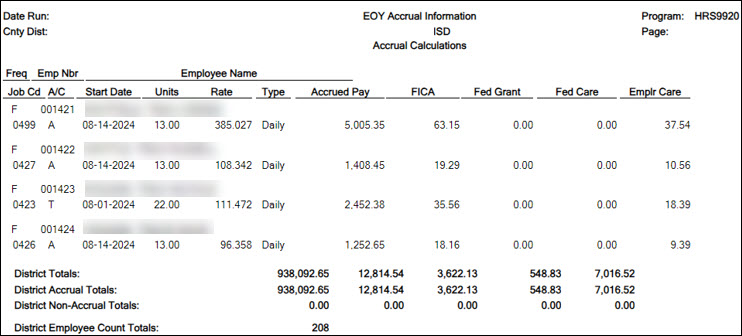
- If the employee accrues monthly, verify that the accrual code (A/C) is accurate for the employee. If the employee does not accrue monthly, verify that the accrual code (A/C) is blank for the employee.
- At the end of the report, verify the accuracy of employee accruals, those who accrue monthly and those who do not accrue monthly.
- EOY Accrual Distribution by Account Code - displays the distribution of the August accrued pay by account codes.
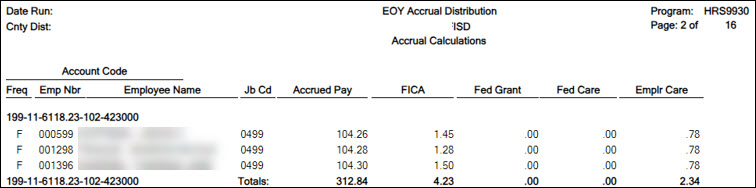
- Verify that the fund and fiscal year are accurate.
- Verify that an amount was calculated for the Federal Grant and Federal Care columns for the appropriate federal funds. If there is not an amount listed, review and update the Personnel > Tables > Salaries > Fund to Grant table.
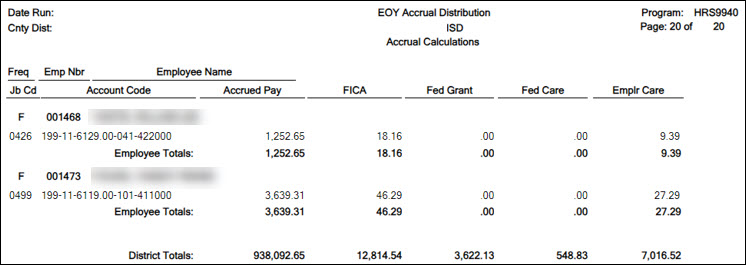
- EOY Accrual Distribution by Alpha - displays the distribution of the August accrued pay alphabetically.
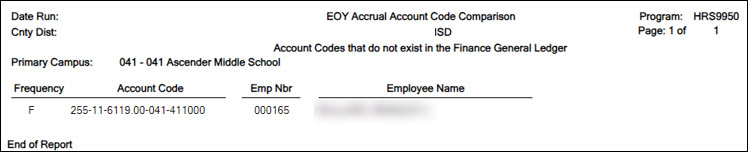
- EOY Accrual Account Code Comparison - compares the distribution of the August accrued pay by account codes and provides a listing of the employee master distribution records that are not changed to reflect the new fiscal year. The account may need to be added to the Finance > Maintenance > Create Chart of Accounts page or corrected on the employee's Distribution tab in Payroll. This information must be corrected before continuing the process.
- EOY Accrual Information with Previous Run Calcs - displays the information of the recalculated accrued pay by hourly/daily job codes.
- EOY Accrual Distribution by Account Code with Previous Run Calcs - displays the distribution of the recalculated accrued pay by account codes.
- EOY Accrual Distribution by Alpha with Previous Run Calcs - displays the distribution of the recalculated accrued pay alphabetically.


5
Create General Journal
Create general journal
Log on to the NYR payroll frequency.
Payroll > Payroll Processing > EOY Payroll Accruals > Create General Journal
The Create General Journal tab is a display-only grid of previous pay runs that have not been interfaced to Finance.
The totals of all your funds added together MUST equal your reports (EOY Accrual Information, EOY Accrual Distribution by Account Code and EOY Accrual Distribution by Alpha) from Step 4 .
The final journal should display all employees included in the EOY Payroll accrual calculations.
Only one row of data (with the accrual date (typically August 31st) from the Run Calculations tab) should be displayed in the grid.
Note: If multiple rows are displayed after all tables are completed and all information is verified, it is recommended that you run the Clear EOY Accrual Data Only Next Year option on the Payroll > Next Year > Copy CYR Tables to NYR > Clear Next Year Tables tab (in the current file ID). This process clears all calculations on the Create General Journal tab except the accrual table information. After performing this process, run the calculations again and review the reports for accuracy before continuing.

❏ In the File ID field, select C for the current file ID.
❏ In the JV Number field, type a JV number such as AUGACC or EOYACC.
❏ Select a data row.
❏ Click Execute. The EOY Accrual General Journal Transactions report is displayed.

If no changes are necessary, it is recommended that you print or save this report for your records, and then click Save as Pending. The following message is displayed.

❏ Click OK. After this step is completed successfully, the data row is cleared from the Create General Journal tab and the general journal information is saved to the Interface to Finance tab.
Notes:
- If changes are necessary after reviewing the general journal, return to Step 1 of the Accrual Process to add or extract the new job or start date to the accrual table, and then proceed with the remaining steps to repeat the process. If you start over, be sure to perform the Delete Pending option on the Interface to Finance tab.
- Verify the totals of each report and correct all errors.
- Use the Payroll > Next Year > Copy CYR Tables to NYR > Clear Next Year Tables page, select Clear EOY Accrual Data Only (do not move any tables), and click Execute to clear only the EOY accrual data.
- Run accrual calculations again and generate reports to verify the corrections.
6
Interface to Finance
Interface to Finance
Log on to the NYR payroll frequency.
Payroll > Payroll Processing > EOY Payroll Accruals > Interface to Finance
If necessary, accrual re-calculations can still be performed even if the interface file was already created. If re-calculations are performed for the same date, then the new interface file is displayed on the Create General Journal tab and the previous interface file is no longer displayed on the Interface to Finance tab.
After the transactions are created for the general journal, they are displayed on this tab. This process is the actual interface between Payroll processing and Finance applications for the EOY Payroll Accruals. This tab is only available after the Create General Journal process is successfully completed.
There are two options available when interfacing general journal transactions to Finance:
- Post to Current Acct Period
- Post to Next Acct Period
Verify the accounting period in Finance to be used when posting the general journal.
The tab contains a display-only grid of the transactions that are pending interface.

Interface to Finance:
❏ Select a data row to interface to Finance.
❏ Under Accounting Period, select whether to post to the current or next account period. In this process, the posting account period should be August (08).
| Field | Description |
|---|---|
| Post to Current Acct Period | If this field is selected and you click Interface, the following may occur: If Finance end-of-month processing is being performed against any file ID, you may not post to either accounting period. If the current and next accounting periods are the same and the current accounting period is locked, a message is displayed indicating that the current accounting period XX is locked and that the next accounting period is also set to XX. You are not allowed to post at this time. Click OK to return to the Interface to Finance tab. If the accounting periods are not the same and the current accounting period is locked, a message is displayed indicating that the current accounting period XX is locked. You are not allowed to post at this time. Click OK to return to the Interface to Finance tab. You can select the next accounting period for posting. |
| Post to Next Acct Period | If this field is selected and you click Interface, the following may occur: If the current and next accounting periods are the same, a message is displayed indicating that the current accounting period XX is locked and that the next accounting period is also set to XX. You are not allowed to post at this time. Click OK to return to the Interface to Finance tab. |
The Interface Transaction Date field is automatically populated with the current system date, but it can be changed. This date is used as the Finance general journal transaction date and is displayed as the actual posting date in Finance.
❏ Click Preview Report. The same EOY Accrual General Journal Transactions report that was created on the Create General Journal tab is displayed.

❏ Click Interface to interface the general journal transactions to Finance. A message is displayed indicating that the general journal transactions were successfully interfaced to Finance.

❏ Click OK.
❏ Run the Finance > Inquiry > General Ledger Inquiry > General Ledger Account Summary in file ID C for account codes 216X and 221X to verify that all EOY Payroll accrual amounts match your accrual reports.
The Post to Master tab is enabled.

After posting to Finance, DO NOT make any changes to the accrual code, job code, or salary distribution codes for employees included in this process until AFTER the process has been posted to Master. The Post to Master process is included in the First Payroll of the School Year (September Start LEAs) guide (Payroll > Payroll Processing > EOY Payroll Accruals > Post to Master).
Do not click the Post to Master tab at this time. Proceed to the subsequent EOY processes in the following order:
1. August TRS Reporting
2. Finance EOY Process
3. First Payroll of the School Year (September Start LEAs)
general/augustaccrualshomepage.1527556588.txt.gz · Last modified: 2018/05/28 20:16 (external edit)
Except where otherwise noted, content on this wiki is licensed under the following license: CC Attribution-Share Alike 4.0 International
Americans with Disabilities Act (ADA) and Web Accessibility
The Texas Computer Cooperative (TCC) is committed to making its websites accessible to all users. It is TCC policy to ensure that new and updated content complies with Web Content Accessibility Guidelines (WCAG) 2.0 Level AA. We welcome comments and suggestions to improve the accessibility of our websites. If the format of any material on our website interferes with your ability to access the information, use this form to leave a comment about the accessibility of our website.