
User Tools
Sidebar
Action unknown: copypageplugin__copy
academy:student:grade_reporting_change_schedules
Book Creator
Add this page to your book
Add this page to your book
Book Creator
Remove this page from your book
Remove this page from your book
ASCENDER Grade Reporting - Change a Student's Schedule

Follow these steps to change a student's current year schedule. These steps apply to students who are already enrolled in course-sections at the campus.
❏ To retrieve a student's records, select the student in one of the following ways:
| Student |
Begin typing the student ID (with leading zeros) or last name. As you begin typing, a drop-down list displays students whose ID or last name begins with the numbers or characters you have typed. The drop-down list displays the students' full name and grade level. From the drop-down list you can select the student. |
|---|---|
| Texas Unique Stu ID |
Type all or part of the student's Texas Unique Student ID to retrieve students whose ID begins with the characters you typed.
Review the Assign a TSDS Unique ID guide for additional information. |
| Directory | Click to select a student from the Directory. |
| (photo) |
If a photo exists for the student, the student photo is displayed. Photos are not displayed in all applications. They are displayed in Attendance (Inquiry), Discipline, Grade Reporting, Graduation Plan, Health, Registration, and Scheduling. They are not displayed in Special Ed or Test Scores. |
- Review the student's current schedule.
Grade Reporting > Maintenance > Student > Individual Maint > Crs Assign
This tab allows you to view a student's current course assignments.
NOTE: If it is early in the school year and the student does not yet have course information such as grades, you can modify a student's schedule or delete a course that was added accidentally. Otherwise, it is recommended that all schedule changes be completed on the Course/Section Change tab where course information such as grades can also be moved.
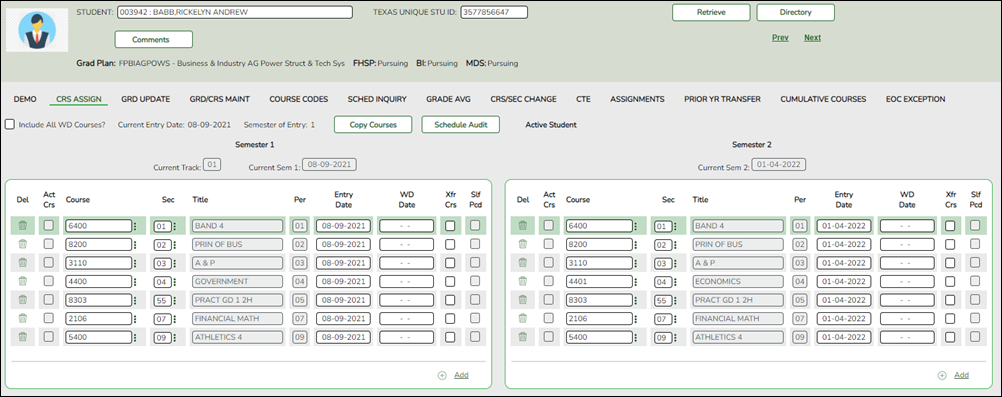
You can also view a student's schedule on the Walk-in Scheduler Inquiry tab or on Maintenance > Student > Individual Maint > Sched Inquiry - Change the student's current schedule.
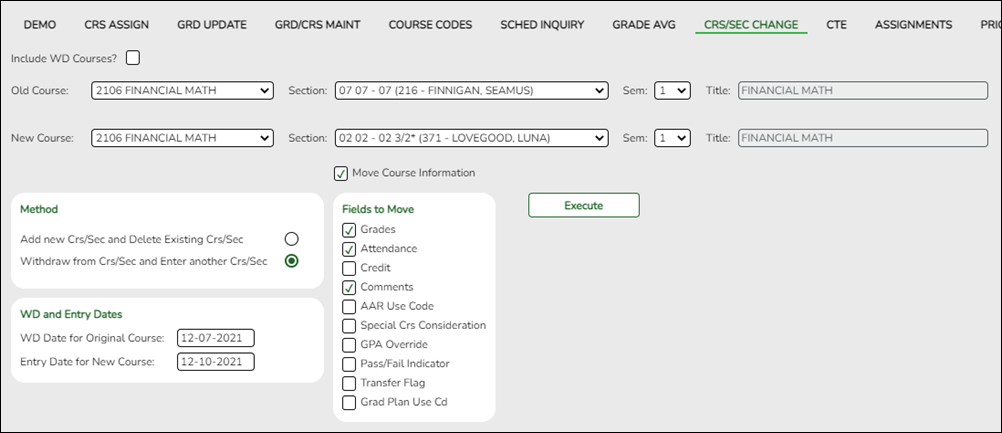
Grade Reporting > Maintenance > Student > Individual Maint > Crs/Sec Change
This tab allows you to transfer a student from one course-section to another. You can also move course information such as grades, attendance, etc.
The old course and the new course must be in the same semester.
Gender restriction is set at the Section and District master schedule page. The program looks at the Section tab first. If a gender restriction exists on the Section tab, it checks if the student meets that restriction.
- If the student does not meet the gender restriction, the course-section cannot be added.
- The Typ Rstrctn on the Section tab indicates if you can override the restriction:
- If Selectable is selected - You can override the restriction and enroll a student in the course-section.
- If Fixed is selected - The course-section cannot be added if the student does not meet the restriction.
Grade restrictions are set on the Section and Course tabs at the campus level. The program looks at the Section tab first. If a grade restriction exists on the Section tab, it checks if the student meets that restriction.
- If the student does not meet the restriction, the course-section cannot be added.
- The Typ Rstrctn on the Section tab indicates if you can override the restriction:
- If Selectable is selected - You can override the restriction and enroll a student in the course-section.
- If Fixed is selected - The course-section cannot be added if the student does not meet the restriction.
Click Retrieve.
- The student's demographic data is displayed.
- The Status field displays ACT (active) or W/D (withdrawn) according to the student's current enrollment status.
Old Indicate the class from which the student is being transferred:
Course Select the course. The drop-down list displays courses from the Crs Assign tab. Section Select the course-section.
Sem Select the semester of the course-section in which the student is currently enrolled.
Title The course title is displayed.
New Indicate the class to which the student is being transferred:
Course Select the course. The drop-down list displays courses from the campus master schedule. Section Select the course-section.
The drop down lists sections for the selected course with following information in this order:
Section number
Beginning and ending periods
Seats assigned and maximum seats available (e.g., 13/25):
• An asterisk (*) is displayed next to the seat count if a section has met or exceeded the maximum number of seats.
• Seats are calculated based on the semester selected for the new course. If you have not selected a semester, seats are calculated based on the semester selected for the old course. If a different semester is selected, the seat count may be different in the Section drop down.
Instructor ID and name in parentheses
Only unlocked sections of the course are listed. Course-sections are locked in the campus master schedule.
If all sections of the course are locked, the course is not displayed in the Course drop-down list.Sem Select the semester of the course-section in which the student is currently enrolled.
Title The course title is displayed.
Move Course Information Select if you want to move old course information to the new course-section. If selected, the Fields to Move options are enabled allowing you to select the information you want to move from the old course to the new course.
If Grades is selected, only the cycle grades are copied.
In TeacherPortal, if the student is transferring to a different section of the same course, the program moves the working cycle average to the new section.Withdraw from Crs/Sec and Enter another Crs/Sec Select this Method, then enter the following under WD and Entry Dates:
WD Date for Original Course Type the withdrawal date for the original course in the MMDDYYYY format. If this date is set to the first day of the semester, the row is deleted.
Entry Date for New Course Type the entry date for the new course in the MMDDYYYY format.
In most cases, the same date should be entered in both fields.
If a working cycle average exists for the old course for the same semester and cycle as the entry date for the new course, a transfer record is created for the new course with the working cycle average as the transfer grade.
If the working cycle average is I, the transfer record is still created in TeacherPortal, but the transfer grade is left blank.
Click Execute. A message indicates when the process is completed.
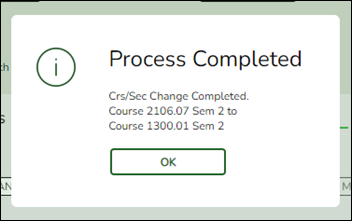
Click OK.
The Save button is not used on this page. The change is made when you click Execute.
View Add/Drop Lists The View Add/Drop List link appears in the top-right corner.
Click the link to view the report which lists the courses dropped and added in the order in which the changes were made.
Review, save, and/or print the report.
Review the report using the following buttons:
Click to go to the first page of the report.
Click to go back one page.
Click to go forward one page.
Click to go to the last page of the report.
The report can be viewed and saved in various file formats.
Click to save and print the report in PDF format.
Click to save and print the report in CSV format. (This option is not available for all reports.) When a report is exported to the CSV format, the report headers may not be included.
Click to close the report window. Some reports may have a Close Report, Exit, or Cancel button instead.
IMPORTANT: If there are more changes to make for the student, do not exit this page until all changes are made. This allows all changes to print on one report.
If you leave the page, the link will not appear when you return.
You CAN change tabs on this page without losing the link.
Click Close Add/Drop List to close the report view.
Comments View comments. 
View medical alert. The button is displayed if a medical warning exists for the student and Consent to Display Alert is selected on Health > Maintenance > Student Health > Emergency.
Click to view the student's medical alert information.Documents View or attach supporting documentation. - Review the change to the student's schedule.
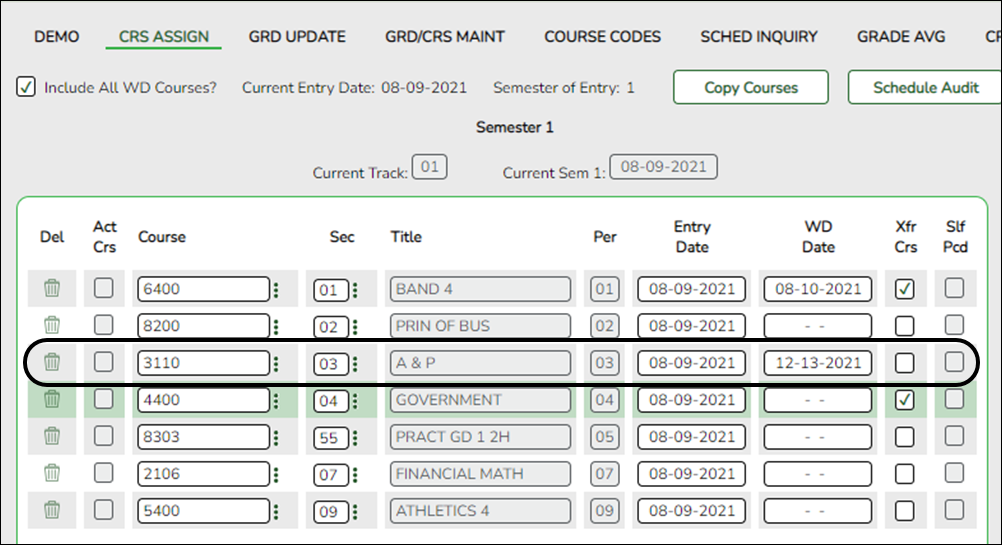
Grade Reporting > Maintenance > Student > Individual Maint > Crs Assign
After changing the student's schedule, return to the Crs Assign tab to view the revised schedule.
NOTE: You must select Include All WD Courses in order to see the course that was dropped from the student's schedule.
- Verify that the student's grades and/or attendance transferred as expected.
Grade Reporting > Maintenance > Student > Individual Maint > Grd Update
This tab allows you to view and update a student's attendance and grades by cycle. Verify that the grades, attendance, credits, and any other data transferred as you expected. Modify as needed.
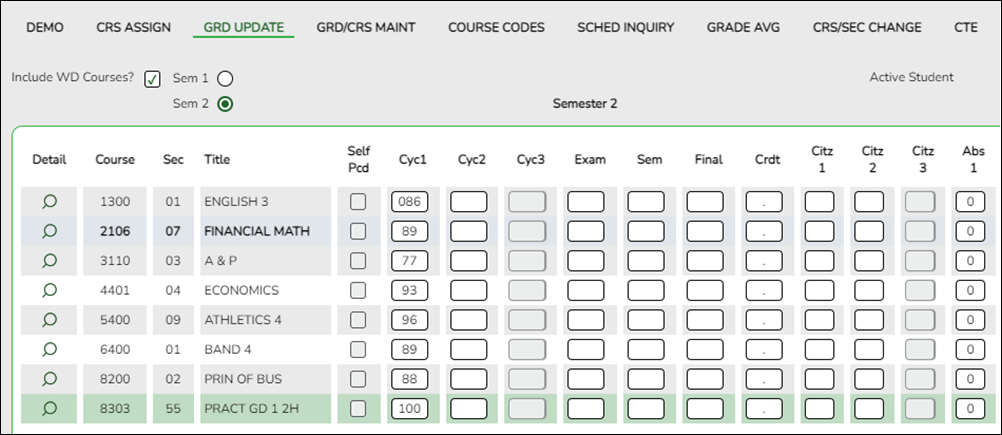
Include WD Courses Select to display the student's withdrawn courses.
The grid displays only data that applies to the the semester selected.
Rows with withdrawn courses are shaded gray and bolded. Exception: Withdrawn self-paced courses are not shaded gray and bolded; instead, a check mark is displayed under Self Pcd.Sem # Select the semester to view.
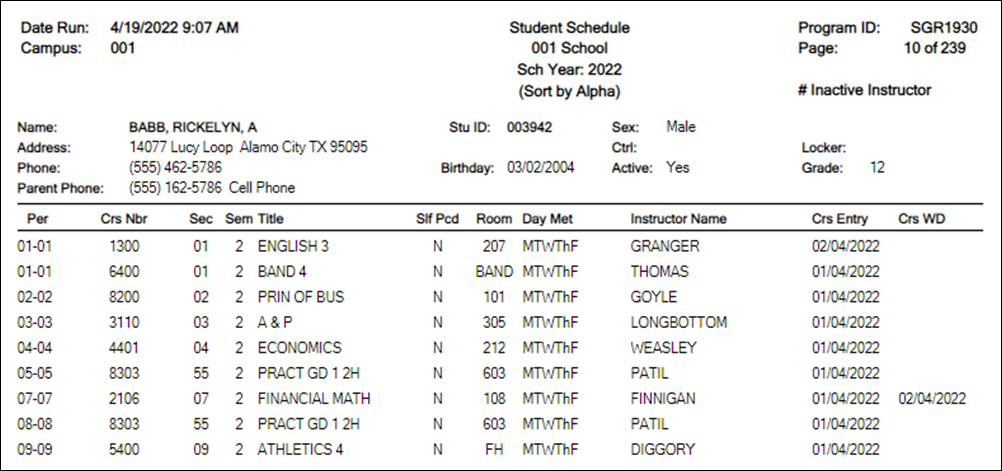
- (Optional) Print the student's new schedule.
This report prints semester schedules for one or more students at a campus, one student per page, including self-paced courses. The report is for the current year only.


academy/student/grade_reporting_change_schedules.txt · Last modified: 2025/05/16 14:30 by apape
Except where otherwise noted, content on this wiki is licensed under the following license: CC Attribution-Share Alike 4.0 International
Americans with Disabilities Act (ADA) and Web Accessibility
The Texas Computer Cooperative (TCC) is committed to making its websites accessible to all users. It is TCC policy to ensure that new and updated content complies with Web Content Accessibility Guidelines (WCAG) 2.0 Level AA. We welcome comments and suggestions to improve the accessibility of our websites. If the format of any material on our website interferes with your ability to access the information, use this form to leave a comment about the accessibility of our website.
If comments exist for the student, the Comments button displays an exclamation mark and is outlined in red. These comments are entered on Registration > Maintenance > Student Enrollment and cannot be updated from this page.