
User Tools
Sidebar
academy:student:scheduling_secondary_manual_phasei
Book Creator
Add this page to your book
Add this page to your book
Book Creator
Remove this page from your book
Remove this page from your book
This is an old revision of the document!
M
TxEIS Scheduling - Manual (Phase I)

Follow these steps to manually create the campus master schedule (section and meeting times) and manually schedule students into course-sections.
Three Scheduling Options Flow Chart:

NOTE: Elementary campuses may choose one of the three options listed above and refer to the Elementary Scheduling guides for Before/After Annual Student Data Rollover.
The Phase I steps include preparing the district and campus master schedule and entering student course requests.
- Communication across campuses is essential throughout the process. Find out for each campus if they intend to copy courses and/or section from Grade Reporting into Scheduling.
- Enable the Scheduling application in ASCENDER Security Admin. See ASCENDER Security Administration > Manage Roles.
- Identify at least one district user who has access to all campuses in the district and the Scheduling application who will be responsible for the deletion and creation of district courses.
- Identify scheduling teams and roles at each campus and at the district level, and maintain communication across teams. The scheduling team should include administrators and counselors.
- This guide assumes you are familiar with the basic features of the ASCENDER Student system and have reviewed the ASCENDER Student Overview guide.
Courses
Update District and Campus Options
- Set district-level scheduling options.
Scheduling > Maintenance > Master Schedule > District > District Control
This tab allows you to maintain scheduling options for the district that apply to the upcoming school year. You can also change the course number length for the district.
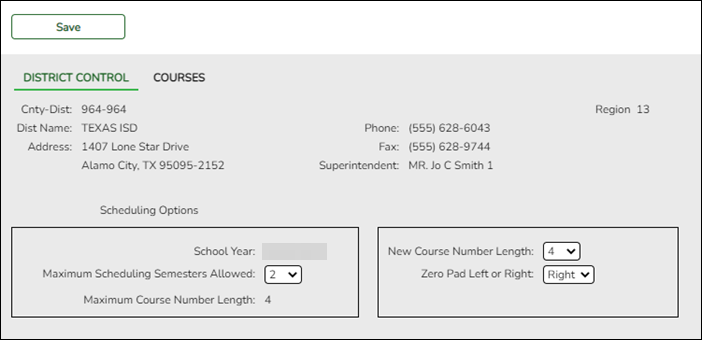
At the top of the page, district demographic data is displayed as entered on Registration > Maintenance > District Profile > District Maintenance > Demographic Info.
School Year The next school year is displayed. The field is populated during Annual Student Data Rollover (ASDR) and cannot be changed.
Maximum Scheduling Semesters Allowed Select the maximum number of semesters for scheduling.
Examples:
• If all the campuses in the district will use two-semester scheduling, select 2.
• If all campuses in the district will use two-semester scheduling, except the high school will use four-semester scheduling, select 4.Maximum Course Number Length The current maximum course number length is displayed.
The following fields are only used when increasing the course number length (e.g., from four digits (1010) to six digits (001010)):IMPORTANT: It is recommended that if you plan to change course numbers, contact your service center as early in the year as possible.
❏ Enter the following:New Course Number Length Select the new maximum course number length to use for scheduling.
Zero Pad Left or Right Indicate if zeros will be added to the current course numbers on the left or right when the course length is increased (e.g., 1001 becomes either 001001 or 100100). If you have already changed the course number length, L or R is displayed and cannot be changed.
If course numbers have already been changed, the message “New Courses Committed” is displayed.
❏ Click Save.
❏ If you entered a number in the New Course Number Length field:
- A message is displayed prompting you to overwrite the crosswalk table. Any changes you made will be lost
- The Commit Crs Changes button appears, and a crosswalk table is created.
❏ Make any necessary changes on the following two tabs:- On Maintenance > Master Schedule > District > Courses, the New Course Number column is displayed next to the Course Number column.
- On Maintenance > Master Schedule > Campus > Proxies, the New Proxy column is displayed next to the Proxy column.
When you add a new course or proxy, the program will pad the numbers to meet the new length if you enter fewer characters.
IMPORTANT: Do not click Commit Crs Changes until you have accepted your scheduling load, which is covered in Step 3.
❏ Once you have made all necessary changes, click the Commit Crs Changes button.
- The Undo Course Changes button and the Committed by and Date fields are displayed and provide the user's name who made the change, the user's login name, and date on which the changes were committed.
- If you make any changes after committing the course number length changes, then decide to revert to the previous course length, all those changes are lost.
Note:
- If you add a new course in Scheduling after committing the course number length change and then add the course to a graduation plan, you cannot undo the course number length change unless you remove the course from the graduation plan.
- You cannot undo the course number length change while courses are being requested (i.e., when ASCENDER StudentPortal is open). You must disable access to ASCENDER StudentPortal in order to undo the course number length changes.
- Until you click Commit Crs Changes, ASCENDER StudentPortal will be disabled. Once course number changes are committed, ASCENDER StudentPortal is re-enabled.
- The new maximum course length number will roll over to the current year during Move To Grade Reporting.
- For each campus, set campus-level scheduling options.
Scheduling > Maintenance > Master Schedule > Campus > Campus Control
This tab allows you to set up scheduling options for a campus. These options apply to the upcoming school year and must be set before you can access the campus master schedule. The Master Schedule > Campus tabs are disabled until these settings are saved.
❏ A warning message is displayed if campus control options have not been set. Click OK.
❏ Enter the following:
Max Sems Allowed Select the number of semesters to be scheduled at the campus for the next school year.
Low Grade Select the lowest grade level at the campus.
High Grade Select the highest grade.
Schedule Withdrawn Students Select if students who withdraw from the campus in the current school year should be scheduled for next year.
Period Begin Type the first class period that can be scheduled using two digits.
Period End Type the last class period that can be scheduled using two digits.
Norm Prd Cntrl The normal period control for the campus is displayed, which is usually equal to number of periods in the school day multiplied by the number of semesters. For example, at a two-semester campus that has 8 periods per day, the normal period control is 16. This number is used to flag students whose course requests vary from what is expected.
Under Scheduling Sequence:
Indicate the order in which grade levels should be scheduled:
❏ Click +Add to add a grade level to the scheduling sequence.A row is displayed in the Scheduling Sequence grid.
Priority The order in which the grade levels are scheduled is displayed in order from highest (i.e., 1) to lowest priority.
Grade Select the grade level that should be scheduled according to the corresponding Priority field. For example, if you want to schedule 12th grade students first, the Priority field should be set to 1, and the Grade field should be set to 12.
All grade levels must be listed.
Delete a grade level from the sequence. 1. Click
to delete a row. The row is shaded red to indicate that it will be deleted when the record is saved. You can select multiple rows to be deleted at the same time.
2. Click Save. You are prompted to confirm that you want to delete the row. Click Yes to continue. Otherwise, click No.
You can save edits and delete records in the same step (i.e., the changes are all committed when the record is saved).
Under ASCENDER StudentPortal Course Requests:
Grant or deny access by grade level to the StudentPortal Student Course Requests system:
❏ Click +Add to add the access status for a grade level.A blank row is displayed in the ASCENDER StudentPortal Course Requests grid.
Grade Select the grade level that is being assigned/denied access to StudentPortal. All grade levels must be added.
Grade levels will be sorted in ascending order when the page is saved.Status Select the status for the grade level.
• Select Open if students can submit course requests through StudentPortal.
• Select Closed if students cannot view or submit course requests through StudentPortal.
If set to Closed, students will not be able to login to StudentPortal to view grades and attendance.
• Select View if students can only view course requests through StudentPortal.
When set to View, students are able to login and view grades, attendance, and course requests. Delete the access status for a grade level. 1. Click
to delete a row. The row is shaded red to indicate that it will be deleted when the record is saved. You can select multiple rows to be deleted at the same time.
2. Click Save. You are prompted to confirm that you want to delete the row. Click Yes to continue. Otherwise, click No.
You can save edits and delete records in the same step (i.e., the changes are all committed when the record is saved).
❏ Click Save.All other Master Schedule > Campus tabs are enabled.


Delete Last Year Course-Sections and Create Current Year Courses
- For each campus, delete campus scheduling data from last year.
Scheduling > Utilities > Delete NY Master Schedule > Campus
IMPORTANT: Communication across campuses is essential throughout the process. Campus data must be deleted before district data is deleted. Notify all campuses before proceeding.
This utility deletes next year campus courses (i.e., the campus master schedule). The next year master schedule information is deleted before the new next year master schedule is created from the current year master schedule.
At the campus level, all student requests and schedules must be deleted before you can delete campus courses. If student requests or schedules exist, course or section information cannot be deleted.
If the information has been deleted, the message “Empty” is displayed next to the field.
❏ Select the data you want to delete.
- If student requests or schedules exist, the Campus Courses, Campus Sections, and Campus Proxies fields are disabled, and you cannot delete next year campus courses.
- Select Instructors. You will re-add them later in the Scheduling process.
- If you select Campus Courses, the Campus Sections field is automatically selected.
- WARNING: If you select Campus Proxies, all proxies are deleted and will need to be recreated individually by the campus. Proxies are not created from the current year master schedule.
❏ Click Delete.
❏ You are prompted to confirm that you want to delete the selected data. Click Yes.
❏ Repeat this process for each campus. - Delete district scheduling data from last year.
Scheduling > Utilities > Delete NY Master Schedule > District
This utility deletes next year district courses (i.e., the district master schedule). The next year master schedule information must be deleted before the new next year master schedule can be created from the current year master schedule.
NOTE: Next year requests (including alternates), student schedules, instructors, campus courses, and campus sections must be deleted from every campus in the district before the next year district courses can be deleted. You cannot delete the next year schedule if the next year schedule (not the current year schedule) has courses assigned to a graduation plan.
IMPORTANT: Use extreme caution when using this utility. Deleting district courses affects all campuses. To delete next year district courses, you must have access rights to district level in Security Administration > Manage Roles > Edit Role for Scheduling > Utilities > Delete Next Year Master Schedule.
❏ Select District Courses.
NOTE: If you have run Scheduling > Utilities > Delete NY Master Schedule > Campus, Campus Courses and Campus Sections are disabled and cannot be selected.
❏ Click Delete.
❏ If proxies exist, you are prompted to select which items to clear.District Delete the next year district courses but keep the proxies. Dist + Proxies Delete the next year district courses and the proxies. Each campus will need to manually recreate its proxies. - Create next year district courses.
There are two ways to create next year district courses:
- Option 1: Create next year district courses from the current year master schedule. Once copied, courses can be manually updated.
Scheduling > Utilities > Create NY Master Schedule > District
This utility creates next year district courses (i.e., the district master schedule) from current year district courses in Grade Reporting. Once created, the courses can be modified as needed on Scheduling > Maintenance > Master Schedule > District > Courses.
If next year master schedule information already exists, the utility is disabled, and the following message is displayed: “The Next Year Master Schedule Information already exists. You will NOT be able to run this utility to create courses.”
District Courses The field is automatically selected, indicating that the district courses will be created.
The field is disabled if courses have already been created.NOTE: If the Maximum Course Number Length in Scheduling (Maintenance > Master Schedule > District > District Control) is different than the current year Maximum Course Number Length in Grade Reporting (Maintenance > Tables > District Control Table), the courses are created using the crosswalk table that was created in Scheduling when the New Course Number Length was changed to match the new district master schedule on the District Control tab.
After the new course number length has been committed, the crosswalk table will no longer exist, and the courses in current year Grade Reporting will be zero padded to the correct length for next year based on the options selected on the Scheduling District Control tab.❏ Click Create.
❏ You are prompted to confirm that you want to create the courses. Click Yes. ❏ If errors are encountered, click Show Errors to view the error report.Review, save, or print the report.
Review the report using the following buttons:
Click to go to the first page of the report.
Click to go back one page.
Click to go forward one page.
Click to go to the last page of the report.
The report can be viewed and saved in various file formats.
Click to save and print the report in PDF format.
Click to save and print the report in CSV format. (This option is not available for all reports.) When a report is exported to the CSV format, the report headers may not be included.
Click to close the report window. Some reports may have a Close Report, Exit, or Cancel button instead.
Once created, courses can be modified as needed on Scheduling > Maintenance > Master Schedule > District > Courses.
- Option 2: Manually create next year district courses.
Scheduling > Maintenance > Master Schedule > District > Courses
This tab allows you to create and maintain course records in the district master schedule. The district master schedule contains all the courses offered within the district. When a campus builds a campus-level course record, they must select from the courses in the district master schedule.
search drop-down Select the field by which you want to search for courses.
search Type all or part of the search phrase.
• If you search by course number, title, or service ID, the search retrieves courses that begin with the characters or numbers you typed. For example, if you select Course Title, type 'eng' to retrieve all courses with a title that starts with Eng.
• For Course Number, you must include leading zeros.
• If you search by abbreviated name, the search retrieves courses that begin with the characters you typed. For example, type 'math' to retrieve all abbreviated names that begin with the letters math.
• Leave blank to retrieve all courses.
❏ Click Retrieve.
A list of courses that meet the specified criteria is displayed.
Course records are only retrieved if the Grade Reporting current year master schedule was copied to Scheduling.
- The list can be re-sorted.
You can re-sort the grid by clicking on an underlined column heading. It will sort in ascending order. Click it again to sort in descending order.
A triangle next to the column heading indicates the column by which the grid is currently sorted and whether it is sorted in ascending or descending
  order.
- If there are multiple pages, page through the list.
Click
to go to the first page of the report or list.
Click to go back one page.
Click to go forward one page.
Click to go to the last page.
Click to select the page number you want to view in the report or list.
Change the grid view:
The default view in the grid is basic course information indicated by ⇒ Crs Nbr in the area below the grid. You can modify the view in the grid by clicking an underlined header in that area.
For example, if you click the Scheduling header, only restrictions information is displayed in the grid. The Scheduling header is displayed as ⇒ Scheduling indicating that it is the current view.
- Click
 for a record in the grid to edit the course record.
 - Or, click +Add to add a course.
❏ The following fields are displayed below the grid where you can add or update the record:
Crs Nbr Type the four- to eight-digit course number assigned to the course by the district.
• Only uppercase alpha characters are allowed. Any lowercase letters are converted to uppercase when you save.
• Special characters are not allowed.
If you are editing an existing record, the field cannot be updated.
NOTE: If you have selected to change the course number length on Maintenance > Master Schedule > District > District Control, a crosswalk is created and the New Course Number field displays the new zero padded course number next to the old course number.
title Next to the Crs Nbr field, type the name of the course, up to 15 characters, with no commas.
Abbrev Name Type the eight-character abbreviated course name that will print on the AAR (SGR2047). The field is for local courses only.
Service ID (Required) Click
 to select the service ID for the course.
TWEDS Data Element: SERVICE-ID (E0724) (Code table C022)
The service ID description is displayed next to the field.
For Classroom Link, verify that the appropriate service ID is assigned to each course.
Service IDs that begin with SA, SR, SS, 8, or 9 are not reported for PEIMS.
NOTE: Local Service IDs that begin with 8 must be unique and cannot end in XXX.
Graded Crs Select if the course is graded.
Nbr Sem Select the number of semesters of the course.
Textbook ISBN Type the international standard book number (ISBN) associated with the textbook for the course, up to ten characters.
Exclude from TeacherPortal Indicate if the course should be excluded from the Attendance and/or Grades pages in TeacherPortal.
Self Paced Select if the course is self paced. Self-paced courses can only be one semester long.
❏ Under Scheduling:
Per Ctrl Type the period control number for the course, which is the number of class periods per day the course meets multiplied by the number of semesters taught.
Examples:
• If a two-semester course has a duration of one period, the period control is 02 (2 semesters x 1 period).
• If a two-semester course has a duration of two periods, the period control is 04 (2 semesters x 2 periods).Department (Optional) Type the code indicating the academic department with which the course is associated, up to three characters. The code is determined by the district.
Gender Restr Select a gender if the section is restricted to one gender.
Required
ElectiveIndicate if the course is a required or elective course.
The scheduling load will attempt to schedule students into required courses before elective courses. If a student has a singleton that is a required class, and a singleton that is an elective class, the scheduling load schedules the student into his required singleton class first, and then schedule the student into his elective singleton second.
NOTE: When the grid view is set to ⇒ Scheduling, the selected option is displayed in the Course Priority column in the grid.
Other Categ (Optional) Select an additional subject category for which the course will be listed in ASCENDER StudentPortal. This category is in addition to the service ID.
❏ Under Course Codes and Credits:
Tot Credits Type the number of academic credits awarded to students who pass the course, up to two digits. The decimal is inserted automatically. For example, if you type 10, the field displays 1.0.
Credit Seq Select the code indicating the conditions under which credits are awarded.
Part Credit Select if partial credit is awarded to students who fail one or more semesters or are only enrolled in part of the course. Partial credit is not allowed for regular one-semester and self-paced courses.
Credit Lvl Select the code indicating the campus level at which the course credit is awarded.
AAR Select the code indicating the academic area in which the course is a requirement. This code determines where the course is displayed on the AAR Multi-Year (SGR2047) report.
CPR Select if the course allows a student to meet the requirement for cardiopulmonary resuscitation (CPR) instruction. The CPR instruction must include training that has been developed by the American Heart Association or the American Red Cross, or using nationally recognized, evidence-based guidelines and incorporation psychomotor skills to support the instruction.
Grad Plan Select the subject area to which the course should be applied on a graduation plan, if other than the course's service ID type.
Speech Select if the course allows a student to meet the Foundation High School Program (FHSP) requirement for speech skills.
Spec Cons Select up to two codes indicating special considerations for the course. The codes cannot be the same for both fields. Special considerations are printed on the student's AAR (SGR2047).
OnRamps Select if this course is an OnRamps dual enrollment course coordinated by The University of Texas at Austin. The field can only be selected for high school credit courses (i.e., Credit Lvl = H).
❏ Under Elem/Misc:
Core Crs Select the code indicating the core course type.
ELA Wgt (English Language Arts weight) Type the percentage of the total language arts grade that the grade for the course represents.
NOTE: If this field is blank or non-numeric, it will be calculated as 0.
Auto Grd Type the default grade that should be assigned to students who have no grade recorded for the course, up to three characters. The field can be alpha or numeric.
Incl UIL Elig Select if the course is used in determining six-week eligibility for extracurricular activities. University Interscholastic League (UIL) rules allow some courses to be exempt in determining six-week eligibility.
This field exists on the campus section record (Maintenance > Master Schedule > Campus > Sections) as well as the district course record (Maintenance > Master Schedule > District > Courses). Both fields affect the Student Grades (UIL Eligibility) Report in TeacherPortal.
• If the field contains a value in the course-section record, that value is used.
• If the field is blank in the course-section record, the field on the district course record is used.Exam/Sem Pat Select the code indicating when exam and semester grades are given.
❏ Under PEIMS:
CTE Hrs Type the number of Career and Technical Education (CTE) hours associated with the course (1-3). The hours are used by the Attendance application to compute CTE contact hours. Leave blank if this is not a CTE course.
Pop Srvd Select the code indicating the student population primarily targeted for the section.
Instr Sett Click
to select the instructional setting used when providing instruction to the students in the section.
Class Type Select the code indicating if the section class type is regular or non-regular.
Examples of non-regular class types are in-school suspension, school-community guidance center, alternative education school program for discipline, televised instruction, non-disciplinary alternative education, special education setting, or residential care and treatment facility.Role ID Select the code indicating the capacity in which the instructor serves the students during the section.
Rule: If the Role ID is 033-Educational Aide, the Class Role must be 05-PK Classroom Aide, and vice versa.
Crs Seq Select the code indicating the sequence of the course, which is not necessarily the semester in which the course is taught.
❏ Under HR/GA (Honor Roll/Grade Averaging):HRoll Wgt Type the number of times the course is counted in honor roll computation. Type 0 to exclude the course from honor roll computation.
HRoll Table Select the code indicating the table used to convert the student's course grade in honor roll computations.
HRoll Code Select the code indicating if this course's grades or students should be excluded from honor roll computations.
GA Table Select the course type table which will be used to adjust the student’s grade for the course in grade averaging calculations. These course types are set up on Grade Reporting > Maintenance > Tables > Course Type.
NOTE: The default value for a course is R-Regular when added to the district master schedule. If R is not the correct grade average table for the course, the field must be updated.
GA Wgt Type the number of times the grade for the course is counted in grade averaging calculations.
If one course meets multiple periods, you may want to adjust the weight to the number of times the course meets.
Example:
If a student has seven one-period courses, his course factor is 7. If a student is in one course that meets three periods, and you enter the weight as 1, this student’s course factor is 5. However, If you enter a weight of 3 for the three-period course, the student’s course factor is 7.
Three-Period Course with Weight = 1 Three-Period Course with Weight = 3 Math 70 Math 70 English 70 English 70 SS 70 SS 70 Science 70 Science 70 Ag Mech (3 hrs) 80 Ag Mech (3 hrs) 80 80 80 Total 360 Total 520 Total Divided by 5 360 / 5 Total Divided by 7 520 / 7 Grade Average: 72 Grade Average: 74.2857143
Type 0 to exclude the course from grade averaging.
NOTE: The weight can be used to exclude a course from grade averaging. If a course has zero weight, it is excluded. Many campuses exclude PE, Band, Athletics, Office Aide, etc. from grade averaging calculations.
❏ Click Save.
Other functions and features:
Edit a record. The data is displayed in fields below the grid allowing you to make changes.
Update the fields as needed, click OK, and then click Save. The changes are displayed in the grid.Delete a course record. 1. Click
to delete a row. The row is shaded red to indicate that it will be deleted when the record is saved. You can select multiple rows to be deleted at the same time.
2. Click Save. You are prompted to confirm that you want to delete the row. Click Yes to continue. Otherwise, click No.
You can save edits and delete records in the same step (i.e., the changes are all committed when the record is saved).
Courses cannot be deleted if they are selected by a campus, have section records, or are a part of a graduation plan that has students assigned to it.
- Create next year campus courses.
There are two ways to create next year campus courses:
- OPTION 1: Copy campus courses. Once copied, courses can be manually updated.
Scheduling > Utilities > Create NY Master Schedule > Campus
This utility creates next year campus courses (i.e., the campus master schedule). At the campus level, courses are only created if they are offered at the district level.
If next year master schedule information already exists, the message “Created” is displayed.
NOTE: If choosing Scheduling Option 1: Manual Entry or Option 2: Combination, campuses can choose to create Instructors and Campus Sections on this screen.
Choosing ONLY Campus Courses gives the campus the option to remove and/or modify courses prior to creating the NY instructors and NY campus sections (if they choose to) into the campus schedules. Then for Scheduling Option 1: Manual Entry or Option 2: Combination, instructors and campus sections are created later.
❏ Select the data you want to create:
NOTE:
• Instructors and sections will be populated in the next step of the scheduling process.
• Active Meeting Times is selected by default; however, meeting times will not be created if Campus Sections is not selected.
Campus Courses Select to create next year courses. Additional fields are enabled:
from CY campus Select if you want courses created from the current year campus master schedule.
from NY district Select if you want courses created from the next year district master schedule.
This option is not usually selected, as it moves ALL courses from the district master schedule, including courses that are no longer used.
This option creates all district courses at the campus. This option can be used if the district has only one campus.The Campus Sections field is enabled allowing you to create sections.
NOTE: If the Maximum Course Number Length in Scheduling (Maintenance > Master Schedule > District > District Control) is different than the current year Maximum Course Number Length in Grade Reporting (Maintenance > Tables > District Control Table), the courses are created using the crosswalk table that was created in Scheduling when the New Course Number Length was changed to match the new district master schedule on the District Control tab.
After the new course number length has been committed, the crosswalk table will no longer exist, and the courses in current year Grade Reporting will be zero padded to the correct length for next year based on the options selected on the Scheduling District Control tab.
❏ Click Create.You are prompted to confirm that you want to create the selected data. Click Yes.
- OPTION 2: Manually select courses from district master schedule.
Scheduling > Maintenance > Master Schedule > Campus > Selection
This tab allows you to select district course records to be added to the campus master schedule.
The campus master schedule contains all the courses and sections offered at the campus. The campus course records are built by selecting district courses; the information from the district course record is automatically copied to the campus course record.
You must establish the campus course records before you can create campus section records.
❏ Select the credit level:
Credit Level Select the credit level for which you want to add course records. The option All is available for K-12 campuses only.
❏ Click Retrieve.
(left grid) District Courses to Add The course records for the district are listed. Courses that have already been selected for the campus master schedule are not listed.
To add district courses to the campus master schedule:
1. Select one or more courses in the left grid.
2. Click —› to move the selected course(s) from the left grid to the right grid.
3. Or, click —» to move all courses from the left grid to the right grid. This overrides any selected courses.(right grid) Campus Courses to Delete All courses selected for the campus master schedule are listed. The campus courses (displayed on the right) are the only campus courses that can be deleted. These courses do not yet have any sections assigned.
To remove courses from the campus master schedule:
1. Select one or more courses in the right grid.
2. Click ‹— to move the selected course(s) from the right grid to the left grid.
3. Or, click «— to move all courses from the right grid to the left grid. This overrides any selected courses.
The following courses cannot be removed from the right grid:
• Courses that have course-sections or enrolled students. You cannot delete a course that is requested by a student as an alternate.
• Courses that have been requested by a student at the campus, either as a request or as an alternate request, are displayed in red. You must remove the requests before the courses can be removed from the right grid.
• Courses that are part of a district graduation plan, and have at least one student at the campus assigned to the graduation plan. The program will look in the crosswalk table when identifying courses that are part of a graduation plan with students assigned to it when the course number length has been changed on Maintenance > Master Schedule > District > District Control. If the course is part of a district graduation plan, but no students are assigned to the graduation plan, the course can be deleted from the campus courses, but you will first be prompted to confirm that you want to delete the course.- If there are multiple pages, page through the list.
Click
to go to the first page of the report or list.
Click to go back one page.
Click to go forward one page.
Click to go to the last page.
Click to select the page number you want to view in the report or list.
❏ Click Save.
Undo Revert to the original course lists before saving. Unsaved changes are lost. The reset function does not reset courses once the lists have been saved.
Modify campus courses as needed.
Scheduling > Maintenance > Master Schedule > Campus > Courses
This tab allows you to maintain course records in the campus master schedule. Data in the campus course records is copied from the district master schedule, and only the fields listed on this Help page can be modified in the campus master schedule. All other fields are maintained in the district master schedule.
You cannot delete a course from this tab. Courses can be deleted on the Selection tab.
search drop-down Select the field by which you want to search for courses.
search Type all or part of the search phrase.
• If you search by course number, title, or service ID, the search retrieves courses that begin with the characters or numbers you typed. For example, if you select Course Title, type 'eng' to retrieve all courses with a title that starts with Eng.
• For Course Number, you must include leading zeros.
• If you search by abbreviated name, the search retrieves courses that begin with the characters you typed. For example, type 'math' to retrieve all abbreviated names that begin with the letters math.
• Leave blank to retrieve all courses.
❏ Click Retrieve.
A list of courses that meet the specified criteria is displayed.
- The list can be re-sorted.
You can re-sort the grid by clicking on an underlined column heading. It will sort in ascending order. Click it again to sort in descending order.
A triangle next to the column heading indicates the column by which the grid is currently sorted and whether it is sorted in ascending or descending order.
- If there are multiple pages, page through the list.
Click
to go to the first page of the report or list.
Click to go back one page.
Click to go forward one page.
Click to go to the last page.
Click to select the page number you want to view in the report or list.
Change the grid view:
The default view in the grid is basic course information indicated by ⇒ Crs Nbr in the area below the grid. You can modify the view in the grid by clicking an underlined header in that area.
For example, if you click the Scheduling header, only restrictions information is displayed in the grid. The Scheduling header is displayed as ⇒ Scheduling indicating that it is the current view.
❏ Click for a record in the grid. The fields below the grid are enabled:
Max Seats Type the number of seats available in the classroom.
Grd Restr If there are grade level restrictions for the course-section, select the lowest grade level allowed.
In the adjacent + field, type the number of additional grade levels that are eligible to take the course.
For example, if the course is for 7th and 8th grade students, select 07 in the Grd Restr field, and type 1 in the + field.Pregrid Grd Restr If there are grade level restrictions that should restrict the course from being displayed in ASCENDER StudentPortal and SCH0133 - ASCENDER StudentPortal Course List (for ASCENDER districts), select the lowest grade level allowed for the course.
In the adjacent + field, type the number of additional grade levels that are eligible to take the course. When students access ASCENDER StudentPortal, the course will only be displayed in the subject area for students in the grade levels indicated.
For example, if the course is for 7th and 8th grade students, select 07 in the Pregrid Grd Restr field, and type 1 in the + field.
Select EX to exclude the course for all grade levels. This option is not available for proxies.
If the Pregrid Grd Restr field is set to EX, any characters typed in the + field are cleared when you click Save.
❏ Under Options:Excl Conflict Matrix Select if the course should be excluded from the conflict matrix reports and the master schedule generator resource allocator. The course will also be excluded from the MSALGO export.
Can Split Opt Type Y or N to indicate if the course can be split in different semesters (i.e., assign a student a full year course with different course sections for first and second semesters).
• Y - The scheduler will determine which section the student will attend each semester; it is not necessarily the same section each semester.
• N or blank - Do not use this option.
The scheduling load does not include this option at this time. This functionality will be added to the scheduling load in a future release of the software.
Rpt Card Grd Typ Select the type of grades that should appear on the report cards for the course. The field is used by TeacherPortal when determining the working cycle average.
Rules:
• You cannot select E, S, N, U if Credit Level = E, Core Course = L, M, S, or X, and the elementary core grade conversion table is set to A, B, C, D, or F.
• You cannot select A, B, C, D, F if Credit Level = E, Core Course = blank or Z, and the elementary noncore grade conversion table is set to E, S, N, or U.
• You cannot select Pass/Fail if Credit Level = E.
• You cannot select E, S, N, U or A, B, C, D, F if Credit Level = H. Only Numeric and Pass/Fail grade types are allowed.
An error message is displayed if there is no match.
The options are stored in the database as follows:
Numeric - blank or Numeric
A = A, B, C, D, F
E = E, S, N, U
P = Pass/FailExcl Stu Crs Req Select if the course should be excluded from ASCENDER StudentPortal and SCH0133 - StudentPortal Course List.
❏ Click Save.
- Create next year proxy courses.
Scheduling > Maintenance > Master Schedule > Campus > Proxies
This tab allows you to set up or edit elementary control proxies.
A proxy is one course number which contains a group of specific courses that are assigned to a student. Control proxies are commonly used to quickly schedule elementary students before running Move to Grade Reporting.
IMPORTANT: The courses are assigned by entering the proxy number instead of the individual course numbers.
For elementary campuses, build a control proxy for each instructor at each grade level, including “pull-out” courses (PE, music, etc.) Note that for pull-out courses, the Instr ID and Instructor in the campus master schedule section record must be the actual teacher of record.
NOTE: At elementary campuses where students are scheduled into one generic course during the ADA period (i.e., using skills-based report cards), it is not necessary to build proxies.
To view or modify existing proxies:
❏ Click Retrieve.
Existing proxies are displayed in the upper grid.
- Click the spyglass icon to modify the information. The data is displayed in fields below the grid allowing you to make changes. Update the fields as needed, click OK, and then click Save. The changes are displayed in the grid.
- The list can be re-sorted.
You can re-sort the grid by clicking on an underlined column heading. It will sort in ascending order. Click it again to sort in descending order.
A triangle next to the column heading indicates the column by which the grid is currently sorted and whether it is sorted in ascending or descending order.
- If there are multiple pages, page through the list.
Click
to go to the first page of the report or list.
Click to go back one page.
Click to go forward one page.
Click to go to the last page.
Click to select the page number you want to view in the report or list.
To add a proxy:
❏ Click +Add in the upper grid to add a new proxy. The fields below the grid are enabled:
Proxy Type a proxy number to identify the proxy. The number cannot be the same as an existing course number.
If you have changed the course number length on Maintenance > Master Schedule > District > District Control, a crosswalk is created, and the New Proxy field will display the new zero-padded proxy number next to the old proxy number.
Title Type a description of the proxy, up to 15 characters.
❏ Under Type, select Control.
Add courses to a proxy:
The lower grid will list the courses and sections the home room teacher's students will be taking, including pull-out courses. This is a reflection of the student schedules, not the instructor's. Determine the section numbers needed by reviewing SCH0120 - Master Schedule Section Info (Next Yr).
❏ Click +Add in the lower grid. A blank row is displayed in the lower grid.
Each proxy must contain at least two courses.
Course Click
to select the course. The course title is displayed.
Sec Refer to the SCH0120 report to determine which section to select.
❏ Click Save.
Sem Cd The semester code for the selected course is displayed.
Edit a record. The data is displayed in fields below the grid allowing you to make changes.
Update the fields as needed, click OK, and then click Save. The changes are displayed in the grid. (upper grid)Delete a proxy. 1. Click
to delete a row. The row is shaded red to indicate that it will be deleted when the record is saved. You can select multiple rows to be deleted at the same time.
2. Click Save. You are prompted to confirm that you want to delete the row. Click Yes to continue. Otherwise, click No.
You can save edits and delete records in the same step (i.e., the changes are all committed when the record is saved).
(lower grid)Delete a course from a proxy. 1. Click
to delete a row. The row is shaded red to indicate that it will be deleted when the record is saved. You can select multiple rows to be deleted at the same time.
2. Click Save. You are prompted to confirm that you want to delete the row. Click Yes to continue. Otherwise, click No.
You can save edits and delete records in the same step (i.e., the changes are all committed when the record is saved).


Students
Transfer Students to Next Year Campus (for Scheduling Purposes)
- Clear and assign year-end-status codes.
Clear and assign year-end-status codes.
Skip this step if year-end-status codes have been assigned for the current year.
- Clear existing year-end-status codes.
Grade Reporting > Utilities > Assign or Clear Year-End-Status Code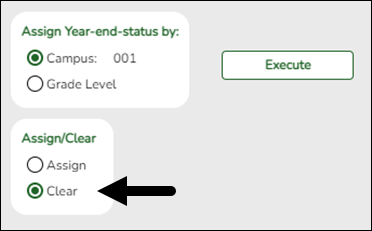
- Under Assign/Clear, select Clear.
- Click Execute.
- Assign year-end-status codes.
Grade Reporting > Utilities > Assign or Clear Year-End-Status Code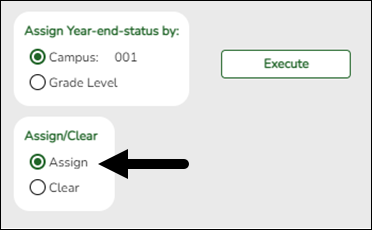
- Under Assign/Clear, select Assign.
If selected, only blank year-end-status codes are updated, and retained reason codes are cleared.
Blank year-end-status codes are updated as follows:
• Grade levels KG and 1-8 are updated to code 01 (Promoted next grade).
• Grade levels 9-11 are updated to code 11 (Advanced next grade).
• Grade level 12 is updated to code 12 (Graduated). - Click Execute.
IMPORTANT: This step marks all students as promoted. You must individually change all students who were not promoted on Registration > Maintenance > Student Enrollment > Demo3.
- (Optional) Create a report to confirm that codes were updated.
Registration > Reports > Create Registration Report
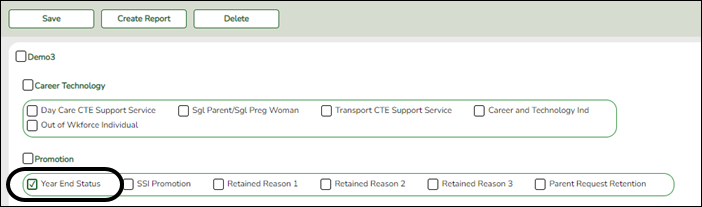
- Select the Year End Status field and any other necessary demographic fields, including Active and Record Status.
- Click Create Report.
- Once the report is generated, filter the report by the Active and Record Status columns.
- Transfer students to the next year campus (students who are in the highest grade level at their current campus).
Transfer students to the next year campus.
The sending campus assigns the next year campus and transfers the students.
IMPORTANT: All campuses must complete this step as this affects Graduation Plan and grade averaging and class ranking.
NOTE: If your district only has one campus, Transfer the students. does not need to be completed.- Assign next year campus to students.
Registration > Utilities > Set NY Campus
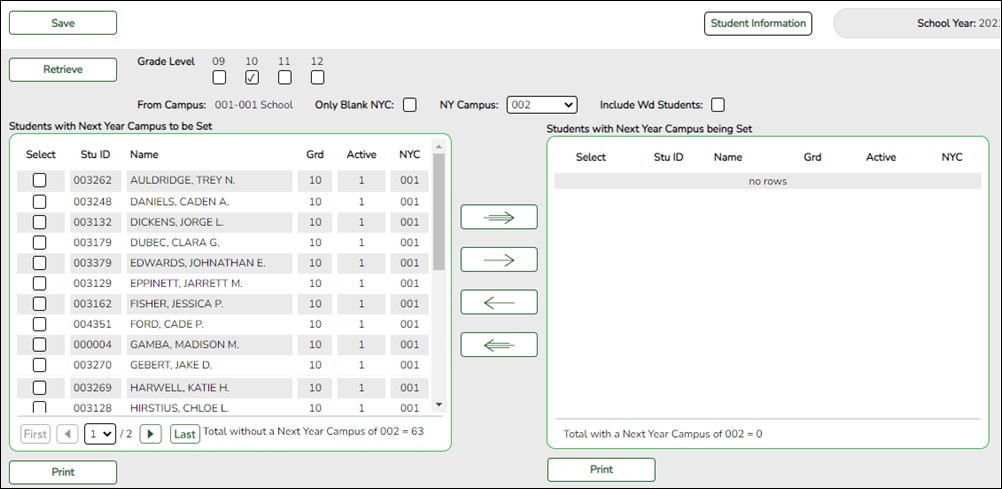
- Select the grade level to assign.
- Select the next year campus for these students.
- Make other selections as needed.
- Click Retrieve. The selected students are listed in the left grid.
- Select the students who will be assigned to the next year campus.
- Use the arrow buttons to move the students to the right grid.
- Click Save.
- If your campus feeds into multiple campuses, re-run the utility for each receiving campus.
NOTE: If new students enroll during the school year, run the utility again to include all new students with the Only Blank NYC field selected.
- Transfer the students.
Registration > Utilities > Transfer > Scheduling Transfer

- Select the campus where the students will be transferred (Receiving Campus).
- Select the grade level to be transferred.
- Select Match Next Year Campus if there are multiple next year campuses to which students are being transferred.
- Click Start.
- Repeat until all students have been transferred.
IMPORTANT:About pre-registering students:
If you need to set up a student who is not currently attending the campus/district but will attend next year, you must register the student in current year registration. The student should be pre-registered in the campus they will attend in the new school year.
Registration > Maintenance > Student Enrollment
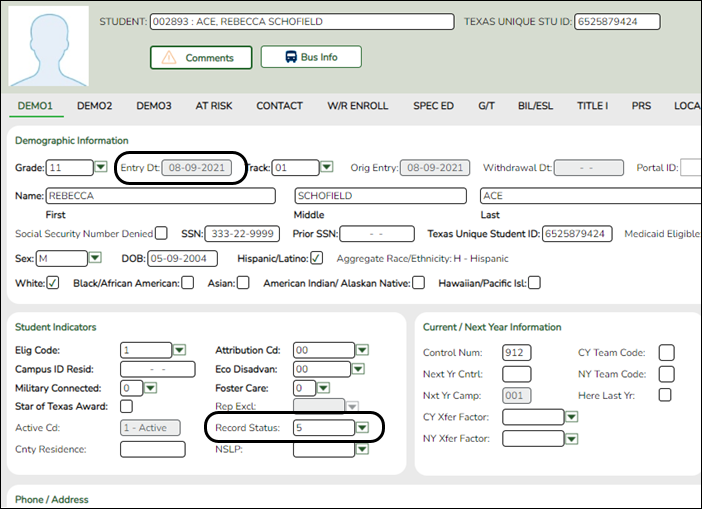
- Use the grade level the student will be in next year.
- Use the last day of the current year as the Date of Entry (WR Enroll tab).
- Use Record Status 5 (not enrolled this year but will attend next year).
WARNING: Do not use Record Status 4, or the program will not let you edit or delete the student until after Annual Student Data Rollover is done.
Returning current year student: If you have a current year student who has withdrawn, but intends to come back next year, do not use these steps to pre-register them or current year data will be skipped during PEIMS. This student will need to be registered after ASDR is done in the summer.


Update Campus Options
- Add and update instructor records for those who will be teaching next year, and delete those will be leaving.
Scheduling > Maintenance > Master Schedule > Campus > Instructors
This tab allows you to add and update scheduling information for instructors in the campus master schedule.
REMINDER: Before an instructor can be deleted, all of the instructor's sections must be cleared.
❏ Existing instructors are displayed in order by instructor ID.
- If there are multiple pages, page through the list.
Click
to go to the first page of the report or list.
Click to go back one page.
Click to go forward one page.
Click to go to the last page.
Click to select the page number you want to view in the report or list.
❏ Click +Add to add an instructor. The fields below the grid are enabled:
Instr ID Type the three-digit instructor number to add to the campus master schedule.
Staff ID Do one of the following depending on whether the district uses staff IDs or social security numbers (i.e., the setting for Student Applications Staff ID on Registration > Maintenance > District Profile > District Maintenance > Control Info):
• If the field is still set to SSN, type the instructor's social security number.
• If the field is set to Employee Number, but the employee demographic table does not exist in the Human Resources application, type the instructor's employee number.
• If the field is set to Employee Number, and the employee demographic table contains employee number information, you must click to select an instructor's employee number. Employees and non-employees will be available in the lookup if the employee demographic table contains values for their social security number, date of birth, and sex.
If you change a staff ID on this page, the staff ID will be changed across all applications and campuses. Principal/counselors who are also instructors will only have one staff ID.
If you have run the Set Staff ID to Employee Number utility, and an employee needs to have a temporary login (e.g., for TeacherPortal), you can assign him a temporary staff ID by selecting the Create Temp Staff ID field and clicking Search. The next available temporary staff ID (T followed by five digits) is displayed. Click the number to assign it to the employee.
Home Room Type the instructor’s home room number, up to four characters.
Name Type the employee's first, middle, and last names and generation code.
In Registration, you can enter up to 60 characters each for the first, middle, and last name. The full name is displayed, up to 60 characters, on the Registration Demo pages.
In all other student applications, the name is truncated as follows: First: 17 characters, middle: 14 characters, last: 25 characters.
Characters used can be a-z, A-Z, hyphen (-), apostrophe ('), or 0-9. However, the last character cannot be a hyphen (-), apostrophe ('), or 0-9.
Texas Unique ID Type the 10-digit TEA Unique ID of the student or staff.
NOTE: This feature will available at a later date.
ESC/SSA Select whether the ESC staff responsibility being reported is part of a shared services arrangement (SSA) for which the ESC is the fiscal agent. This is reported by ESCs only; the field is not valid for school districts.
ESC-SSA-STAFF-INDICATOR-CODE ESC/SSA (E1015)
Code Table: C169
Under Maximum Values:Study Halls/Day Type the maximum number of study halls per day that can be assigned to the instructor.
Periods/Day Type the maximum number of periods per day the instructor can teach. Type 0 or leave blank if the instructor is not assigned to any classes.
Sections/Sem Type the maximum number of sections per semester that can be assigned to the instructor. Type 0 or leave blank if the instructor is not assigned to any classes.
Preps/Sem Type the maximum number of unique courses (preparations) per semester that can be assigned to the instructor. Unique courses usually require the instructor to do a separate preparation. Type 0 or leave blank if the instructor is not assigned to any classes.
Contact Periods/Year Type the maximum total contact periods the instructor can be assigned for the year, up to four digits. Type 0 or leave blank if the instructor is not assigned to any classes.
A contact period is defined as a single class on a single day during one semester.
Total contact periods = semesters x days x periods
NOTE:
• The Resource Allocator Record Creation utility can be used to update maximum values for all instructors at one time.
• The Master Schedule Generator uses these values to determine how many sections, etc. to assign an instructor. The recommended value is 99, because values that are too small will prevent an instructor from being assigned a class.
Under Restrictions:Department Type the code indicating the academic department with which the instructor is associated, up to three characters. Departments are set up on Maintenance > Master Schedule Generator > Tables > Departments.
Subject Area Type the one-character code indicating the academic area with which the instructor is associated. Subject areas are set up on Maintenance > Master Schedule Generator > Tables > Subject Areas.
Rsrvd Room Type a room number if the instructor has a reserved classroom, up to four characters. If used, the instructor is assigned only to this room. The reserved room is not necessarily the same as the Home Room.
Rooms are set up on Maintenance > Master Schedule Generator > Tables > Rooms.
Designators (Optional) Enter one-digit codes for up to three designators for the instructor. Designators may be characteristics or equipment (e.g., C = computers available). They can also designate an instructor's skills or characteristics (e.g., S = sign language). Designators are set up on Maintenance > Master Schedule Generator > Tables > Designators.
Under Elementary:Grade Type the grade level the instructor will be teaching next year.
Section Type the two-digit section number the instructor teaches.
Each instructor for each grade level must have a unique section number. If there is a duplicate section, the master schedule utility will not run, and will not generate an error message indicating a duplicate section numbers.
Exclude from PEIMS Select if you want to exclude the instructor from PEIMS reporting. If blank, the instructor is extracted for PEIMS reporting.
❏ Click Save.
Other functions and features:
Edit a record. The data is displayed in fields below the grid allowing you to make changes.
Update the fields as needed, click OK, and then click Save. The changes are displayed in the grid.Delete a row. 1. Click
to delete a row. The row is shaded red to indicate that it will be deleted when the record is saved. You can select multiple rows to be deleted at the same time.
2. Click Save. You are prompted to confirm that you want to delete the row. Click Yes to continue. Otherwise, click No.
You can save edits and delete records in the same step (i.e., the changes are all committed when the record is saved).
You cannot delete an instructor who is assigned to a section.
Schedule View instructor's schedule.
Review the report using the following buttons:
Click to go to the first page of the report.
Click to go back one page.
Click to go forward one page.
Click to go to the last page of the report.
The report can be viewed and saved in various file formats.
Click to save and print the report in PDF format.
Click to save and print the report in CSV format. (This option is not available for all reports.) When a report is exported to the CSV format, the report headers may not be included.
Click to close the report window. Some reports may have a Close Report, Exit, or Cancel button instead.
NOTE: If the campus section information does not exist, the district information is used and displayed in bold type.
Enter Student Course Requests
Enter student course requests.
Follow these steps to enter student course requests and assign courses.
- Modify course requests and assign courses.
Scheduling > Maintenance > Student Schedules > Course Requests
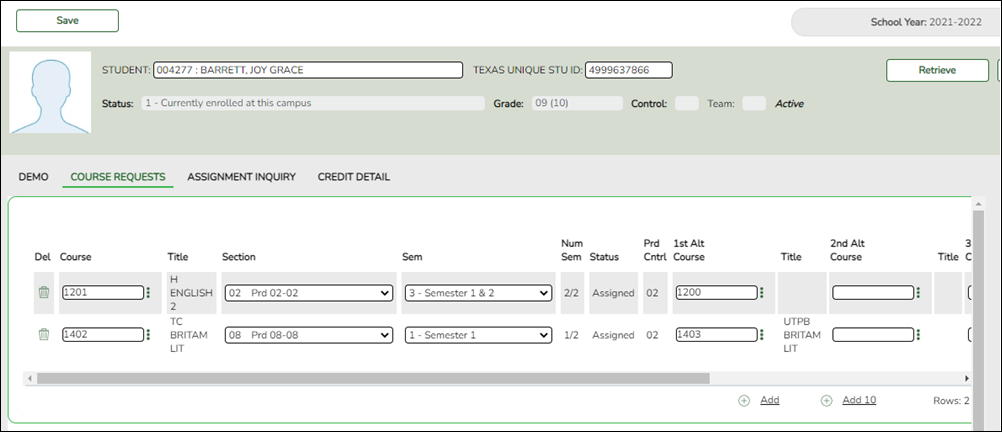
- Retrieve the student.
- To modify a request, select another course number.
- To assign a course, select the section and semester. The Status changes to Assigned.
- Click Save.
- Review a student's course assignments.
Scheduling > Maintenance > Student Schedules > Assignment Inquiry
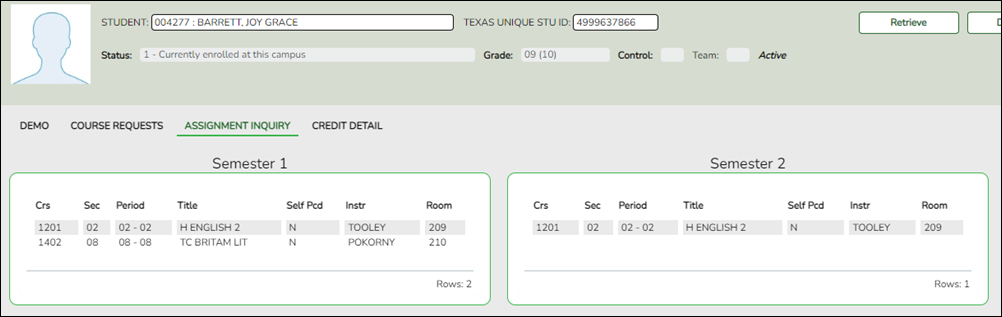
Once the course request Status is Assigned, the course is listed. - Review a student's graduation plan.
Graduation Plan > Reports > SGP0400 - Educational Planning TranscriptIf using grad plan
Scheduling > Reports > Scheduling Reports > Pre-Load > SCH0400 - Student Course Request (Next Yr)


Run Phase I Reports
academy/student/scheduling_secondary_manual_phasei.1542139638.txt.gz · Last modified: 2018/11/13 15:07 (external edit)
Except where otherwise noted, content on this wiki is licensed under the following license: CC Attribution-Share Alike 4.0 International
Americans with Disabilities Act (ADA) and Web Accessibility
The Texas Computer Cooperative (TCC) is committed to making its websites accessible to all users. It is TCC policy to ensure that new and updated content complies with Web Content Accessibility Guidelines (WCAG) 2.0 Level AA. We welcome comments and suggestions to improve the accessibility of our websites. If the format of any material on our website interferes with your ability to access the information, use this form to leave a comment about the accessibility of our website.